Buying Guide · WhatsApp Business API

Best WhatsApp Business API Providers: Reddit Discussions, Features and Costs

Choosing a WhatsApp Business API provider involves more than the headline price. The real decision sits in onboarding speed, technical access, webhook reliability, CRM and automation integrations, support quality, data portability and how messaging charges actually stack up — not just which name shows up first in a search.

Vendor-neutral comparison · No fabricated pricing · Last reviewed October 14, 2026

Explore BetaXLab’s WhatsApp API OfferingContact the Team for Technical Requirements →
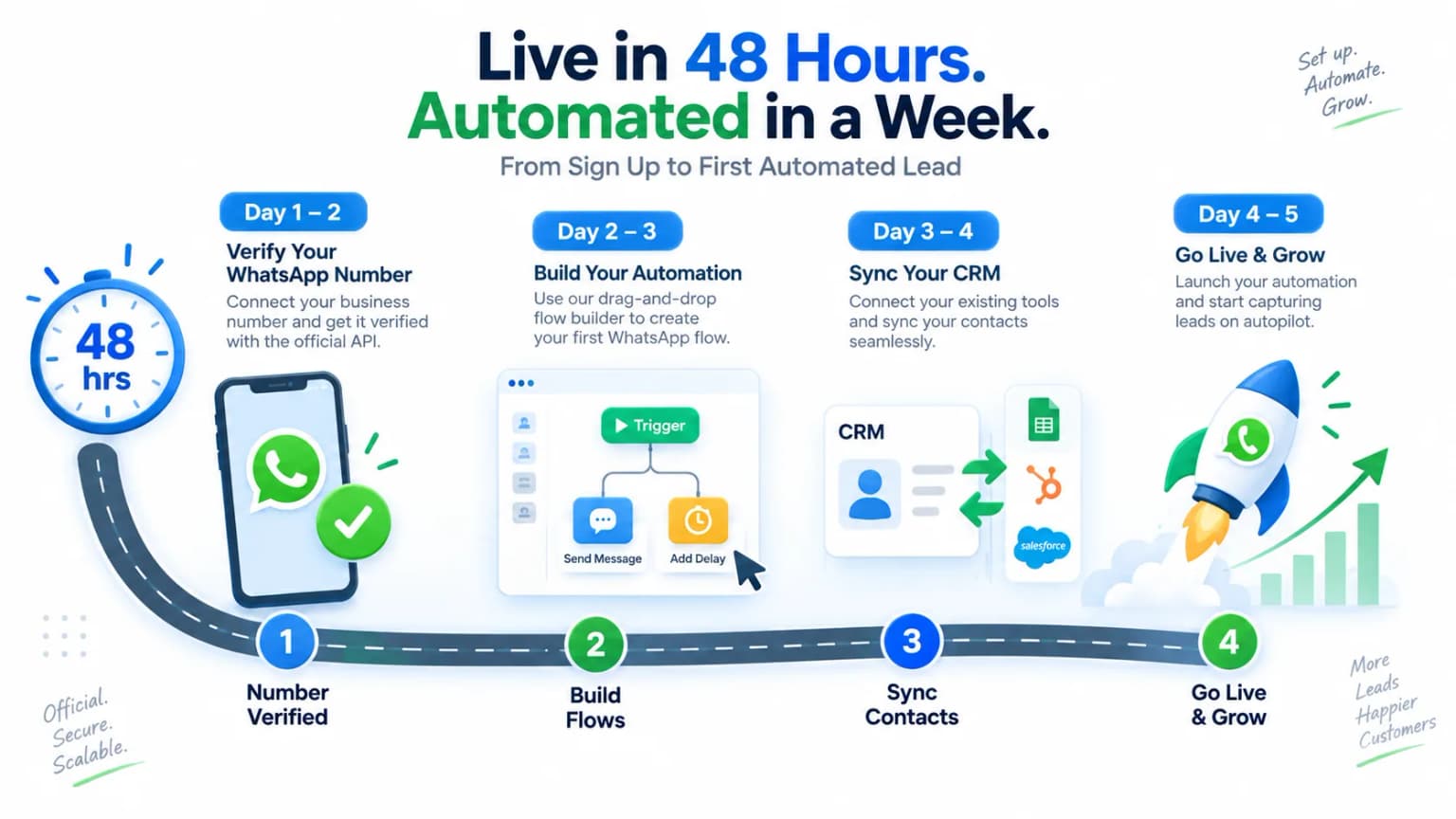
WhatsApp API service provider India setup process from number verification to live automation in 4 steps

Summarise this post with:

What the WhatsApp Business Platform Actually Is

Most of the confusion in “which WhatsApp API provider should I use” threads starts here: the free app, the official Platform, and the software people actually buy are three different layers.

The first is the WhatsApp Business app — a free consumer app for one phone. No API, no automation, no multi-agent access, no webhooks. Fine for a single person answering chats manually.

The second is the WhatsApp Business Platform, which people still call “the API”. It’s Meta’s official messaging infrastructure and has no interface of its own — it is a set of endpoints and webhooks that something else has to connect to. You cannot “log in” to it directly as a business user.

The third layer is third-party software built on the API — products like BetaXLab, or a BSP’s own console, that connect to the Platform on your behalf and add a usable interface: inbox, CRM, broadcast tools, chatbot builder, template manager and analytics.

✓ Honest comparison of direct API, BSP and complete-CRM access models

✓ No invented Reddit quotes, threads or competitor prices

✓ Qualitative pricing structure explained, not fabricated numbers

✓ Technical integration checklist for webhooks, retries and limits

✓ Clear statement of what BetaXLab is — software, API access, or both

✓ Links through to Meta’s own official pricing and policy docs

In practice, “choosing a WhatsApp API provider” usually means choosing which company you trust to connect you to the Platform and what — if anything — they build on top of it. See the full breakdown on the Official WhatsApp Business API page.

What Developers and Businesses Researching This Usually Ask

Public developer and small-business discussion around WhatsApp API providers tends to circle the same set of practical concerns, summarized here in neutral terms rather than attributed to any specific thread, user or date.

Onboarding and time-to-live

How long verification realistically takes, what documents get requested, and why some applications sit in review longer than others.

Business verification

What Meta checks against a business name, address and website, and what commonly causes a mismatch or a request for more documents.

Number registration and migration

Whether an existing number can move from the consumer app to the API, and whether a number can later move between providers without losing history or status.

Webhooks and reliability

How message status events (sent, delivered, read, failed) get delivered, what happens on downtime, and how retries and duplicate events are typically handled.

Messaging limits

How daily/rolling messaging tiers work, how they change over time, and what affects whether they grow or shrink.

Documentation and support quality

How easy a provider’s docs are to implement against, and how support responds when something in production breaks.

Cost structure

How the pieces — Meta’s own charges, a provider’s fee, and any software subscription — stack on top of each other, and how to avoid double-counting them.

This reflects common patterns in public discussion rather than any specific cited thread, quote or user. We do not claim a “Reddit consensus,” and policies, pricing and features referenced anywhere on this page can change — always confirm current details directly with Meta or the provider before deciding.

WhatsApp API Provider Comparison

Meta Cloud API, 360dialog, Twilio, Gupshup and BetaXLab, compared structurally — direct API access, BSP/intermediary, or complete CRM software.

DimensionMeta Cloud API360dialogTwilioGupshupBetaXLab
What it isDirect connection to Meta’s WhatsApp Business Platform with no intermediary layerBusiness Solution Provider (BSP) — a licensed intermediary that provisions API access and resells connectivityCommunications platform / BSP that layers WhatsApp alongside SMS, voice and other channelsCommunications platform / BSP with WhatsApp plus bot-building and other messaging channelsComplete CRM and automation software built on top of official API access, combining onboarding with inbox, CRM, broadcast and chatbot tools
Who it suitsEngineering teams that want to build their own inbox, CRM and automation entirely in-house against raw endpointsTeams that want API access plus a lightweight console, often building most of the business logic themselvesTeams already invested in Twilio’s broader communications stack who want WhatsApp as one more channelTeams wanting a BSP with built-in bot-building primitives alongside WhatsApp connectivityTeams that want API access and the CRM, inbox, broadcast and automation layer on top as one product rather than assembling it themselves
Developer experienceFull control over implementation; you handle webhook infrastructure, retries, template submission and status tracking yourselfAPI and webhook access with varying levels of abstraction depending on the integration path chosenMature, widely documented API conventions familiar to developers who have used Twilio for other channelsAPI access with additional tooling for conversational flows and bot logicREST APIs and webhooks are exposed for custom integration, with most day-to-day workflows available through the product UI so a dedicated integration isn’t mandatory
CRM / inbox includedNone — you build or buy a separate interfaceMinimal console; most teams pair it with separate CRM or helpdesk softwareNone built in — typically paired with Twilio Flex or a third-party CRMBasic console; bot and campaign tooling rather than a sales CRMYes — shared team inbox, lead stages, contact records, broadcast and chatbot included in the product
Billing structureMeta’s own conversation/template charges only — no separate platform feeMeta’s charges plus the provider’s own fee structure (qualitative — check current published rates)Meta’s charges plus Twilio’s own fee structure (qualitative — check current published rates)Meta’s charges plus the provider’s own fee structure (qualitative — check current published rates)Flat published platform subscription, with Meta’s own message charges itemised and passed through at cost
PortabilityYour number lives on your own Meta Business Account from day oneNumber is tied to your Meta Business Account; migratable via Meta’s official processNumber is tied to your Meta Business Account; migratable via Meta’s official processNumber is tied to your Meta Business Account; migratable via Meta’s official processNumber belongs to your Meta Business Account, not to BetaXLab; migratable through Meta’s official process

Described structurally, not by price — no dollar or rupee figures are quoted for Meta Cloud API, 360dialog, Twilio or Gupshup here, since third-party pricing changes and should be verified on each provider’s own site. See BetaXLab’s published pricing or the broader WhatsApp CRM alternatives comparison for more.

WhatsApp API Pricing Explained

“How much does the WhatsApp API cost” rarely has a single number because the real bill is usually several separate charges stacked together.

Meta’s messaging charges

Set by Meta, priced by template category (marketing, utility, authentication) and recipient country, with a limited free allowance for customer-initiated service conversations before billing applies. This applies to every provider — it is not a markup any of them add.

Provider / BSP fee

An intermediary connecting you to the Platform typically charges its own fee on top of Meta’s charges, structured as plans, usage tiers or credit bundles depending on the provider — check each one’s current published rates directly.

Software subscription

If you use a CRM/automation layer like BetaXLab instead of building your own, that product charges a separate subscription covering the inbox, CRM, broadcast and automation tooling.

Implementation cost

Building directly against the Cloud API means engineering time to handle webhooks, retries, template management and UI — a real cost even when no vendor invoice shows it.

AI usage costs

An AI chatbot layered on top of WhatsApp messaging typically carries its own usage-based cost separate from WhatsApp’s own messaging charges, whether that AI is self-hosted or part of a vendor’s product.

See BetaXLab’s Published Pricing →

Meta’s own conversation and template pricing is set out in its official pricing documentation — the authoritative source, since Meta updates these terms independently of any provider.

How to Choose a WhatsApp API Provider

Eight questions worth answering before signing up with any provider — direct API, BSP, or complete CRM software.

🛡️

Reliability & Uptime

Ask what the provider’s own historical uptime looks like and whether webhook delivery has a documented retry and failure-notification mechanism, since a dropped delivery-status event is invisible until a customer complains.

📚

Documentation Quality

Good docs show request/response examples for every webhook event type, rate-limit headers, and error codes with plain-English meanings — not just a reference list of endpoints.

🎧

Support Responsiveness

Find out the real support channel (ticket, email, chat) and typical response time before you are in production, not after a campaign fails at 9am on a Monday.

🔌

Integrations

Check whether the provider connects to the CRM, helpdesk or ecommerce platform you already run, or whether every integration has to be hand-built against raw webhooks.

🔄

Portability

Your WhatsApp number sits on your own Meta Business Account regardless of provider. Confirm in writing that migrating to another provider later won’t require abandoning the number, display name or quality rating.

💳

Billing Transparency

Ask for an itemised breakdown that separates Meta’s own per-message charges from the provider’s own fee, so a monthly invoice can actually be reconciled rather than trusted on faith.

🔐

Security

Look for webhook signature verification, encrypted storage of access tokens, and role-based access inside the product so not every teammate can export your full contact list.

✅

Compliance

Confirm the provider enforces Meta’s opt-in and messaging policies by default — template category rules, 24-hour window handling and opt-out processing — rather than leaving all of that to you.

How BetaXLab Fits Into the API Ecosystem

✓

What BetaXLab is. BetaXLab is software, not a bare API endpoint. It provisions official access to the WhatsApp Business Platform through Meta’s own Embedded Signup / Business Solution Provider onboarding flow, and layers a complete CRM and automation product on top — shared team inbox, lead stages and contact records, broadcast, drip campaigns, an AI chatbot and message template management, all in one plan rather than purchased as separate tools.

✓

What you still set up yourself. You still need your own Meta Business Account, a phone number eligible for the API (new, or deregistered from the WhatsApp Business App), and business verification documents that match your business name and website. BetaXLab’s onboarding team pre-checks these before submission to Meta, but the verification decision itself belongs to Meta alone — including any Official Business Account (green tick) application, which is granted on brand notability and cannot be guaranteed by any provider.

✓

API access for developers. Alongside the product UI, BetaXLab exposes REST APIs and webhooks for contacts, conversations, templates and message events, so a team can sync leads to an existing CRM, push events from a store or backend, or build custom automation — without that integration being mandatory for teams who are happy working inside the product. See BetaXLab Developer Resources for the published OpenAPI specification and integration references.

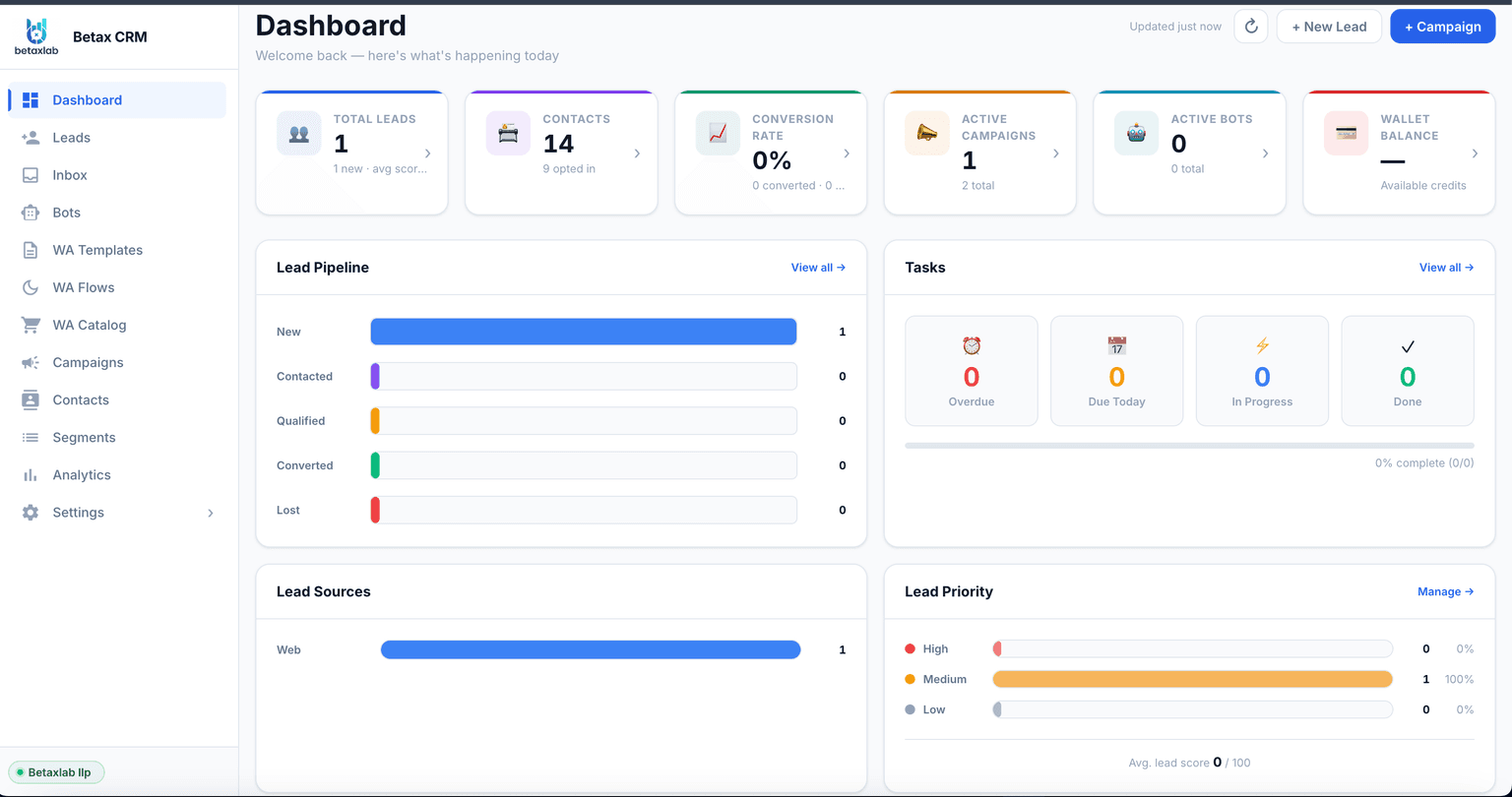
BetaXLab dashboard showing the shared WhatsApp inbox, lead records and automation tools built on top of official API access

Technical Integration Checklist

Whichever provider you choose, these are the things worth verifying before production. Exact implementation details depend on the specific provider and API version you integrate against.

✓

Webhook signature validation. Verify the signature header on every inbound webhook before trusting the payload, so a spoofed request can’t trigger an automation.

✓

Retries & idempotency. Expect the same webhook event to arrive more than once. Use the event or message ID as an idempotency key so a retried delivery doesn’t double-process.

✓

Message status events. Track sent, delivered, read and failed states per message, and store the provider’s specific failure/error code rather than a generic "failed" flag.

✓

Rate limits & messaging tiers. Respect per-second send limits and your current 24-hour messaging tier; queue overflow instead of letting a burst send trigger throttling or rejected sends.

✓

Template sync. Keep your local template library in sync with each template’s live approval status (pending, approved, rejected, paused), since sending with a stale status produces failed sends.

✓

Logging & audit trail. Log every inbound and outbound payload with timestamps, so a disputed delivery or a compliance question can be answered from records rather than memory.

✓

Error handling. Group failures by cause (invalid number, template rejected, rate limited, number not on WhatsApp) and only auto-retry the transient ones.

✓

Secret management. Store access tokens and webhook secrets in a secrets manager, rotate them periodically, and scope API credentials to the minimum access a given integration needs.

Five-step Meta Business verification timeline from Business Manager setup to WhatsApp API go-live

Frequently Asked Questions

Public discussion tends to cover the same handful of names repeatedly: Meta’s own Cloud API for teams building everything in-house, BSPs like 360dialog, Twilio and Gupshup for API access with varying levels of tooling, and complete CRM software like BetaXLab for teams that want the inbox, automation and CRM layer included. What gets recommended usually depends on whether the person asking wants to build their own software or use a finished product — not on one provider being universally "best." Specific pricing or support experiences mentioned in any single discussion thread may be outdated, so verify directly with the provider.

The Cloud API itself carries no licence fee from Meta. You still pay per outbound template message, priced by category (marketing, utility, authentication) and by recipient country, and you need your own infrastructure or a software layer like BetaXLab to actually send and receive messages through it. Customer-initiated service conversations get a limited free allowance per number per month, billed beyond that — check Meta’s official pricing documentation at developers.facebook.com/docs/whatsapp/pricing for the exact terms in effect.

A Business Solution Provider (BSP) is a Meta-sanctioned intermediary that provisions technical access to the WhatsApp Business Platform — essentially a pipe to Meta’s infrastructure. A CRM is software that sits on top of that access and gives a team somewhere to actually work: a shared inbox, contact records, lead stages, broadcast tools and automation. Some products, including BetaXLab, combine official onboarding with a full CRM and automation layer in one plan rather than requiring a separate BSP and a separate CRM.

Generally yes. Your WhatsApp Business number is tied to your own Meta Business Account, not to whichever provider currently connects to it. Meta has an official migration process for moving a number between providers that preserves your display name, quality rating and message history on Meta’s side. A provider that makes this difficult or ties your number to their own infrastructure in a non-standard way is a portability red flag worth asking about before you sign up.

Costs generally stack in layers: Meta’s own per-category message charges (marketing, utility, authentication, and limited free service conversations before billing kicks in), a provider or BSP fee on top of that connectivity, a software subscription if you use a CRM/automation layer, any implementation or developer time to integrate it, and usage-based AI costs if you run an AI chatbot. Specific dollar or rupee figures for third-party providers vary and change, so always confirm current numbers directly with that provider’s published pricing rather than a forum post.

Yes, in effect. Meta requires a verified Meta Business Account and a display name that matches your business before approving a number for production use at scale, and verification is also a prerequisite for the Official Business Account ("green tick") badge, which is Meta’s decision alone based on brand notability. The documents typically requested include business registration proof, an address match and a working website, though exact requirements can vary by region and have changed over time.

Yes — that is the standard mechanism. Inbound customer messages and status events (sent, delivered, read, failed) arrive at a webhook URL you or your provider configure, as near-real-time HTTP callbacks rather than something you poll for. Building directly against the Cloud API means you host and secure that endpoint yourself; using a provider or software layer like BetaXLab means the webhook infrastructure is already handled, and the resulting conversations surface inside the product’s inbox.

Ready to Compare WhatsApp API Providers Properly?

If you want official API access plus the CRM, inbox and automation layer already built, start a free trial. If you have specific technical requirements — webhooks, existing CRM sync, number migration — talk to the team before committing.

Last reviewed October 14, 2026. Provider features, policies and pricing change — verify current details directly with Meta or the provider before deciding.

Related Reading

Official WhatsApp Business APIBetaXLab Developer ResourcesWhatsApp CRMTransparent PricingBest WhatsApp CRM for Small BusinessBest WhatsApp AI ChatbotBest WhatsApp Automation ToolsAffordable WhatsApp CRM SoftwareWhatsApp Shared Inbox for TeamsWhatsApp Lead Management SoftwareBest WhatsApp Broadcast SoftwareWhatsApp Automation for ShopifyWhatsApp CRM Alternatives Comparison

Comparing WhatsApp API providers? Talk to BetaXLab about your technical requirements.

Explore BetaXLab →