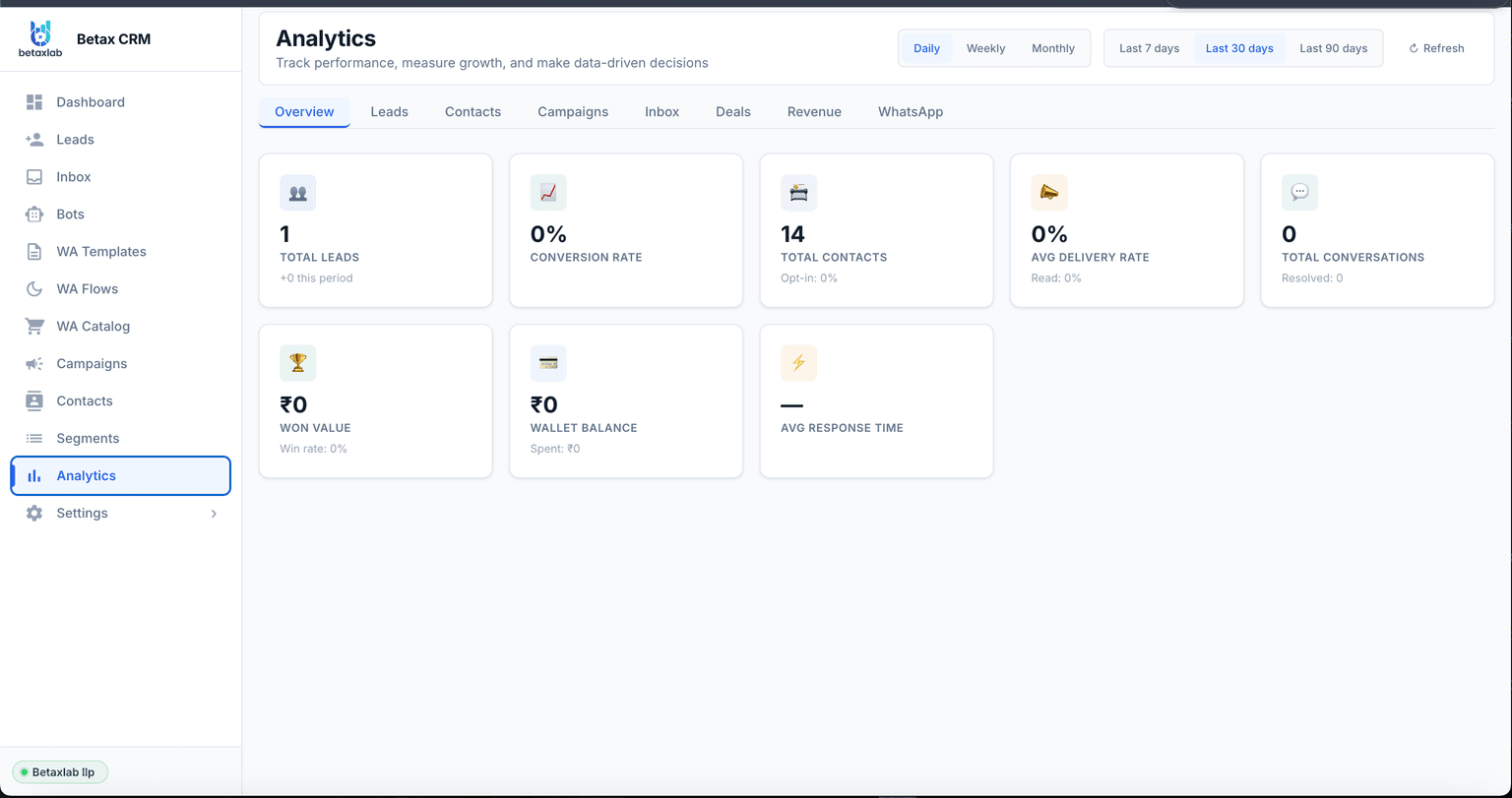
WhatsApp Analytics That Show Exactly What's Working
Stop guessing. BetaXLab's real-time analytics dashboard surfaces every metric that matters — delivery rates, agent response times, campaign ROI, and revenue — so you can make decisions based on data, not instinct.
The BetaXLab Analytics Dashboard is the single source of truth for your entire WhatsApp business operation. Whether you are a founder checking yesterday's revenue or a team manager reviewing agent response times, everything you need is on one screen — no spreadsheets, no third-party tools, no manual calculations required.
The dashboard tracks lead analytics — how many new leads entered your pipeline, where they came from, how many converted, and what they are worth. It tracks campaign analytics — delivery rates, open rates, click rates, and reply rates for every broadcast and drip campaign you run. It tracks agent performance — who is handling conversations fastest, who is closing the most deals, and where bottlenecks are forming in your team inbox.
Critically, BetaXLab connects all three layers — campaigns, conversations, and CRM — so you can see the complete journey from the first message received to revenue won. You will know which broadcast drove which sale, which agent closed the deal, and what the total WhatsApp ROI looks like for any given period. That is business intelligence most WhatsApp tools simply cannot provide.
Agent performance — response time, resolution rate
Revenue attribution — won value per campaign or agent
Analytics Features
Six Analytics Modules That Drive Smarter Decisions
From campaign delivery to revenue attribution — every module of BetaXLab's analytics is built to answer a specific business question.
Campaign Analytics
Measure the performance of every broadcast and drip campaign you run. See delivery rate, open rate (read rate), click-through rate, reply rate, and cost per conversation — all updated in real time as your campaign propagates across your contact list. Compare campaigns side-by-side to identify which message templates, send times, and audience segments produce the best results. Use campaign analytics to continuously improve the ROI of every future broadcast.
Delivery rate, open rate, click rate per campaign
Reply rate and revenue per campaign
Side-by-side campaign comparison
Template performance benchmarking
Agent Performance
Know exactly how each member of your WhatsApp team is performing. Track response time (how quickly agents pick up new conversations), resolution time (how long it takes to close a conversation), conversations handled per day or week, and the number of deals won per agent. Agent performance data helps managers coach team members effectively, reward top performers, and identify training needs before they become customer experience problems.
Avg first response time per agent
Conversations handled and resolution rate
Deals won and revenue attributed per agent
Daily and weekly performance trends
Lead & Conversion Analytics
Understand the complete lead lifecycle from first WhatsApp contact to closed deal. Track total leads, lead source breakdown (which campaign, chatbot, or entry point brought each lead in), conversion funnel stages, win rate (percentage of leads that close), and average deal value. Lead analytics answer the most important business question: which WhatsApp activities are actually generating revenue — and which are burning budget without results.
Total leads and new leads per period
Lead source attribution per campaign or channel
Conversion funnel and win rate tracking
Average deal value and total won value
Broadcast Reports
Every broadcast campaign generates a detailed delivery report the moment it is sent. The report shows the exact count of messages sent, delivered, read, and replied to — updated live as the broadcast propagates. Drill down to per-contact delivery status to identify specific numbers that failed to receive your message. Use broadcast reports to clean your contact list, improve template content, and report campaign results to stakeholders with hard data rather than estimates.
Sent, delivered, read, replied — per campaign
Per-contact delivery status drill-down
Failed delivery identification for list cleaning
Historical broadcast archive with searchable records
Real-time Dashboard
The BetaXLab home dashboard gives you a live snapshot of your entire WhatsApp business at a glance. Live counters show active conversations, messages waiting for response, Avg Response Time, total contacts, and Wallet Balance — all refreshing continuously. Real-time visibility means you can spot problems immediately: a sudden drop in delivery rate, an agent with a 30-minute response time, or a wallet balance running low before a scheduled campaign. No waiting for end-of-day reports to find out what happened.
Live counters for conversations and queue depth
Avg Response Time and Wallet Balance in real time
Total contacts and active conversations
Instant alerts when key metrics drop below threshold
CSV Export
Every report in BetaXLab can be exported as a raw CSV file with one click. Campaign reports, agent performance data, lead lists with stage and deal value, conversation logs, and delivery status — all available as structured data exports. Use exports to build custom dashboards in Google Sheets, share results with clients, integrate WhatsApp data with your CRM or BI tool, or run deeper analysis that goes beyond the built-in dashboard. Set a custom date range before exporting to get precisely the data window you need.
One-click CSV download from any report view
Custom date range before every export
Campaign, agent, lead, and conversation exports
Compatible with Google Sheets, Excel, and BI tools
How It Works
Analytics Live in 3 Steps — No Technical Setup
BetaXLab captures and surfaces analytics automatically the moment your WhatsApp Business Account is connected. No tracking codes. No integrations to configure.
Step 1
01
Connect Your WhatsApp Business Account
Link your WhatsApp Business API (WABA) number to BetaXLab in minutes. BetaXLab guides you through the Meta Business verification and WABA connection process step by step. Once connected, all messages, campaigns, and conversations on your number are automatically captured — no additional configuration needed. Your analytics dashboard starts populating with data from the first message.
Green tick verification supported
WABA connected in under 30 minutes
Data capture starts immediately
Step 2
02
Run Campaigns and Handle Conversations
Send broadcasts, run drip campaigns, and manage incoming conversations through BetaXLab as normal. Every action is automatically logged to the analytics layer in real time — delivery confirmations from WhatsApp, read receipts, agent assignment events, reply timestamps, CRM pipeline stage changes, and deal closures. You do not need to do anything differently; BetaXLab collects the data silently in the background as your team works.
Campaigns auto-tracked on send
Agent actions logged in real time
CRM events sync to analytics instantly
Step 3
03
Review Dashboard, Spot Trends, Optimise & Scale
Open your analytics dashboard anytime to review performance. Set a date range to compare this month versus last month. Identify which broadcast had the highest conversion rate and replicate its template. Find which agent has the slowest response time and coach them. Export a CSV to present results to your leadership team. Use what you learn to optimise your next campaign — better templates, better timing, better audience segmentation — and watch your WhatsApp ROI compound over time.
Custom date range filtering
Trend comparison across periods
One-click CSV export for any report
Comparison
BetaXLab vs WhatsApp Business App — What You Can Actually Measure
The standard WhatsApp Business App gives you almost no analytics. BetaXLab gives you a complete data layer across every dimension of your WhatsApp operation.
Metric
BetaXLab
WhatsApp Business App
Delivery rate
Yes — per campaign and overall avg
No
Open rate (read rate)
Yes — per campaign and per message
No
Click rate on CTA buttons
Yes — tracked per button per campaign
No
Revenue per campaign
Yes — via CRM won value attribution
No
Agent response time
Yes — per agent, filterable by date
No
Conversation volume
Yes — total, active, and closed
Partial (basic count only)
Lead conversion rate
Yes — full funnel with win rate
No
CSV export
Yes — one-click from any report
No
Custom date range
Yes — any start and end date
No
Real-time updates
Yes — live counters and dashboards
No
Start Measuring WhatsApp ROI Today
BetaXLab analytics are included in every plan — starting at ₹2,799/month. Connect your WhatsApp number and your first real-time dashboard is live in under 30 minutes.
No setup fees. No third-party analytics tools to configure. No waiting for end-of-day batch reports. Just live data that helps you make better decisions every day.
Everything you need to know about BetaXLab's WhatsApp Analytics Dashboard.
Q
What WhatsApp metrics can I track with BetaXLab?
BetaXLab tracks a comprehensive set of WhatsApp business metrics including Total Leads, Conversion Rate, Total Contacts, Average Delivery Rate, Total Conversations, Won Value (revenue from closed deals), Wallet Balance, and Average Response Time — all visible on a single real-time dashboard. You can also drill into campaign-level metrics (sent, delivered, read, replied), agent-level metrics (conversations handled, response time, resolution rate), and lead-level metrics (source, stage, deal value). Every metric updates automatically as activity happens on your WhatsApp number.
Q
How is delivery rate calculated?
Delivery rate is the percentage of messages that were successfully delivered to the recipient's device, out of the total messages sent. For example, if you send 1,000 messages and 940 are delivered, your delivery rate is 94%. A message counts as "delivered" when WhatsApp confirms the double-tick on the recipient's phone. Undelivered messages are typically caused by invalid numbers, recipients who have blocked your number, or numbers no longer on WhatsApp. BetaXLab shows delivery rate per campaign and as an average across all campaigns, so you can identify and clean poor-quality contact lists.
Q
Can I see individual agent performance?
Yes. BetaXLab's analytics dashboard breaks down performance by individual agent across your shared team inbox. For each agent, you can see total conversations handled, average first response time, average resolution time, conversations closed per day, and customer satisfaction indicators. This data helps managers identify top performers, coach agents who are slow to respond, and distribute workload more evenly across the team. Agent performance reports can be filtered by date range for weekly reviews, monthly reporting, or annual appraisals.
Q
Does BetaXLab track revenue from WhatsApp campaigns?
Yes. BetaXLab's CRM layer tracks Won Value — the total revenue attributed to deals that were closed through WhatsApp conversations. When a lead is marked as "Won" in the CRM pipeline and a deal value is assigned, BetaXLab aggregates this into your revenue analytics. You can see total revenue won per campaign, per agent, per time period, or per lead source. This gives you a clear picture of your WhatsApp ROI — exactly which campaigns, which agents, and which message sequences are generating the most revenue for your business.
Q
Can I export analytics data to CSV?
Yes. Every report in BetaXLab — campaign reports, agent performance reports, lead reports, and conversation logs — can be exported to CSV with one click. The CSV export includes all raw data fields so your marketing team or data analyst can build custom pivot tables, charts, or combine WhatsApp data with data from other channels. You can set a custom date range before exporting so you get exactly the data window you need — whether that's yesterday's results or the last 12 months of performance.
Q
How real-time is the dashboard?
BetaXLab's analytics dashboard updates in near real-time as events happen on your WhatsApp number. When a message is sent, the sent count increments immediately. When it is delivered, the delivery counter updates. When a contact replies, the reply counter updates. Live counters for active conversations, messages in queue, and wallet balance refresh continuously so you always have an up-to-the-minute picture of your WhatsApp activity. For broadcast campaigns, you can watch delivery and read rates climb in real time as the campaign propagates across your contact list.
Q
Can I set custom date ranges for reports?
Yes. All analytics reports in BetaXLab support custom date range filtering. You can select any start and end date to view performance for that specific window — a particular campaign period, a sales quarter, a month, or a single day. Pre-set quick filters for "Today", "This week", "This month", and "Last 30 days" are also available for common reporting needs. Date range filters apply across all metrics on the dashboard simultaneously, so your numbers always stay consistent.
Q
Does BetaXLab integrate with Google Sheets for analytics?
BetaXLab supports CSV export from all analytics reports, which can be imported into Google Sheets or Excel for custom analysis and charting. For teams that want automated data sync, BetaXLab's webhook and API layer can push analytics data to Google Sheets via Zapier or Make (formerly Integromat). This means your marketing dashboards in Google Sheets can receive updated WhatsApp metrics automatically — delivery rates, conversation counts, lead status — without any manual export steps.
Q
What's the difference between delivery rate and open rate on WhatsApp?
Delivery rate measures whether your message reached the recipient's device (shown by the double-tick on WhatsApp). Open rate — sometimes called "read rate" — measures whether the recipient actually opened and read the message (shown by the blue double-tick). A message can be delivered but not yet read. BetaXLab tracks both separately so you can distinguish between reach (delivery rate) and engagement (read/open rate). Industry benchmarks on WhatsApp are approximately 90–95% delivery rate and 70–80% read rate — significantly higher than email at 20% open rate.
Q
How do I track ROI from WhatsApp broadcasts?
BetaXLab tracks WhatsApp broadcast ROI through a combination of campaign analytics and CRM pipeline data. At the campaign level, you see how many messages were sent, delivered, read, and replied to — and what click-through rate your CTA buttons achieved. At the revenue level, leads generated from a broadcast campaign are tagged with their source, and when those leads close as "Won" deals in the CRM, BetaXLab attributes the revenue back to the originating campaign. Divide revenue won by campaign cost (template messaging fees + BetaXLab subscription at ₹2,799/month) to calculate your broadcast ROI directly from the dashboard.
You cannot improve what you cannot measure. BetaXLab's analytics dashboard gives you the complete picture — every campaign, every agent, every lead, every rupee of revenue — so you can make confident decisions that compound over time.
Starting at ₹2,799/month. Full analytics included in every plan. 14-day free trial — no credit card required.