Official WhatsApp Business API · No 256 Limit

WhatsApp Broadcast Software That Sends One Message to Thousands — Officially

One message. Ten thousand opted-in contacts. One click.

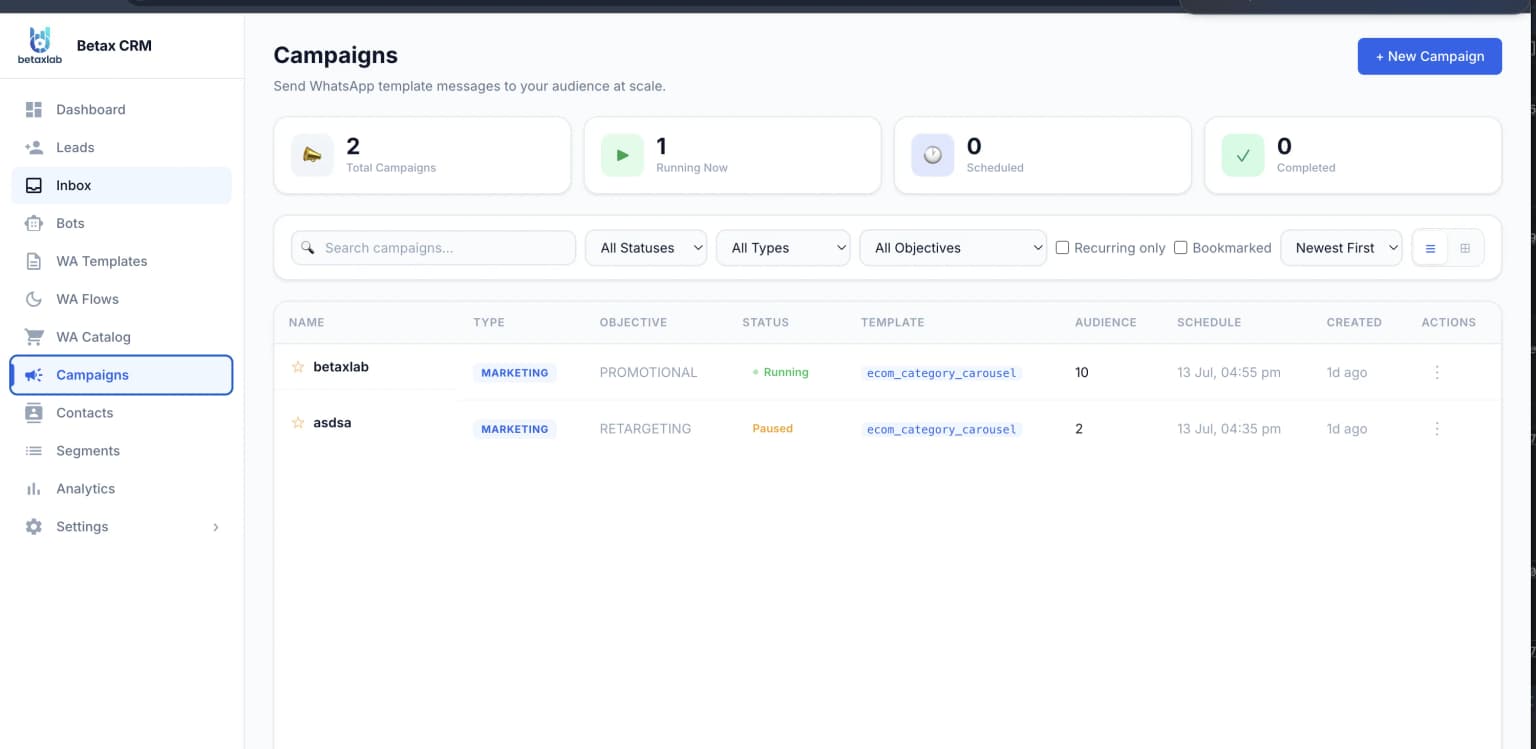
A single approved template goes out to your entire opted-in list at once — not to the 256 people who happened to save your number. Segment by tag, attribute, purchase history or last activity, pace the send so your quality rating stays green, and watch delivered, read and replied tick upward per contact while the send is still running.

Official Meta Business Partner · Green-Tick Approval Support · Setup in 48 Hours · 99.9% Uptime

Bulk send one approved template to unlimited opted-in contacts
Audience segment builder — tags, attributes, activity, custom fields
Automatic send-rate pacing to protect your Meta quality rating
Per-contact delivery, read, reply and failure tracking, live
Scheduled sends with send-window control
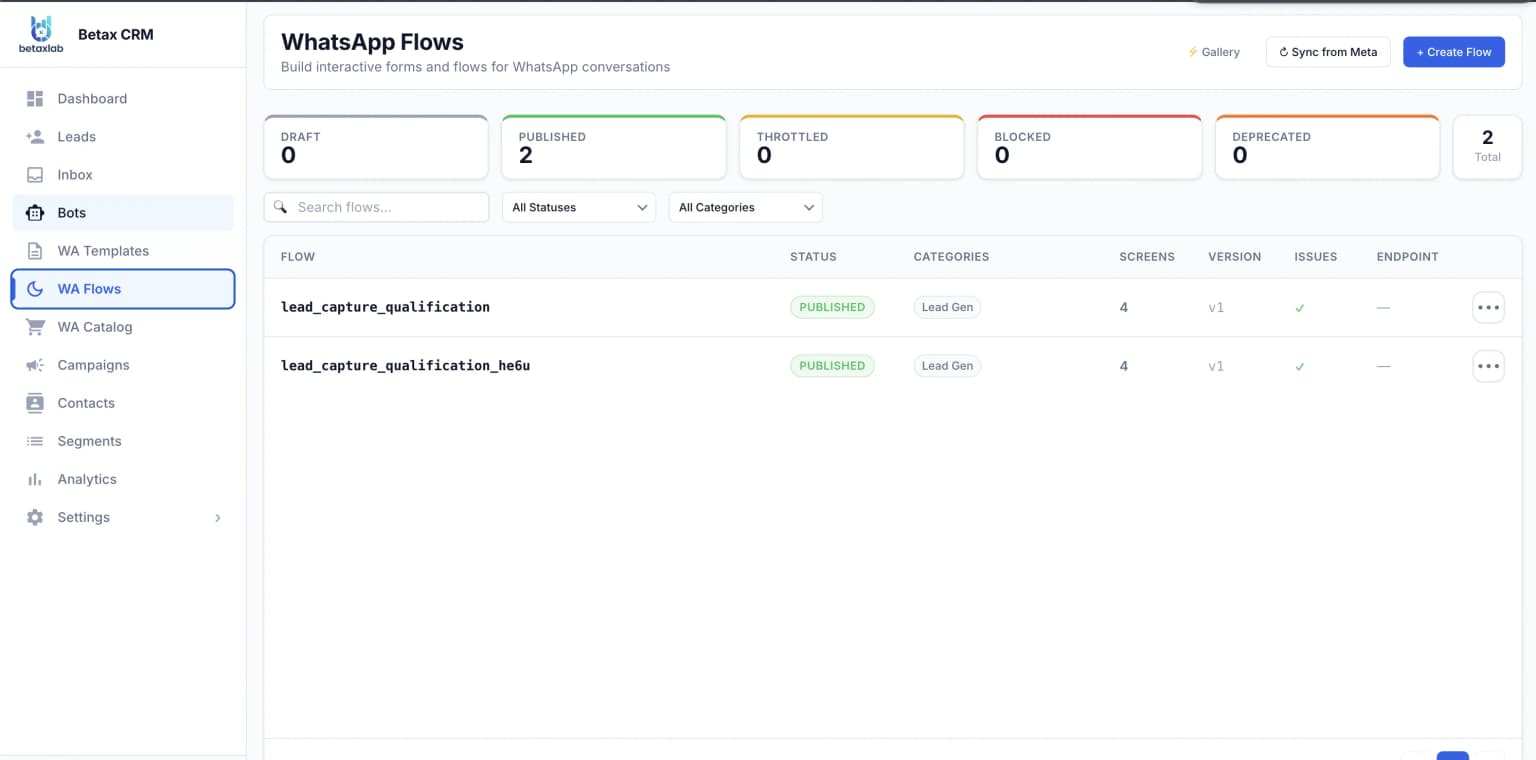
Interactive buttons and WhatsApp Flows inside every broadcast
Official Meta Partner
✔️ Green-Tick Support
Live in 48 Hours
🔒 99.9% Uptime
10,000+
Contacts Per Broadcast
3 min
Segment To Send
48hr
Setup & Go Live
98%
Message Open Rate
Bulk BroadcastSegment BuilderTemplate LibraryMeta Approval TrackingSend-Rate PacingScheduled SendsPer-Contact DeliveryRead & Reply TrackingInteractive ButtonsWhatsApp FlowsOpt-Out HandlingShared Team InboxBulk BroadcastSegment BuilderTemplate LibraryMeta Approval TrackingSend-Rate PacingScheduled SendsPer-Contact DeliveryRead & Reply TrackingInteractive ButtonsWhatsApp FlowsOpt-Out HandlingShared Team Inbox
The Definition

What Is WhatsApp Broadcast Software?

WhatsApp Broadcast Software sends one pre-approved message template to thousands of opted-in contacts simultaneously, as individual one-to-one chats rather than a group. Each recipient sees a normal private message with their own name and details merged in — and the sender gets per-contact delivery, read and reply tracking for the entire send.

Broadcast vs. WhatsApp’s Built-In Broadcast List (the 256 Ceiling)

The Broadcast List inside the regular WhatsApp and WhatsApp Business apps is a personal-scale feature. It caps at 256 recipients per list, and — this is the part that quietly kills campaigns — a recipient only receives the message if they have already saved your business number. Most of your customers have not. You “send” to 256 people, reach a fraction of them, and get no report telling you which fraction.

Broadcast on the Official WhatsApp Business API works differently: no 256 cap, no saved-contact requirement, and a delivery status for every message. What replaces those limits is a compliance model — recipients must have opted in, the message must use a template Meta approved in advance, and send volume scales with a messaging limit tier that rises as your quality rating stays healthy. BetaXLab is the layer that makes that model usable by a marketing team instead of a developer.

Sound Familiar?

Why Bulk WhatsApp Sending Breaks for Most Businesses

Four failure modes, in the order businesses usually hit them:

Reach Capped at 256 Saved Contacts

You built a 9,000-contact list over four years, then split it into 36 broadcast lists of 250 and paste all afternoon. WhatsApp throttles the number halfway through — and the saved-contact rule silently dropped an unknown share of the list before delivery.

One Blast to Everyone Kills Your Quality Rating

Send a menswear promotion to your whole database including the 4,000 women who bought once in 2022, and a few hundred block you. Ratings slide green to yellow to red, templates get paused, and your messaging limit tier stops climbing.

12,000 Messages Sent, Zero Feedback

Plenty of tools accept a CSV and report “12,000 messages queued.” Then nothing. No delivered-versus-bounced split, no read rate, no winner between your two message variants, no list of the 340 numbers that failed. That is not marketing, it is expenditure.

The Reply Wave Hits and Nobody Owns It

You send to 6,000 people at 11 a.m. and 400 reply within twenty minutes. If those land on one manager’s phone, a successful campaign becomes a service incident — and the 24-hour service window closes on the people who raised their hand hardest.

👇 BetaXLab fixes all four — and most teams send their first live broadcast within 48 hours.

The Fix

How BetaXLab Fixes Each of Those Four Problems

Reach, relevance, measurement and the reply wave — solved as one connected system, not four tools.

📡

Unlimited Opted-In Reach on the Official API

Connecting your number to the Official WhatsApp Business API removes the 256-recipient cap and the saved-contact requirement in one step. A 9,000-contact send goes out as 9,000 individual one-to-one chats under your verified business name.

Live tier and daily headroom shown in the composer
🎯

Segment Builder for the Right Slice

Filter by tag, lifecycle stage, city, last order value, product category, activity date, owner or any custom field, with AND/OR logic and a live count. “Women’s footwear buyers in Pune, active in 90 days” resolves to 1,240 people before you commit.

Auto-suppresses opt-outs, hard failures and recent recipients
📊

Live Delivery, Read and Reply Tracking

Every message carries its own status streamed from Meta’s webhooks — queued, sent, delivered, read, replied, or failed with the exact error reason. Counters move while the send is still running.

Split-test two approved templates on one audience
👥

A Shared Inbox Sized for the Spike

Replies land in the Shared Team Inbox tagged by broadcast, auto-assigned round-robin or by rule, with collision prevention. An AI chatbot takes the first turn on price, availability and hours, then hands off the moment intent gets serious.

Number masking and role-based access included
Broadcast Features

Every Broadcast Feature Inside BetaXLab

Sixteen capabilities that take a broadcast from list import to delivery report — all on the Official WhatsApp Business API.

Official API

One-Click Bulk Send to Any Segment

Select an audience, select an approved template, press send. BetaXLab dispatches individual one-to-one messages to every contact through the Official API, respecting your messaging limit tier and queuing any overflow.

An afternoon of copy-paste becomes 3 minutes

Audience Segment Builder

Build audiences from tags, custom attributes, lifecycle stage, purchase history, city, language, last-activity date and lead owner with AND/OR logic. Live contact counts update as you filter. Save segments and reuse them.

Relevance up, blocks and opt-outs down

Template Library with Meta Approval Tracking

Draft, submit and manage WhatsApp message templates without leaving the platform. See live status per template — pending, approved, rejected with Meta’s stated reason, or paused for quality — with the billing category set at submission.

No launch-day rejection surprises

Personalization Variables & Rich Media Headers

Merge first name, city, order ID, appointment time or any custom field into the template body, header and button URLs, and attach an image, video, PDF or location header.

Reads like a message written to one person

Send-Rate Pacing & Quality Protection

Control how fast a broadcast dispatches — trickle 20,000 messages across three hours instead of firing everything in ninety seconds, so reply volume stays inside what your team can actually handle.

No support meltdown at 11 a.m.

Scheduling & Send-Window Control

Schedule a broadcast for a specific date and time, and set allowed send windows so nothing dispatches at 2 a.m. Queue Diwali, Black Friday and Ramadan campaigns weeks ahead.

Lands when your audience is awake

Per-Contact Delivery & Read Tracking

Every recipient carries a live status — queued, sent, delivered, read, replied, or failed with the Meta error code and a plain-English explanation of what went wrong.

Answer “did this customer get it?” for anyone

Broadcast Analytics Dashboard

Per-broadcast funnel of sent, delivered, read, button-clicked and replied, plus opt-out count and failure breakdown. Compare broadcasts over time, or two templates on one audience.

Decisions on read rates, not instinct
Popular

Interactive Buttons & WhatsApp Flows

Add quick-reply buttons (“Yes, book me”, “Not now”), tracked call-to-action URL buttons, and full WhatsApp Flows forms so a recipient can book, choose a slot or submit details without leaving the chat.

The broadcast becomes the conversion surface

Automatic Opt-Out & Consent Handling

Opt-out keywords are detected in any reply and the contact is suppressed from all future marketing broadcasts immediately. Opt-in source and timestamp are stored per contact.

Evidence consent whenever Meta asks

Contact Management & List Hygiene

Import from CSV or sync from your CRM with automatic de-duplication, country-code normalisation and invalid-number flagging before the send rather than after.

Stop paying to message dead numbers

Shared Team Inbox & Reply Routing

Broadcast replies flow into one shared inbox, tagged by campaign, auto-assigned by round-robin or by rule, with internal notes, @mentions and collision prevention.

400 replies worked in parallel by six agents

AI Chatbot First Response on Replies

An AI chatbot answers the predictable first questions — price, sizes, availability, timings, delivery time — and escalates the moment buying intent or complexity appears.

Every replier answered in seconds, at any hour

Follow-Up Automation for Non-Responders

Automatically enrol contacts who were delivered but did not read, or read but did not reply, into a follow-up sequence or drip campaign with a different angle.

A second, better-aimed touch without a chase list

Role-Based Access & Broadcast Approvals

Decide who can build segments, who can draft templates and who can press send. Route large sends through an approver, with an audit trail of who launched what.

Nobody sends a draft offer to your full database

Failure Diagnostics & Safe Retries

Failures are grouped by cause — invalid number, not on WhatsApp, template paused, rate limited, tier exhausted — with one-click safe retry for the transient ones only.

Fix the real problem, don’t re-blast the list

20-minute demo · real dashboard · your use case

Business Outcomes

What You Get Out of It: Six Business Outcomes

What changes in the business once broadcasting stops being copy-paste.

💰

Increase Sales

WhatsApp messages get opened — that is the entire commercial argument for broadcast. Attach a quick-reply button and the distance between “saw the offer” and “talking to a salesperson” collapses to one tap. A well-targeted send to 1,200 relevant contacts consistently outperforms an untargeted blast to 9,000.

⏱️

Save Time

Splitting a list into 250-contact chunks and pasting the same message 36 times is roughly half a working day, every campaign. Segment-and-send takes about three minutes, and scheduling means the recurring ones — Friday’s menu, Monday’s slot availability, the monthly reminder — are built once and forgotten.

📈

Increase Conversion

A message that names the customer, references the product they actually bought and offers “Book Now” and “Talk to Us” as buttons converts materially better than a generic paragraph with a link. WhatsApp Flows go further — the recipient submits details inside the chat, with none of the landing-page drop-off.

🎣

Never Miss Leads

Everyone who replies to a broadcast is a lead, and BetaXLab treats them like one. Replies are captured with the source broadcast attached, auto-assigned to an owner and pushed through your pipeline stages, while non-responders enrol in follow-up automatically.

💚

Improve Customer Experience

Segmentation means customers get messages about things they plausibly care about, so broadcasts feel like service rather than spam. The AI chatbot plus a staffed shared inbox answers replies in seconds to minutes, even during the spike your own campaign created.

Increase Team Productivity

Six agents working one shared, auto-assigned inbox with internal notes and collision prevention handle a reply wave that would flatten a single person. Role-based access removes the approval bottleneck by making it explicit — and analytics end the meeting about whether the campaign worked.

Our Process

How WhatsApp Broadcast Works in BetaXLab — 3 Steps

List to segment to send, in about ten minutes once your number is connected.

1Step 1

Build and Segment Your Opted-In Audience

Import contacts from CSV or sync them from your CRM. BetaXLab de-duplicates, normalises country codes, flags invalid numbers and records opt-in source and date. Then filter to the segment you want — tags, city, last purchase, lifecycle stage, activity date — watching the live count as you narrow. Save it for reuse.

2Step 2

Pick an Approved Template and Personalize It

Choose a Meta-approved template from your library, or draft and submit a new one from inside BetaXLab. Map personalization variables to contact fields, add an image, video or PDF header, and attach quick-reply buttons, a tracked CTA URL or a WhatsApp Flow. The preview shows exactly what a recipient will see, populated with real contact data.

3Step 3

Send or Schedule, Then Track and Follow Up

Send immediately or schedule it, set pacing so reply volume matches your staffing, and launch. Delivery, read, click and reply counters update live. Replies route to your Shared Team Inbox with the campaign tag attached, non-responders drop into follow-up automation, and failures are grouped by cause for cleanup before the next send.

Industry Use Cases

WhatsApp Broadcast Use Cases by Industry

Six real segmented sends — note that none of them go to the whole list.

🏢
Real Estate

Tower Launch to 4,300 Segmented Enquiries

Three segments instead of one press release — 2BHK buyers under ₹80L in the western suburbs, 3BHK buyers above that, and channel partners — each getting a different template with a floor-plan PDF header and “Book a Site Visit” plus “Send Me the Price Sheet” buttons. Site-visit taps auto-assign to the executive who owns that locality.

📈 3,100 non-tappers re-touched in 3 days
🏥
Clinic

Preventive Health Check to Lapsed Patients

A preventive package goes to patients aged 40+ who have not visited in nine months — roughly 1,800 contacts filtered out of 12,000, so recent patients and unrelated specialities are never touched. A separate utility broadcast confirms tomorrow’s appointments with a reschedule button every evening.

📈 No-shows cut with nightly reminders
💇
Salon

Friday Weekend Slot-Fill Offer

Clients who last visited 5 to 10 weeks ago and previously booked colour or spa services — about 600 people, each greeted by name with their usual stylist mentioned. Quick-reply buttons offer “Book Saturday”, “Book Sunday” and “Not this week”, and the third suppresses that contact from the next two weekend sends.

📈 Chairs filled before Saturday discounts
🍽️
Restaurant

Weekend Special Split by Branch

7,000 opted-in diners, but branch-level segments ensure nobody in Andheri gets an offer valid only in Bandra, and lunch regulars get a different template from dinner regulars. Pacing spreads the send over ninety minutes so the phone does not ring off the hook at once.

📈 Read rate by branch guides list rebuilds
🎓
Education

Admissions Deadline by Application Stage

5,600 enquiries segmented by course interest and stage — enquired-but-never-applied get urgency and a fee-structure PDF, applied-but-unpaid get a payment-link button, and enrolled students are excluded entirely. Exam-date and result announcements run as utility broadcasts with per-contact delivery proof.

📈 AI chatbot absorbs fee & eligibility replies
🛒
Ecommerce

Flash Sale to Recent Category Buyers

Customers who bought in a specific category within 180 days, excluding anyone who already ordered during the current sale. The template carries first name, category imagery and a tracked CTA URL with the contact ID appended, so revenue is attributed rather than guessed at.

📈 Failed numbers exported and cleaned every send
Head to Head

BetaXLab vs WATI vs Gallabox vs Interakt vs AiSensy vs Zoko

Six broadcast platforms compared on the things that actually decide a bulk send.

CapabilityBetaXLabWATIGallaboxInteraktAiSensyZoko
Core Broadcast FeaturesSegment builder, template library with approval tracking, send-rate pacing, scheduling, per-contact delivery/read/reply tracking, buttons + Flows, failure diagnosticsSolid broadcast with segmentation and scheduling; deeper controls tied to higher plansBroadcast with tagging and scheduling; strong on chatbot builderBroadcast and campaign sending; ecommerce-oriented feature setBroadcast-first product with campaign schedulingBroadcast built around catalogue and commerce use cases
Ease of UseComposer built for marketers — segment, template, preview and send on one screen with live countsMature, familiar UI; some settings live several layers deepClean interface; flow builder has a learning curveStraightforward for standard sendsSimple to launch a basic broadcastCommerce-first UI; less natural for non-retail teams
Automation DepthBroadcast handoff into follow-up automation, drip campaigns, AI chatbot first response and reminder automation as one connected systemGood automation, often gated to upper tiersStrong visual chatbot flowsAutomation focused on ecommerce triggersAutomation lighter than broadcast capabilityAutomation centred on commerce journeys
Built-in CRMNative WhatsApp CRM — broadcast replies become tracked leads with owner, stage and full history, no third-party tool requiredCRM-lite; many teams integrate an external CRMContact management with pipeline featuresContact records geared to store integrationsContact lists more than a true CRMCommerce/order-centric records
Pricing TransparencyFlat, published plan pricing with Meta’s per-message template charges passed through at cost — no per-message platform markupTiered plans with add-ons that change effective costPlan tiers plus usage-based componentsTiered plans with usage componentsCredit-style purchasing that varies with volumeHigher-tier positioning; cost scales with commerce features
Team CollaborationShared inbox, multi-agent auto-assignment, collision prevention, internal notes, role-based access, number masking — included, not an upsellTeam inbox with per-agent seat pricingTeam inbox with agent seatsTeam inbox available on higher plansMulti-agent support varies by planTeam inbox available; seat-based

Comparison reflects publicly documented positioning at time of writing. Vendor features and packaging change — verify current details with each provider before purchasing. See transparent pricing for BetaXLab plans and message costs.

Send Your First Broadcast This Week

Your List Is Already There. Stop Reaching a Quarter of It.

Connect your number to the Official WhatsApp Business API, import your opted-in contacts, and send a segmented, personalized, fully tracked broadcast — most teams are live within 48 hours. No card required, and we walk you through Meta verification and your first template approval.

No credit card Setup support included Meta verification handled Cancel anytime
FAQ

WhatsApp Broadcast Software FAQs

Twenty questions teams ask before their first bulk send — limits, compliance, cost and tracking.

WhatsApp Broadcast Software sends one pre-approved message template to thousands of opted-in contacts at the same time, delivered as individual one-to-one chats rather than a group. Each recipient sees a private, personalized message, and the sender gets per-contact delivery, read and reply tracking for the whole send.

Use the Official WhatsApp Business API instead of the WhatsApp Business app. The app’s built-in Broadcast List caps at 256 recipients who must have saved your number. Connect your number to BetaXLab, import your opted-in contacts, choose a Meta-approved template, select a segment and send — there is no 256 limit, only your Meta messaging limit tier.

Your ceiling is your Meta messaging limit tier — how many unique customers you can start conversations with in a rolling 24 hours. Accounts start conservative and step up as quality stays healthy. BetaXLab shows your current tier and remaining headroom before you send, and queues any overflow.

No. That requirement applies only to the Broadcast List feature inside the consumer WhatsApp and WhatsApp Business apps. On the Official WhatsApp Business API, any opted-in contact receives your message whether or not they have saved your number, and they see your verified business name on the chat.

It is legal when you have opt-in. Meta’s WhatsApp Business Messaging Policy requires that recipients agreed to receive messages and know which business they agreed to. BetaXLab stores opt-in source and timestamp per contact, honours opt-out replies automatically, and suppresses those contacts from every future marketing broadcast.

Any message sent outside the 24-hour customer service window must use a template Meta reviewed in advance. Since a broadcast almost always reaches people who have not messaged you recently, templates are mandatory. Review is usually quick — often minutes, occasionally up to 24 hours.

Common causes are promotional content submitted under the wrong category, variables at the very start or end of the body, missing sample values, spammy or all-caps phrasing, and URL shorteners. BetaXLab shows Meta’s stated rejection reason next to the template so you can fix and resubmit.

Meta scores your number green, yellow or red based largely on how recipients react — blocks, reports and low engagement pull it down, and untargeted mass sends are the fastest way to lose it. A red rating can pause templates and cut your messaging limit tier. Segmentation, pacing and honouring opt-outs are the defences.

Two components. Meta charges per template message, priced by category (marketing, utility, authentication) and by recipient country. BetaXLab charges a flat published platform subscription and passes Meta’s message charges through at cost, with no per-message platform markup. See /pricing for current plans.

Effective cost depends on your volume and how each vendor packages things. BetaXLab’s model is a flat subscription plus Meta’s charges at cost, with the shared inbox, CRM, chatbot and automation included rather than sold as tier upgrades or agent seats. The real difference usually lives in add-ons and seat fees, not the headline price.

No platform markup on messages from BetaXLab. You pay your subscription, and Meta’s per-message template charges are billed at cost. Broadcast analytics show message counts by template category so you can reconcile spend against Meta’s billing.

For broadcast specifically, BetaXLab’s advantages are the segment builder with live counts and automatic suppression, built-in send-rate pacing, per-contact failure diagnostics, and a native CRM that turns replies into tracked leads without a third-party tool. WATI is capable and mature; the practical differences show up in packaging and in how much sits behind higher tiers.

Interakt and Zoko are strongest for ecommerce and catalogue-led commerce, and Gallabox is strong on visual chatbot flows. BetaXLab is built around broadcast plus CRM plus a multi-agent inbox as one system, which suits service businesses — real estate, clinics, education, salons — as naturally as retail.

Yes. Merge first name, city, order ID, appointment time, agent name or any custom field into the template body, header and button URLs. The composer previews the message with a real contact’s data so you can confirm every variable resolves before launching to thousands.

Yes. Set a date and time, define allowed send windows so nothing dispatches overnight, and pick a pacing rate so the send spreads across minutes or hours instead of firing at once. Festival, sale and term-start campaigns can be queued weeks ahead.

Open the broadcast report. Every recipient carries a live status — queued, sent, delivered, read, replied or failed with the reason — streamed from Meta’s webhooks. The dashboard shows the aggregate funnel including button clicks and opt-outs, and you can search any contact to confirm whether that specific person received and read it.

Replies land in the Shared Team Inbox tagged with the campaign, then auto-assign across agents by round-robin or by rule, with collision prevention stopping two people answering the same chat. An AI Chatbot takes the first turn on routine questions and escalates real intent, so the queue clears inside the 24-hour service window.

Yes. Approved templates support image, video, document and location headers, so you can attach a floor plan, price list, menu photo, product image or event PDF. Media is uploaded once and reused across sends of the same template.

A broadcast is a single message sent to a whole segment at one moment — a sale, an announcement, a deadline. A drip campaign is a timed sequence of messages delivered to each contact over days or weeks based on when they entered. Most teams use both: see /drip-campaign for sequenced journeys.

Typically 48 hours end to end — Meta Business verification and number connection, contact import and cleanup, then template submission and approval. Most teams send their first live broadcast within two working days of starting the free trial, with onboarding handling the Meta steps alongside you.

Keep Reading

Everything a Broadcast Touches

Official WhatsApp Business APIWhatsApp Marketing SoftwareWhatsApp Message TemplatesWhatsApp Drip CampaignWhatsApp Contact ManagementShared WhatsApp InboxFollow-Up AutomationWhatsApp CRMWhatsApp FlowsMeta Approval HelpTransparent Pricing

📣 Ready to broadcast to your whole list? Live in 48 hours.

Try Free →
WhatsApp Broadcast Software | Bulk Send to 10,000+ | BetaXLab