Buying Guide · Healthcare & Clinics

WhatsApp Clinic Appointment Software: How Clinics Cut No-Shows and Book Patients 24/7

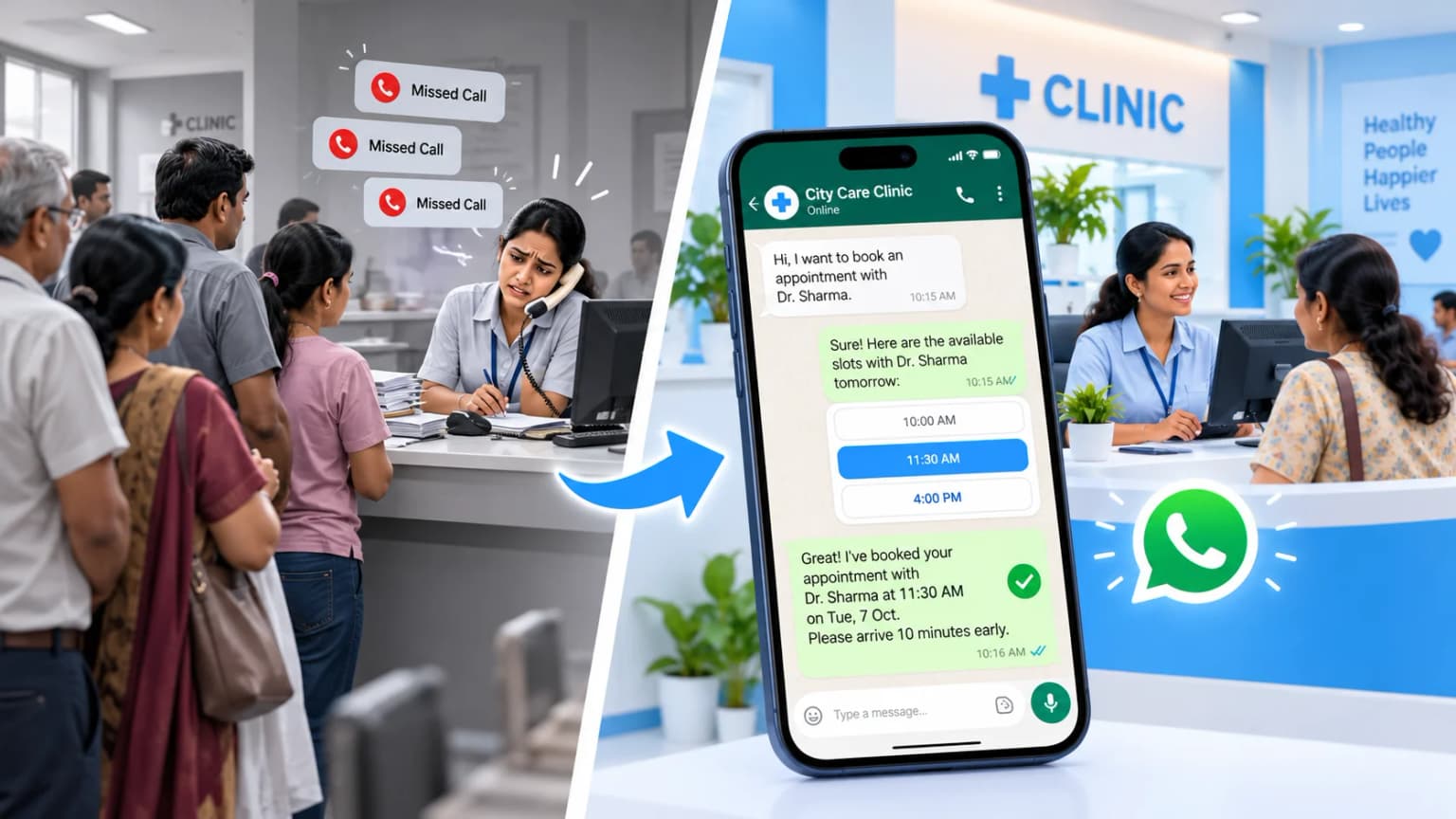
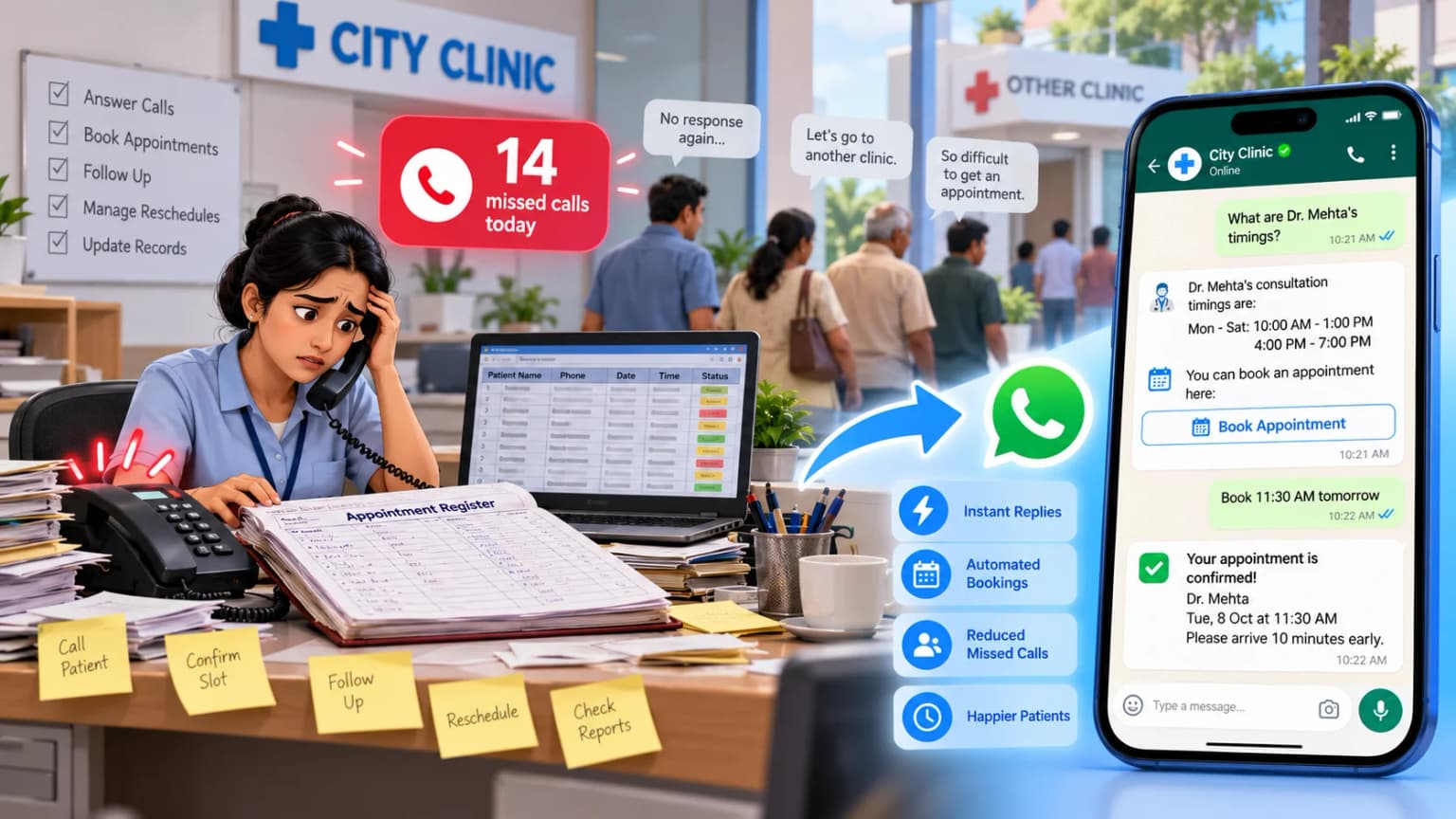
Walk into most private clinics at 10 a.m. and you’ll see the same scene: the receptionist has the landline wedged between ear and shoulder, typing notes with one hand, while a patient waits at the counter. When the lines are busy, callers don’t wait on hold — they hang up and try the next clinic down the road. WhatsApp clinic appointment software closes that gap by letting patients book, confirm, or reschedule an appointment in seconds, inside the app they already use every day.
Talk to Us on WhatsAppJump to ROI →
WhatsApp clinic appointment software booking patients automatically while a calm Indian clinic reception runs smoothly

Summarise this post with:

What Is WhatsApp Clinic Appointment Software?

WhatsApp clinic appointment software is a tool that lets patients book, confirm, reschedule, or cancel an appointment with your clinic directly inside WhatsApp — connected to your clinic’s calendar so slots update in real time. It runs around the clock, so a patient messaging at 11 p.m. gets the same instant response as one who calls during working hours. It’s usually one part of a wider WhatsApp CRM for healthcare setup, sitting alongside report notifications and patient retention campaigns.

🗓️

24/7 booking

Patients book after clinic hours, so late-night enquiries don't go to the next clinic.

🔔

Reminders patients read

Confirm or reschedule with one tap inside WhatsApp.

💳

Deposits and follow-ups

UPI booking deposits and automatic recall reminders for chronic care.

The Hidden Cost of Manual Scheduling

Manual scheduling — phone calls, paper registers, static spreadsheets — quietly eats dozens of staff hours every week. When a receptionist spends half the shift answering the same questions about doctor availability, fees, and directions, actual in-clinic patient care suffers. Clinic appointment software removes that administrative load by turning repetitive front-desk questions into something patients can answer themselves, instantly.

Standalone patient portals have the same problem from a different angle: patients drop off the moment they’re asked to install an app, create an account, and verify an email just to see which doctor is free. WhatsApp removes that step entirely — patients already have it installed, so they can browse open slots and confirm a visit within seconds.

Clinic appointment software replacing manual phone calls, paper registers, and Excel sheets at a busy front desk

There’s also a quieter revenue leak: missed calls during busy hours. Clinics that audit their call logs commonly find that 8–30% of incoming calls go unanswered when staff are busy at the counter. An automated WhatsApp AI chatbot means every enquiry gets an instant, useful reply — turning into a confirmed booking without adding another person to the front desk.

How WhatsApp Reminders Cut Patient No-Shows

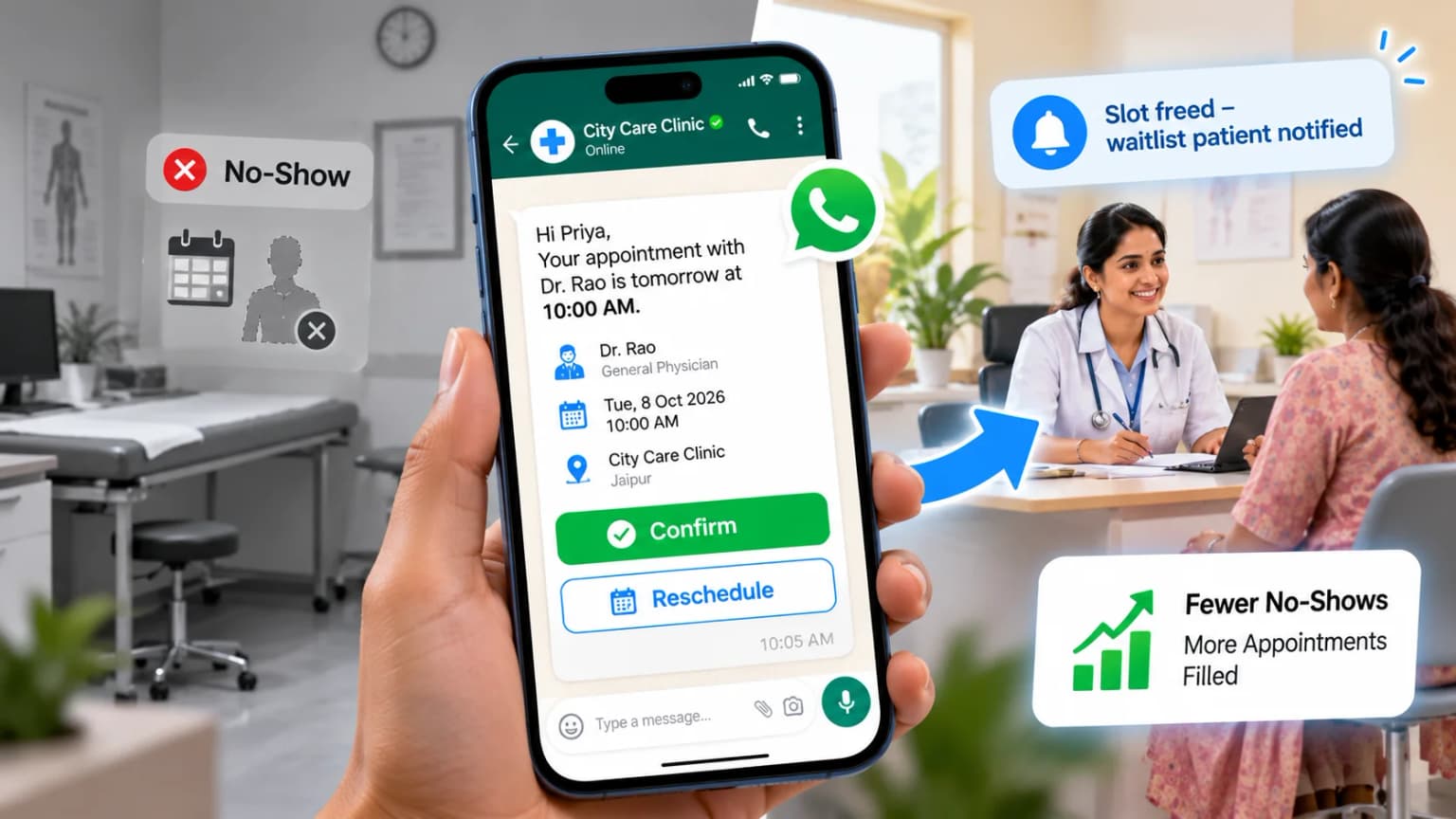
Unfilled slots and last-minute no-shows are one of the most expensive problems in outpatient care. No-shows in the 15–30% range are common across Indian clinics, which means doctors sit idle in examination rooms that were already paid for in staff time and rent. Dedicated whatsapp clinic appointment software fixes this by reaching patients on the channel they actually check.

SMS reminders don’t work as well as they used to — mobile carriers increasingly filter bulk SMS as spam, and most patients don’t read messages from an unfamiliar short code. Reminders sent to a patient’s personal WhatsApp chat see open rates that are usually well above 90%, simply because the message shows up where they’re already looking. These go out as pre-approved WhatsApp message templates, so Meta reviews the wording before it ever reaches a patient.

WhatsApp appointment reminder with Confirm and Reschedule buttons reducing patient no-shows at a clinic

What makes this work in practice is that patients can act on the reminder with one tap — Confirm or Reschedule — instead of ignoring it like a text. And when a slot opens up from a cancellation, the system can automatically notify patients on the waitlist, often filling that same slot within hours instead of leaving it empty.

Doctor Appointment Software for Multi-Doctor Clinics

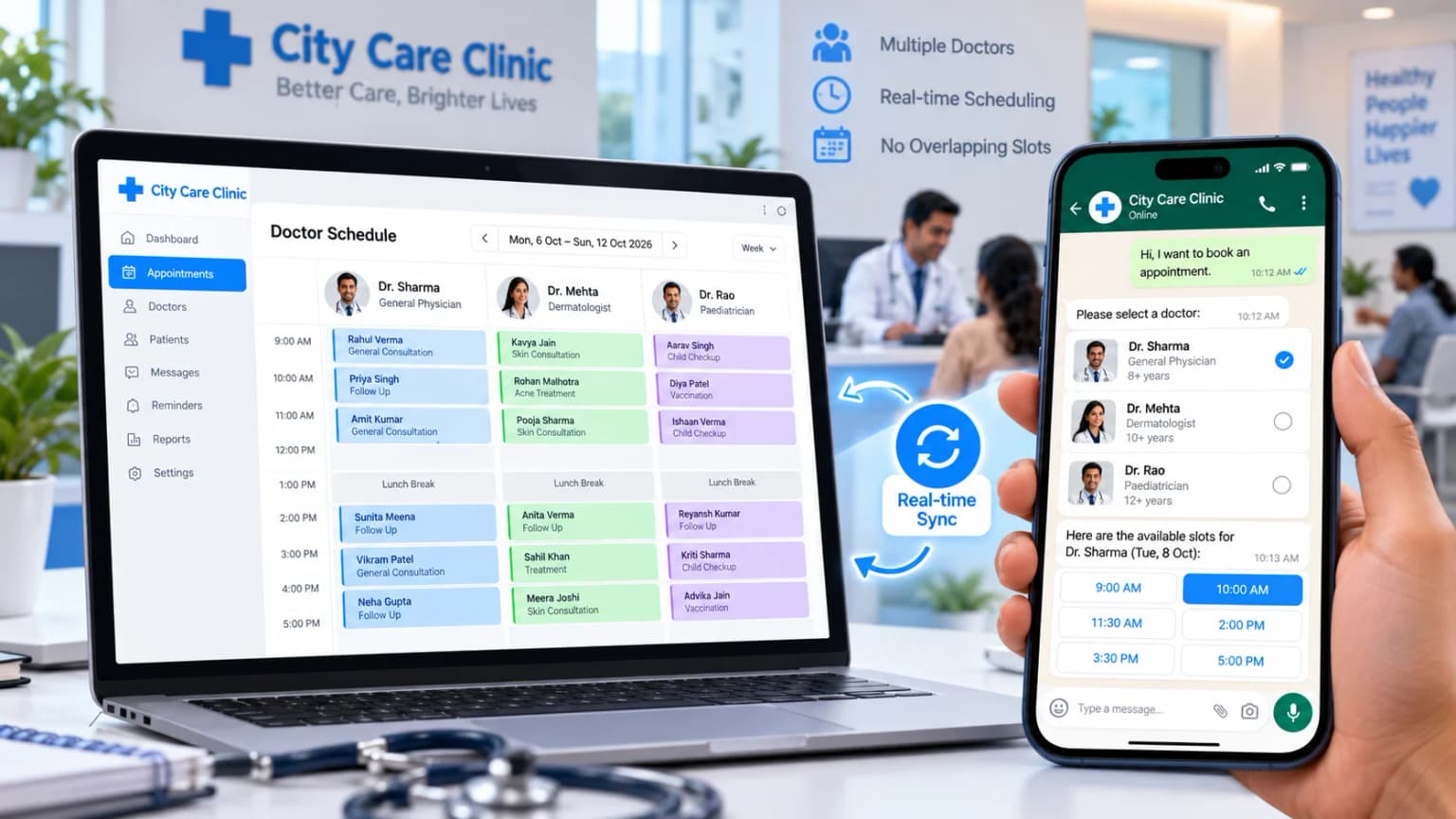
Coordinating several doctors, consulting hours, and treatment rooms gets complicated fast in a multi-specialty clinic. Without the right tools, a receptionist juggling this by hand will eventually double-book a room or a doctor’s time — and sorting that out after the fact is far more disruptive than preventing it in the first place. Doctor appointment software keeps each doctor’s calendar separate and synced in real time, so overlapping bookings simply aren’t offered as an option.

Doctor appointment software showing a real-time multi-doctor calendar and a patient choosing a doctor on WhatsApp

Patients also prefer this setup: they can pick the doctor they want, check basic credentials, and see real, current availability right on their phone, rather than being told a time over the phone that later turns out to be wrong. Showing accurate slots up front, before the patient ever arrives, builds confidence in the clinic’s scheduling and reduces the chance they call back to double-check.

Good doctor appointment software can also collect basic details before the visit — symptoms, past prescriptions, and other basic information — so the doctor already has context when the patient sits down. That shortens the time spent gathering history in the room and leaves more of the consultation for the actual examination.

Patient Scheduling Software for Follow-Ups and Retention

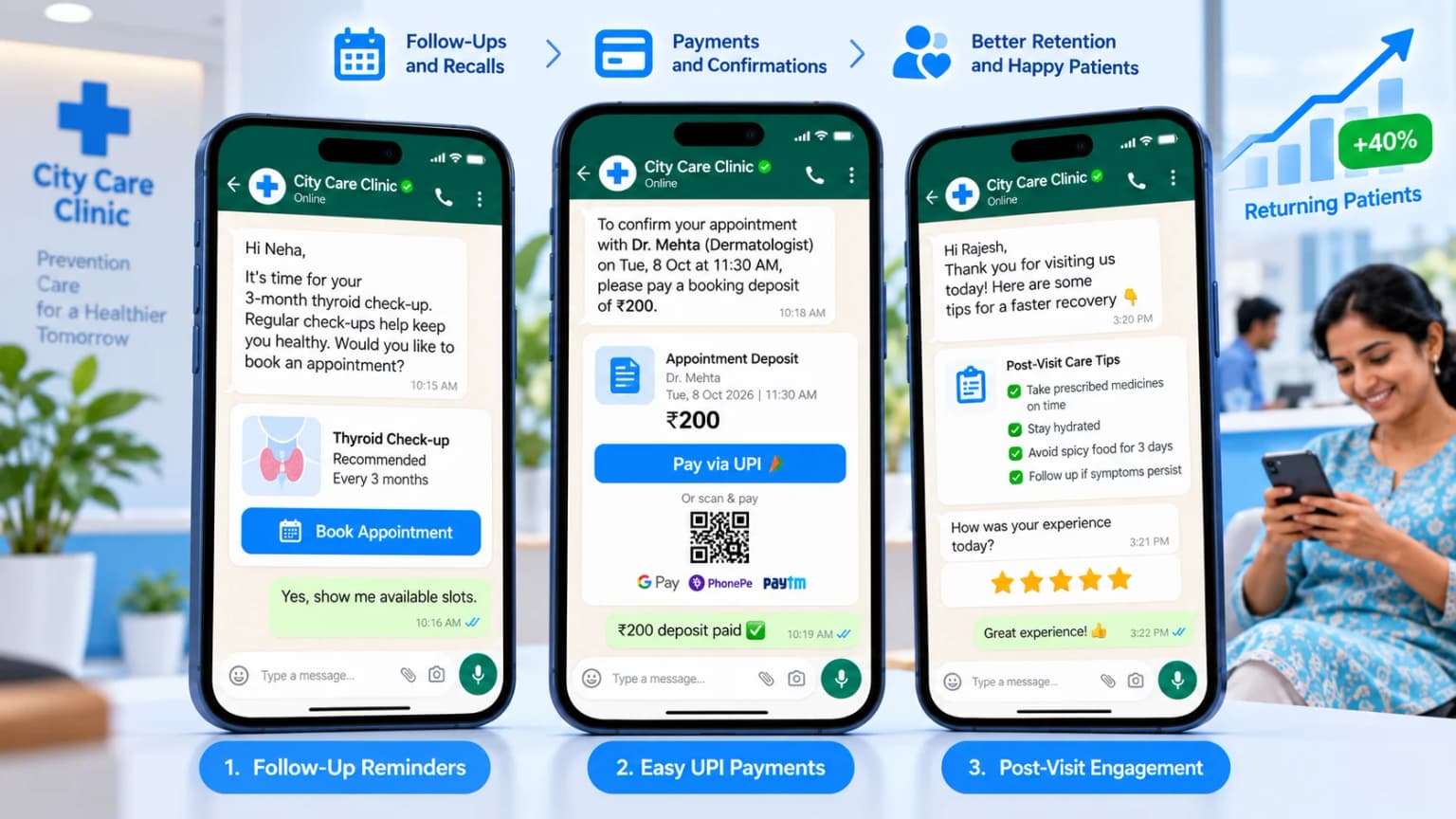
A clinic’s long-term health depends on continuity of care, not just one-off visits. Patients managing chronic conditions — diabetes, high blood pressure, thyroid disorders — need regular follow-ups, repeat tests, and occasional changes to their medication. Patient scheduling software can lock in these recall schedules as an automated WhatsApp drip campaign, sending a reminder when a routine follow-up is due instead of relying on the patient, or the clinic, to remember.

Patient scheduling software sending follow-up reminders and collecting UPI booking deposits on WhatsApp

The same system is useful after a procedure too, not just before one. Post-procedure care instructions, dietary guidance, and short feedback surveys can go out automatically within hours of discharge, so patients feel looked after between visits — which is often what turns a one-time patient into a returning one who refers others.

Collecting a booking deposit in advance also helps. Patient scheduling software can take a small deposit through UPI, card, or a QR code right inside the chat, which cuts down on casual, no-intention bookings — especially useful for high-demand diagnostic slots or specialty procedures, where an empty slot costs the clinic the most.

Traditional Reception vs Clinic Appointment Software

Laid side by side, the gap between a manual front desk and automated scheduling becomes obvious:

CapabilityTraditional ReceptionWhatsApp Clinic Appointment Software
Booking availabilityWorking hours only (9 AM – 6 PM)24/7 automated booking and slot locking
Patient confirmationManual phone calls by staffTwo-way interactive buttons
Calendar updatesPaper register or static spreadsheetReal-time multi-doctor calendar sync
Payment collectionCash or card at the desk onlyIn-chat payment links and deposits
Follow-upsForgotten or done manuallyAutomated recalls and lab test alerts

How to Choose Clinic Appointment Software

A practice should never settle for unauthorized, grey-market messaging bots that risk a permanent number ban from Meta. Here’s what to check before committing to a platform:

01

Use the official WhatsApp Business API

Avoid unofficial bots that risk your number getting banned by Meta.

02

Check multi-doctor scheduling

Separate calendars, consulting hours, and rooms with no double bookings.

03

Look for interactive reminders

Confirm and Reschedule buttons, plus automatic waitlist fill.

04

Confirm a shared team inbox

Two or more receptionists can reply without duplicate responses.

05

Ask about EMR / HMS integration

Patient details, appointments, and receipts should sync through an API.

06

Check payment support

UPI, cards, and QR deposits inside the chat.

If your front desk runs on two or more receptionists, confirm the platform offers a shared team inbox — without one, two staff members can end up replying to the same patient at once. And whichever provider you shortlist, confirm they operate on the official WhatsApp Business API, not an unofficial workaround that Meta can block without warning.

One more thing worth building in from day one: only message patients who have opted in, and handle health information in line with the Digital Personal Data Protection Act, 2023 (DPDP Act). Keep messages limited to what’s actually needed for the appointment, and avoid storing more patient data in the chat tool than you need to.

Calculating the ROI of Automated Scheduling

Consider a mid-sized clinic running three consulting doctors, each seeing about 20 patients a day. If just five appointments a day are lost to no-shows or missed calls, that works out to roughly 110–130 lost consultations a month across a typical 22–26 working-day month — not a handful, but a meaningful share of the clinic’s capacity.

A quick worked example

3 doctors × 20 patients/day. 5 lost slots a day × ~24 working days ≈ 120 lost consultations a month. At ₹500 per consultation, that’s about ₹60,000 in missed revenue every month.

For most clinics, recovering even a few missed appointments a week covers the monthly subscription for automated scheduling software — everything beyond that, including retained chronic-care patients and higher turnout for specialty procedures, is incremental revenue.

There’s also a less visible return: lower stress on front-desk staff and a calmer waiting room. When a receptionist isn’t pulled onto a phone call mid-conversation with a patient at the counter, service feels smoother on both ends — and that shows up in patient satisfaction, not just the schedule.

Frequently Asked Questions

It's a tool that lets patients book, confirm, reschedule, or cancel clinic appointments inside WhatsApp, through an automated chat connected to your clinic's calendar. It runs 24/7, so patients can book even when your front desk is closed.

No. Patients use the WhatsApp they already have. They message your clinic number, pick a doctor and slot, and get an instant confirmation — no app install, sign-up, or email verification.

It sends automatic WhatsApp reminders before each appointment with Confirm and Reschedule buttons. Patients respond in one tap, and if someone cancels, the freed slot can be offered to waitlisted patients automatically.

Yes, when you use the official WhatsApp Business API through a Meta-certified provider and only message patients who have opted in. Keep messages limited to what's needed (appointment time, doctor, location) and handle patient data in line with the DPDP Act, 2023.

Yes. Good doctor appointment software keeps a separate calendar for each doctor and room, shows patients only real available slots, and blocks double bookings automatically.

Yes. Patients can pay a small deposit through UPI, cards, or a QR code inside the chat, which reduces casual bookings for high-demand procedures. BetaXLab supports payments through Razorpay integration.

Fill Your Appointment Slots Without Adding Front-Desk Staff

BetaXLab is a Meta-certified WhatsApp Business Platform provider. We help clinics set up WhatsApp clinic appointment software with 24/7 booking, reminders, multi-doctor calendars, and follow-ups — with setup in minutes and no coding.

Sources: Meta — WhatsApp Business Platform documentation, Ministry of Electronics & IT — DPDP Act, 2023. Published Oct 3, 2026 · Reviewed by the BetaXLab team. Figures are typical industry ranges and will vary by clinic.

Related Reading

WhatsApp CRM for HealthcareWhatsApp AI ChatbotShared WhatsApp InboxOfficial WhatsApp Business API ProviderWhatsApp Drip CampaignWhatsApp Message TemplatesWhatsApp Bulk Sender IndiaBetaXLab Pricing

Ready to automate your clinic bookings on WhatsApp?

Get Started →