Buying Guide · Salons & Beauty Studios

WhatsApp Salon Booking Software: Fill Every Chair Without the Front-Desk Chaos

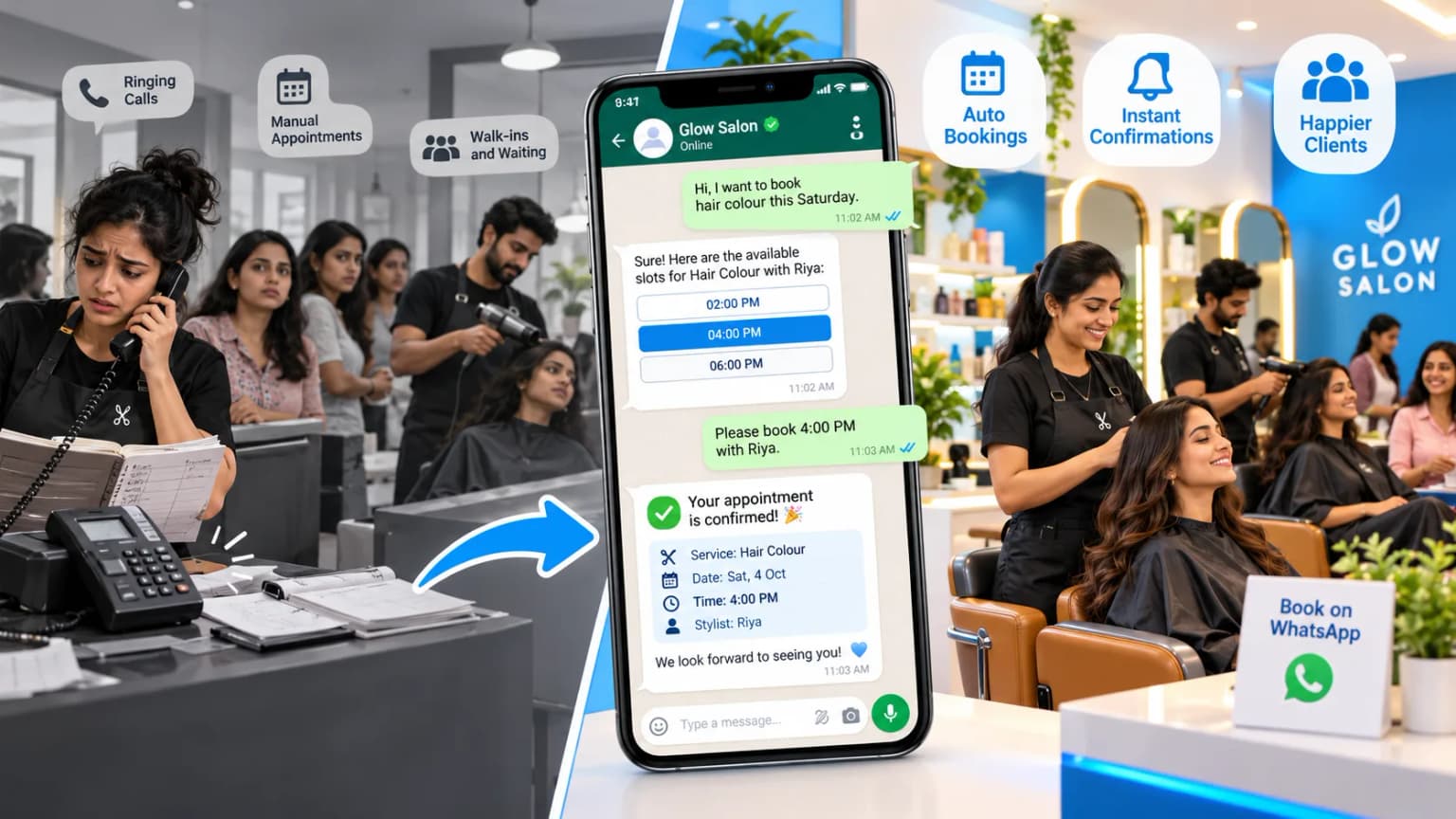
Every salon owner knows this Saturday: the front-desk phone keeps buzzing, your best stylist is mid-blowout, two walk-ins are waiting by the door, and a client with a high-ticket colour appointment just cancelled. With whatsapp salon booking software, that same enquiry becomes a confirmed, paid appointment in seconds — right inside the chat app your clients already have open all day.
Talk to Us on WhatsAppJump to ROI →
WhatsApp salon booking software confirming a client appointment while stylists work calmly in an Indian salon

Summarise this post with:

What Is WhatsApp Salon Booking Software?

WhatsApp salon booking software lets clients book, reschedule, and pay for their appointment without leaving a chat. Clients can browse your service menu, pick their favourite stylist, and lock in a slot whenever it suits them — bookings run 24/7, even after you’ve closed for the night.

✂️

Book in 30 seconds

Clients pick a service and stylist in chat, with no app download or account.

🔔

Reminders clients read

Confirm or reschedule with one tap, and freed slots go to the waitlist.

💳

Deposits for big services

UPI or card deposits for colour, keratin, and bridal bookings.

The Hidden Cost of Booking Friction

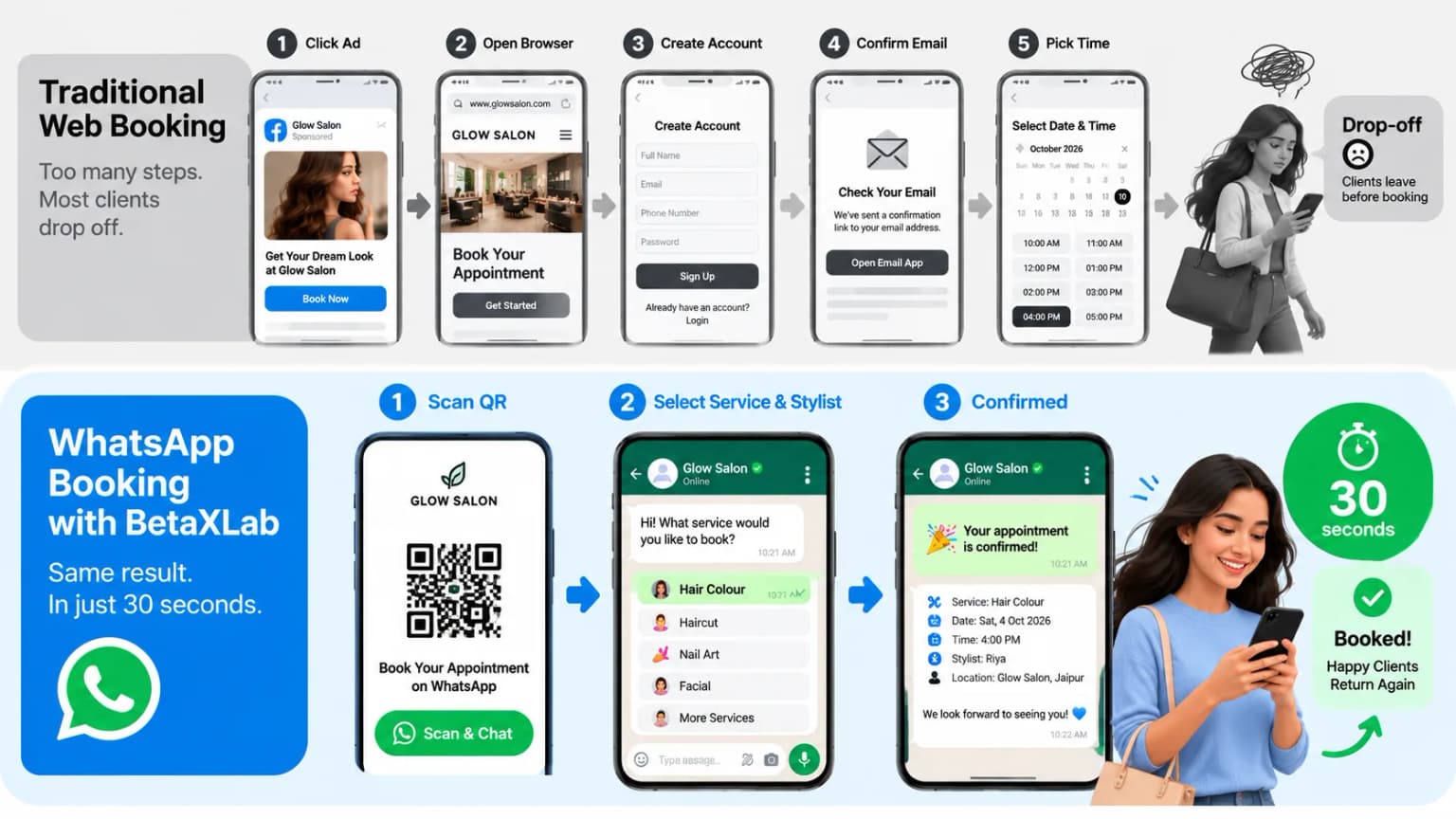
Older booking pages put obstacles in front of clients who just want a slot. Asking visitors to create an account, confirm an email address, or recall a forgotten password causes real drop-off before checkout. Booking inside a chat skips all of that — a client can go from “hi” to a confirmed appointment in under a minute, without ever leaving the conversation.

Clients who can’t reach you during your busiest hours take their business elsewhere. When a stylist has to stop and answer the phone mid-service, the client in the chair notices the pause, and the whole afternoon’s schedule slips a little further behind. Automating the front desk lets your staff focus on the guest in front of them instead of juggling the phone.

Traditional web booking
Click Ad→Open Browser→Create Account→Confirm Email→Pick Time→Drop-off
WhatsApp booking
Click Link / Scan QR→Chat Opens→Select Service & Stylist→Confirmed in ~30 seconds
Salon booking software comparison showing a long web booking flow versus a 30-second WhatsApp booking flow

No-shows quietly drain chair-time revenue every month. Traditional SMS reminders get ignored, deleted, or marked as spam, so clients forget appointments they genuinely meant to keep. Per Meta’s WhatsApp Business Platform data, open rates often run above 90%, so a reminder sent the day before actually gets seen — and a Confirm or Reschedule button makes it effortless to act on.

How WhatsApp Salon Booking Software Runs Your Front Desk

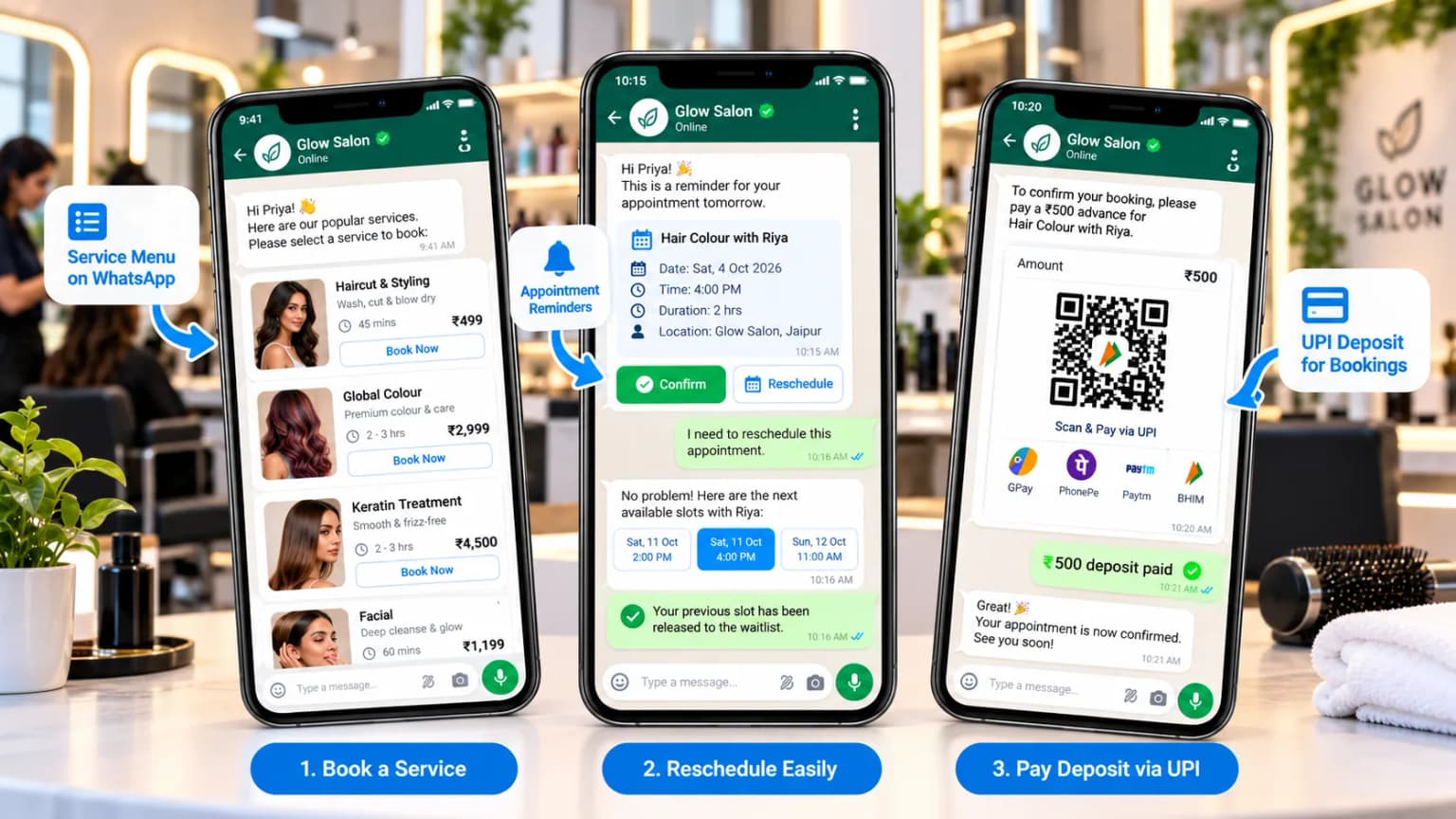
A short greeting — often handled by an AI chatbot — shows your full service menu, price ranges, and estimated service times. The client picks a treatment, checks whether their preferred stylist is free, and locks in a date and time, all within the same chat.

Rescheduling and last-minute cancellations are no longer a headache for the front desk. If something comes up, the client can tap a button to reschedule their appointment. The software updates the master calendar, notifies the stylist, and releases the original slot to a waitlisted client — no one at reception needs to do anything.

Deposits during peak season become just as simple. A payment link sits right inside the chat, so clients can pay by UPI, card, or digital wallet. Taking a deposit upfront for chemical treatments filters out casual bookings and gives you a clearer picture of confirmed revenue ahead of time.

WhatsApp salon booking chat showing a service menu, reschedule button, and UPI deposit for a hair treatment

Salon Appointment Software for a Better Guest Experience

First impressions start before a client ever sits in your chair. Good salon appointment software sends an instant booking receipt, directions to your studio, and parking guidance — small details that put a first-time visitor at ease before they walk in.

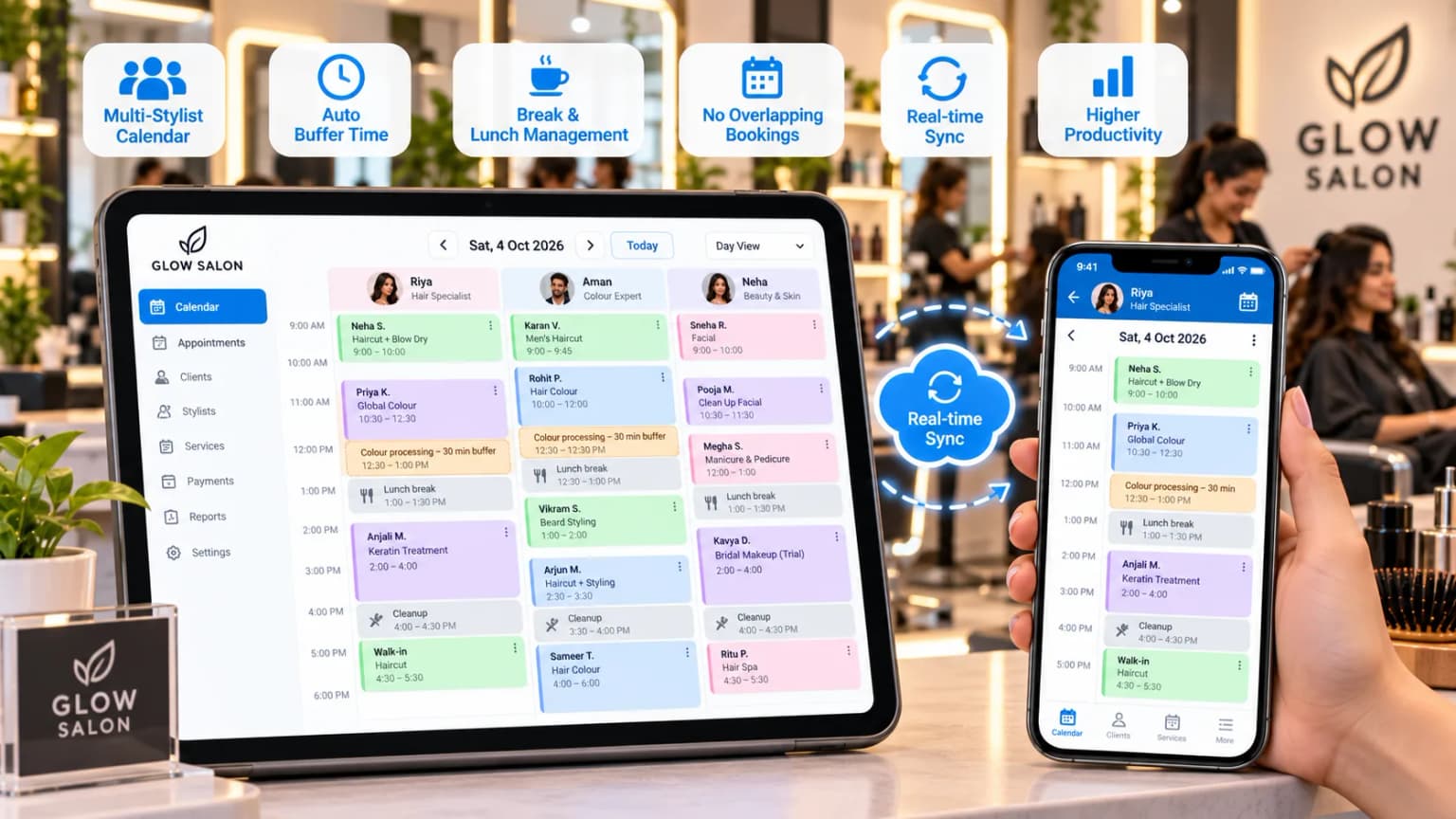
Behind the scenes, it prevents double bookings and overlapping schedules. Buffer settings account for cleanup time, colour processing pauses, and stylist breaks automatically, and that extra margin is what helps appointments run on time.

Your full service menu, shared in chat, lets clients explore add-on treatments on their own instead of asking at the counter. Stylists can also send pre-visit instructions — for example, hair-wash guidance before a keratin treatment — straight to the guest’s phone ahead of time.

Salon appointment software showing a multi-stylist calendar with buffer time for colour processing and breaks

Driving Repeat Visits with Salon CRM Software

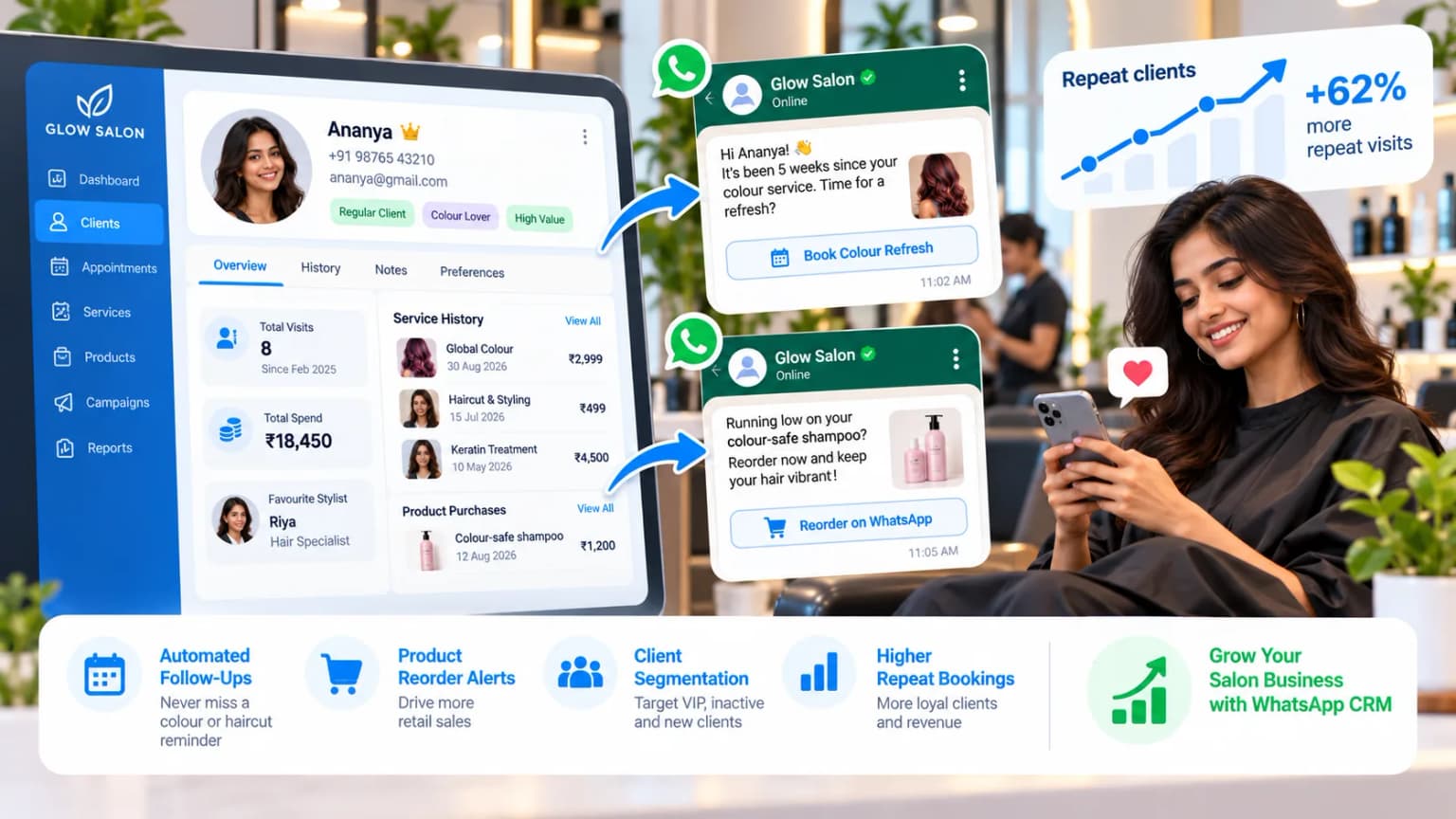
Filling the calendar once is the easy part — bringing clients back is what keeps revenue steady. Salon CRM software keeps a profile for every client: past services, favourite stylist, and retail purchase history. Once that profile is connected to your booking chat, every message you send can be personal instead of generic.

Colour and precise haircuts naturally need a refresh every 4–6 weeks. Salon CRM software tracks that interval for each client and sends gentle recall reminders when it’s time — so you’re reaching out before they start looking at a salon down the street.

The same system protects retail sales. If a client bought colour-safe shampoo, a reminder to reorder around 40 days later keeps that product moving. Timely product nudges and loyalty offers sent to the right segment keep your retail shelves active and nudge up the average ticket.

Salon CRM software tracking client history and sending WhatsApp reminders for colour refresh and product reorders

Basic Booking Bots vs Full Salon Booking Software

Not every tool that takes a WhatsApp booking is built the same way. Here’s what tends to separate a basic booking bot from software built to run a salon’s whole front desk:

FeatureBasic Booking BotsWhatsApp Salon Booking Software
Messaging engineUnofficial web extensions (risk of number ban)Official Meta WhatsApp Business API
Calendar syncManual entry or static calendarReal-time multi-stylist sync
Payment optionsCash at the counter onlyIn-chat UPI and card payments
Client profilesBasic contact listBuilt-in salon CRM software
RemindersManual or noneAutomated reminders and recall campaigns

How to Choose Salon Booking Software

A dependable platform should run on the official Meta Business API, which gives reliable delivery and protects your salon’s main phone number from bans — unlike tools that rely on unofficial WhatsApp Web workarounds.

01

Use the official WhatsApp Business API

Unofficial tools can get your salon’s main number banned by Meta.

02

Check multi-stylist scheduling

Separate calendars, service durations, and buffer times.

03

Look for interactive reminders

Confirm and Reschedule buttons, plus automatic waitlist fill.

04

Confirm in-chat payments

UPI, cards, and deposits for high-value services.

05

Check staff permissions

Stylists see their own schedule on their phone, not business reports.

06

Ask about integrations

POS, calendar, and payment tools should connect without manual exports.

If your reception team already works from a shared WhatsApp inbox, confirm the booking software plugs into it directly. And whatever platform you choose, only message clients who have opted in, and handle client data in line with the Digital Personal Data Protection Act, 2023 (DPDP Act).

Calculating the Return on Salon Booking Software

The return on salon booking software comes from two places: appointments you’d otherwise have lost to no-shows or missed calls, and the reception workload you no longer need extra hands for.

A simple monthly estimate

Recover 3 missed appointments a week (about 12 a month) plus 5 lapsed colour clients a month. That’s 17 extra bookings. At an average ticket of ₹1,500, that’s roughly ₹25,500 in recovered revenue every month.

Weigh that recovered revenue against what the software actually costs — check BetaXLab’s pricing for your salon’s contact volume before budgeting.

This is an illustrative example, not a promise — actual results vary by salon size, ticket price, and how consistently reminders and waitlists are used.

Frequently Asked Questions

It’s a tool that lets clients view your service menu, pick a stylist and time slot, and confirm their appointment inside WhatsApp. It’s connected to your salon calendar and works 24/7, including after closing time.

No. Clients use the WhatsApp they already have. They can tap a link or scan a QR code at your salon, and the booking chat opens straight away — no app, account, or password needed.

It sends automatic WhatsApp reminders before each appointment with Confirm and Reschedule buttons. If a client cancels, the slot can be offered to waitlisted clients automatically, so the chair doesn’t sit empty.

Yes. You can send a payment link inside the chat so clients pay a deposit through UPI, cards, or wallets before high-value services. BetaXLab supports payments through Razorpay integration.

Yes. Each stylist gets their own calendar, with service durations and buffer time for cleanup, colour processing, and breaks. Clients only see slots that are actually free, which prevents double bookings.

It keeps a profile for every client with past services, favourite stylist, and product purchases. It uses that history to send timely reminders, like a colour refresh after 4–6 weeks or a product reorder, so clients come back without you chasing them.

Fill Your Chairs Without Adding Front-Desk Staff

BetaXLab is a Meta-certified WhatsApp Business Platform provider. We help salons set up WhatsApp salon booking software with 24/7 booking, reminders, deposits, multi-stylist calendars, and repeat-visit campaigns — with setup in minutes and no coding.

Sources: Meta — WhatsApp Business Platform documentation, Ministry of Electronics & IT — DPDP Act, 2023. Published Oct 3, 2026 · Reviewed by the BetaXLab team. Figures are typical industry ranges and examples, and will vary by salon.

Related Reading

WhatsApp CRM for SalonsWhatsApp AI ChatbotWhatsApp CRMShared WhatsApp InboxWhatsApp CRM RetailWhatsApp Drip CampaignWhatsApp BroadcastWhatsApp Clinic Appointment SoftwareBetaXLab Pricing

Ready to automate your salon bookings on WhatsApp?

Get Started →