Buying Guide · WhatsApp Shared Inbox

Best WhatsApp Shared Inbox for Teams: Reddit Discussions and Tools

A shared WhatsApp inbox lets a team coordinate customer conversations from one WhatsApp Business number, instead of relying on a single device or several fragmented personal accounts. People researching this are usually dealing with overlapping replies, lost context when an agent is away, or no clear way to divide enquiries as the team grows. This guide compares assignment, conversation history, collaboration and cost across the tools people actually consider.

Built on the Official WhatsApp Business API · Last reviewed October 14, 2026

Request a BetaXLab Team DemoSee Tools Compared →
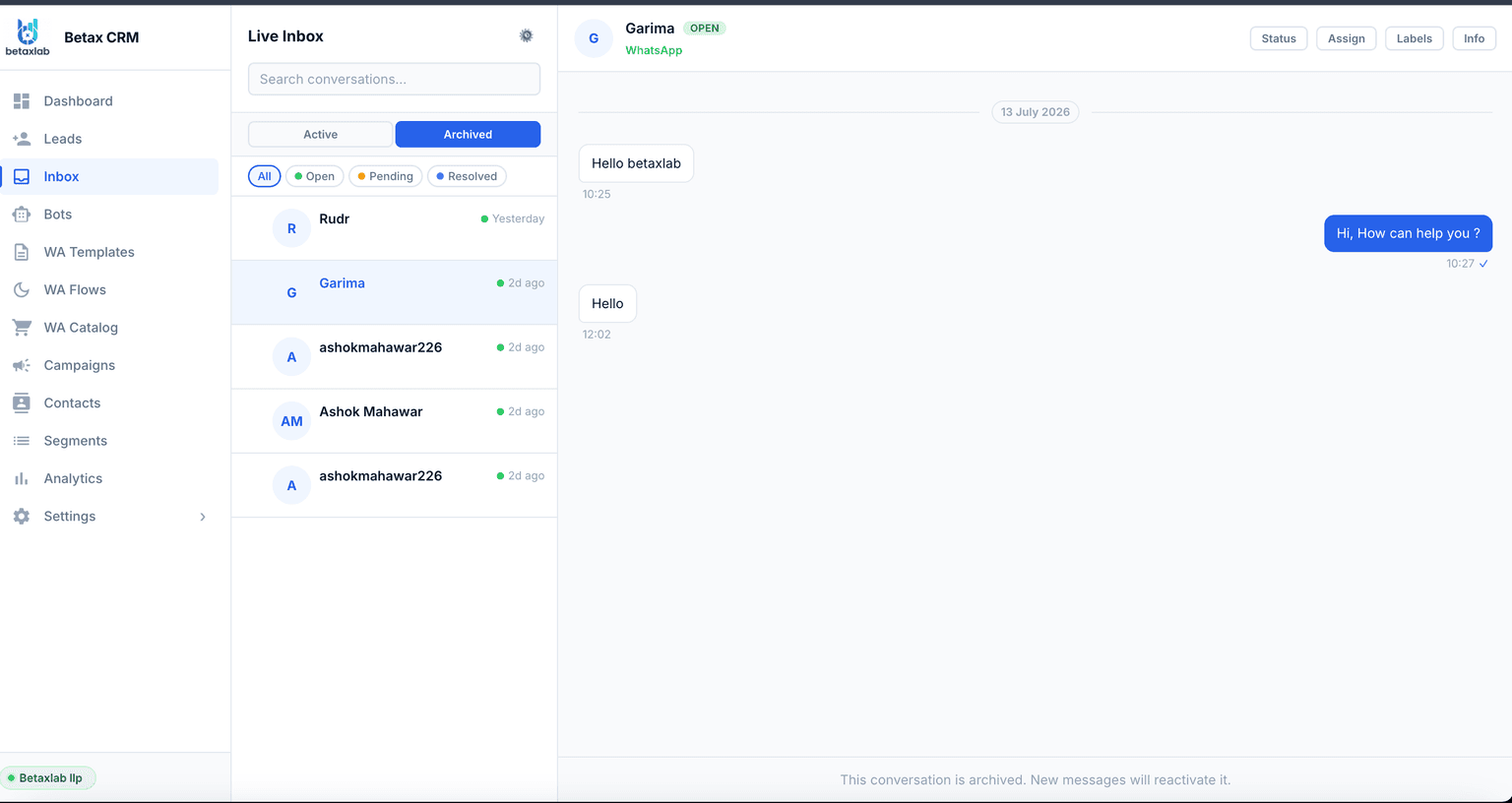
BetaXLab shared WhatsApp inbox dashboard showing multiple agents assigned to conversations on one WhatsApp Business number

Summarise this post with:

Why Businesses Need a Shared WhatsApp Inbox

A single WhatsApp number works fine for one person. The moment a second person needs to reply — or enquiry volume outgrows what one agent can handle — ownership, response consistency, handoffs and visibility all become real operational problems rather than theoretical ones. Who is replying to a given chat right now? Does the next agent know what was already promised? Can a manager see where the team is falling behind? A shared inbox exists to answer those questions as the team and the volume grow.

What People Researching This Usually Ask

Before naming a single tool, it helps to know what the actual recurring questions are when teams go looking for a shared WhatsApp inbox — on forums, in Reddit threads, and in sales calls.

Can one number really work for more than one employee?

A common starting question is whether several people can reply from the same WhatsApp number without buying extra SIMs or phones, and whether that requires the Official WhatsApp Business API rather than the consumer or Business app.

Replies crossing or contradicting each other

A recurring theme in team-WhatsApp discussions is two people answering the same conversation — a customer getting two different answers within minutes because nobody could see that a colleague was already typing.

What happens to history when an agent is away or leaves

People ask whether conversation history, notes and context stay with the business or disappear with the person who was handling the chat, especially after someone goes on leave or leaves the company.

Whether per-agent pricing gets expensive as a team grows

Cost comes up often — specifically how pricing scales as a team adds agents, and whether features like assignment or notes are included or sold as upgrades.

Official API vs workarounds

Some discussion threads mention unofficial multi-device tricks or shared-login workarounds for team WhatsApp access, alongside warnings that these approaches carry a higher risk of a number getting restricted.

This reflects common, generic patterns we’ve seen referenced in public discussion — including Reddit — about team WhatsApp tools. It is not a citation of any specific thread, user or post, and it is not a claim of verified “Reddit consensus.” A single complaint type mentioned about any named product below should be read as one data point to investigate, not as a confirmed, product-wide defect.

What Goes Wrong Without a Shared Inbox

Illustrative example — not an actual case

A six-person sales team shares one WhatsApp Business number, logged in on a couple of phones that get passed around. A high-intent lead messages asking for a price. Two agents happen to have the chat open at the same time, and both reply — one quotes a number, the other quotes a different one ninety seconds later. The lead doesn’t say anything; they just stop replying.

A week later, a different customer calls back about a pending order. The agent who originally handled it is on leave, and nothing about the verbal discount or the delayed delivery exists anywhere except in that agent’s memory. The new agent starts from “can you remind me what this is about?” — the fastest way to make a returning customer feel unheard. Neither failure is really about effort; both are about ownership and context not being recorded anywhere the next person can see.

Essential Shared Inbox Features to Look For

Whichever vendor you evaluate, these are the capabilities worth checking for directly rather than taking on faith.

✓

Multiple Agents. More than one person can log in and reply from the same WhatsApp Business number, each with their own account.

✓

Assignment & Reassignment. Every incoming chat gets an owner — manually or by rule — and can be reassigned in one click.

✓

Internal Notes. Private notes and @mentions attached to a conversation, invisible to the customer, for handovers and context.

✓

Contact History. Past messages, notes and interactions sit on one contact record that any authorised agent can open.

✓

Tags & Statuses. Label conversations by stage, issue type or priority, and filter queues by status.

✓

Follow-Up Tasks. Set a reminder or task against a conversation so a promised callback or pending reply doesn’t get forgotten.

✓

Permissions. Control what each agent, team lead or admin can see and do — including who can export contacts or launch messages.

✓

Auditability. A record of who was assigned what and when, so a conversation’s history can be reconstructed later.

✓

Bot-to-Human Handoff. A chatbot can answer routine questions first and pass the conversation to a human with context attached when needed.

BetaXLab vs WATI vs Respond.io vs Interakt

Four platforms compared on what actually decides whether a team inbox works day to day.

CapabilityBetaXLabWATIRespond.ioInterakt
Core Inbox FeaturesMulti-agent inbox, assignment and auto-routing, internal notes, contact timeline, tags, collision detection, SLA timers — included as standardEstablished shared inbox with team assignment and notes; depth varies by plan tierOmnichannel inbox with strong routing and workflow automation across WhatsApp and other channelsShared inbox with assignment, oriented toward ecommerce order context
Agent AssignmentRound-robin, least-busy, keyword or tag-based routing, with one-click reassignment and bulk reassignment when someone leavesAssignment available; rule depth and automation often tied to higher tiersFlexible routing rules as part of a broader workflow builder, which can take longer to configureBasic assignment focused on order-related conversations
Conversation History & NotesInternal notes, @mentions and full contact timeline retained on the contact record, independent of which agent is logged inConversation and note history retained; export and retention options vary by planFull conversation history across channels, aimed at larger, more complex support operationsHistory tied closely to order and transaction records
Ease of Setup for a New TeamGuided Meta Business verification and API connection, with onboarding support; most teams invite agents and set routing rules in one sessionMature, familiar interface; some routing and permission settings sit several layers deepPowerful but has a steeper learning curve, since it is built for complex multi-channel workflowsSimple for a small team doing straightforward order support
Automation & AIAI chatbot first response with human handoff, follow-up and drip automation, in the same plan as the inboxChatbot and automation available, often as a separate add-on or higher-tier featureStrong automation and bot-building tools, built for larger support and sales operationsAutomation centred on cart recovery and order-status flows
Pricing PositioningFlat, published plan pricing with agent seats included; costs rise by moving to a higher seat-tier rather than per-conversation creditsTiered plans; effective cost depends on contact volume and add-ons selectedTiered, usage-influenced pricing suited to teams already managing multiple channelsTiered plans priced around commerce feature sets

Compare official pricing and feature pages directly before deciding — this table reflects general positioning at time of writing, not live data, and vendor plans change. See BetaXLab pricing or read the broader WhatsApp CRM alternatives comparison for more options.

Who Is This Suitable For, and How to Set It Up

A shared inbox is worth setting up the moment more than one person needs to reply from the same WhatsApp number — that’s typically true from two agents upward, and becomes necessary well before a team hits ten. Solo operators handling WhatsApp themselves generally don’t need one yet. Here’s the setup sequence most teams follow.

1

Connect your business account to the Official API. A shared inbox with assignment, notes and multi-agent login requires the Official WhatsApp Business API rather than the consumer or Business app. This means completing Meta Business verification and connecting your number through a provider.

2

Set up access roles. Decide who is an agent, team lead or admin before inviting anyone. Agents typically see only their assigned or team queue; admins see everything and control exports and settings.

3

Define routing rules. Choose how new conversations get an owner — round-robin, least-busy, keyword or tag-based, or by working hours. Leave a fallback shared queue for anything that doesn’t match a rule.

4

Prepare saved replies. Draft answers to the handful of questions that make up most of your incoming volume, so new agents can respond consistently from day one.

5

Train agents on notes and handover. Agree on what goes in an internal note versus the main thread, and build a habit of leaving a short note before going offline or handing off a conversation.

6

Run test conversations before go-live. Send a handful of test messages through the live routing rules to confirm chats land with the right agent, notes stay private, and reassignment works, before the whole team relies on it.

When BetaXLab Is a Good Fit for a Team Inbox

BetaXLab runs a multi-agent shared inbox on the Official WhatsApp Business API with assignment, internal notes, contact history, collision detection, role-based access and number masking included as standard — plus an AI chatbot that can take the first turn on routine questions and hand off to a human with context attached.

✓

Multi-agent shared inbox. Built on the Official WhatsApp Business API, with assignment, internal notes and contact history included as standard — not sold as a separate add-on.

✓

Collision detection. If a colleague already has a conversation open, a visible indicator stops a second agent from sending a contradicting reply.

✓

Role-based access. Agents, team leads and admins see different queues and permissions, with an auditable record of who was assigned what.

✓

Number masking. Customers keep messaging the one number they already have saved, regardless of which agent is logged in.

✓

AI chatbot with human handoff. The bot can take the first turn on routine questions and hand off to a human with the full conversation attached.

What that looks like as an actual workflow

1

A new enquiry arrives. It lands in the shared inbox and is auto-assigned to an agent by your routing rule, with an SLA timer attached.

2

The agent replies, with context on hand. The agent sees the contact’s history and any internal notes left by a previous conversation, so the customer isn’t asked to repeat themselves.

3

A colleague is kept out of the way. If another agent opens the same thread, a collision indicator shows who is already handling it, preventing a duplicate or contradictory reply.

4

The conversation gets tagged and handed off if needed. The agent tags the chat (for example "pricing enquiry") and, if it needs another department, reassigns it in one click with a note attached.

5

A follow-up task is set. If the customer needs to be chased in two days, the agent sets a follow-up task against the conversation instead of relying on memory.

BetaXLab WhatsApp CRM customer conversation view showing contact history alongside the live chat

Honest note on plan limits. Agent seats, routing depth and some automation features are tied to your BetaXLab plan tier rather than unlimited on every plan — a larger team generally means moving to a higher seat tier rather than paying a per-conversation surcharge. Check the current pricing page for exact seat counts and feature inclusions before committing, since plans are updated over time.

Start Free Trial

See the inbox with your own team’s routing logic, not a generic demo script

Shared Inbox Implementation Checklist

Independent of which vendor you choose, agree on these before the whole team starts relying on the inbox.

✓

Ownership rules — who is assigned what, and what happens to unassigned chats

✓

First-response time expectations agreed with the whole team, not just managers

✓

A clear escalation path for complaints or anything past the first-response target

✓

A tagging convention for stage, issue type and priority, agreed before go-live

✓

Working-hours routing so chats don’t queue silently behind an offline agent

✓

A simple reporting habit — first-response time, chats per agent, reassignment rate — reviewed weekly

Frequently Asked Questions

There isn’t one tool that gets a consistent recommendation across public discussion — what comes up in a given thread usually reflects whatever the poster happens to use, not a verified best answer. Platforms built on the Official WhatsApp Business API that come up in these conversations include WATI, Respond.io, Interakt and BetaXLab, among others. Rather than looking for a single recommended name, it’s more useful to evaluate any shortlist against the same checklist: multiple agents, assignment, internal notes, contact history, and transparent pricing as the team grows.

Yes, but only reliably through the Official WhatsApp Business API. The consumer WhatsApp app and the free WhatsApp Business app support a limited number of linked devices with no ownership, assignment or audit trail between them. A shared inbox built on the API lets each employee log in with a separate account while customers keep messaging the one number they already have saved.

With a proper shared inbox, yes — conversation history, notes and tags are stored on the contact record rather than on an individual agent’s device, so any authorised agent can open a contact and see what was discussed before, even if a different person handled it originally.

Yes. Conversations can be assigned manually or automatically by rule — round-robin across the team, least-busy agent, or routed by keyword, tag or working hours. Any conversation can typically be reassigned in a click if someone is on leave or a chat needs to move to a different person.

Not in the way most teams need. The free WhatsApp Business app supports a small number of linked devices, but it has no agent assignment, no internal notes, no collision alerts and no role-based access — everyone sees everything, and there’s no record of who handled what. Those capabilities require connecting the number to the Official WhatsApp Business API through a provider.

With a shared inbox built on the API, you revoke that agent’s login and bulk-reassign their open conversations to someone else. Because conversation history, notes and the audit trail live on company-owned contact records rather than a personal device or personal number, the context stays with the business instead of leaving with the person.

Pricing models vary by vendor — some charge per agent seat, some bundle seats into plan tiers, and some use usage-based components. BetaXLab uses flat, published plan pricing with agent seats included in each tier, so moving to a bigger team generally means moving to a plan with more seats rather than an unpredictable per-conversation charge. Always check a vendor’s current pricing page directly, since plans and packaging change — see BetaXLab’s own pricing page for current plans.

Ready to Give Your Team One Shared WhatsApp Inbox?

Stop the overlapping replies and the context that disappears when someone goes on leave. See the inbox set up with your own routing logic, not a generic demo script.

Last reviewed: October 14, 2026 — vendor features and pricing change; verify current details on each provider’s own site before purchasing.

Related Reading

Shared WhatsApp InboxWhatsApp CRMWhatsApp Automation for BusinessBest WhatsApp CRM (Reddit Guide)Best WhatsApp AI Chatbot (Reddit Guide)Best WhatsApp Automation ToolsAffordable WhatsApp CRM SoftwareWhatsApp Lead Management SoftwareBest WhatsApp Broadcast SoftwareWhatsApp Automation for ShopifyWhatsApp CRM Alternatives ComparedBest WhatsApp Business API ProviderTransparent Pricing

Not sure which plan fits your team?

Request a Team Demo →