Buying Guide · WhatsApp CRM

Best WhatsApp CRM for Small Businesses: Reddit Discussions and Alternatives

Choosing a WhatsApp CRM depends on how your business manages enquiries, assigns conversations, tracks leads and follows up with customers. This guide reviews common buyer research patterns and compares WATI, Interakt, Respond.io, Kommo and BetaXLab using verified features, pricing positioning and honest limitations — not a single ranked recommendation.

No fabricated Reddit quotes · No invented competitor prices · Last reviewed 14 October 2026

Talk to Us on WhatsAppSee the Comparison Table →
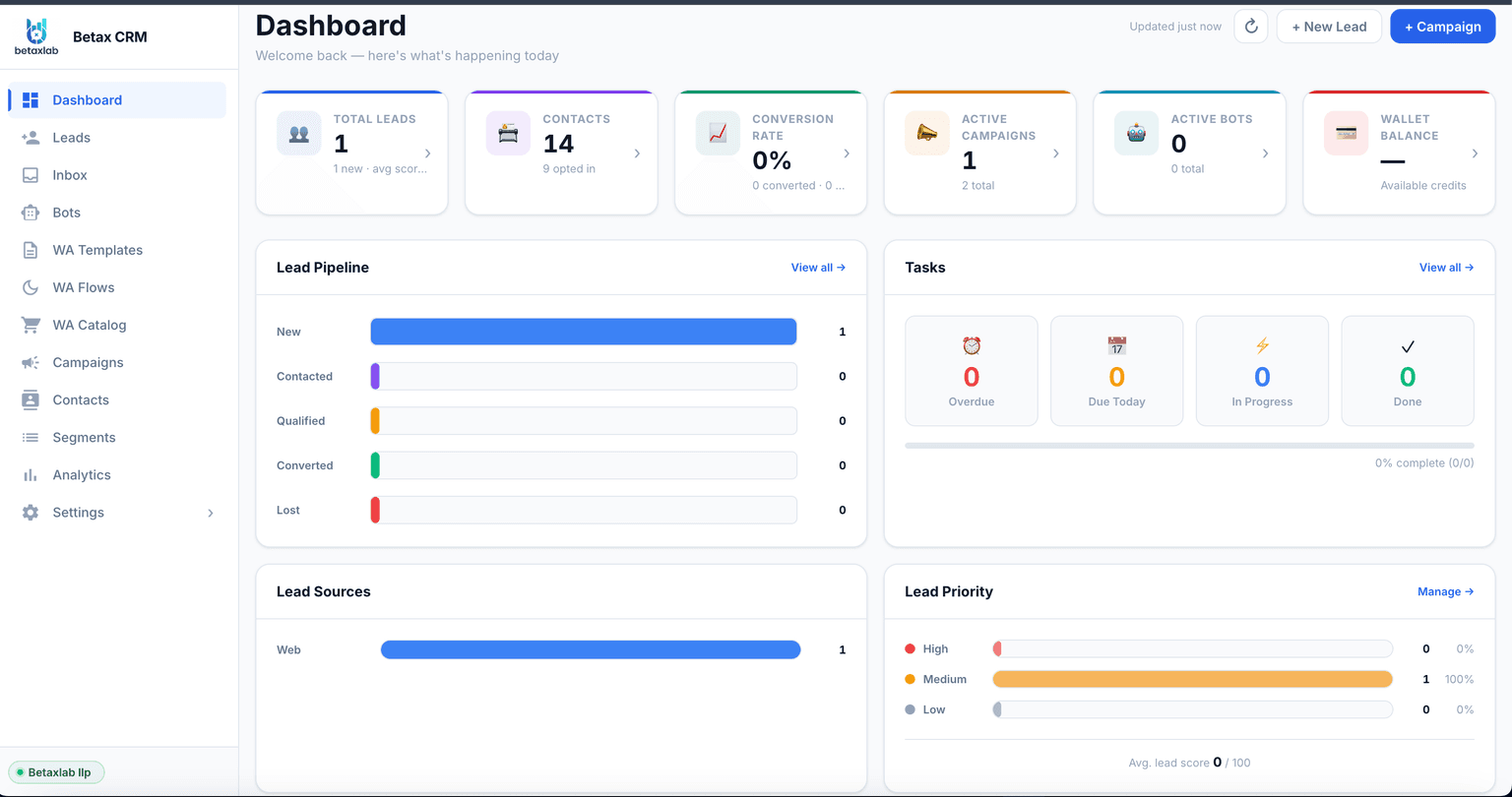
Real BetaXLab CRM dashboard showing total leads, contacts and lead pipeline

Summarise this post with:

What Are People Researching a WhatsApp CRM Typically Looking For?

Strip away the brand names and most small-business WhatsApp CRM searches come down to the same six things.

1

One shared inbox so no enquiry depends on a single phone or person

2

Contact history attached to every number — not scattered across threads

3

A visible lead status so a manager can see what stage a deal is in

4

Follow-up reminders that do not depend on memory

5

Room for more than one agent to work the same number without collisions

6

Simple automation for the repetitive first questions, without hiring a developer

Most of this list has nothing to do with any specific brand — it is simply what breaks first when a growing number of WhatsApp conversations outpaces a single person’s memory. If you are also evaluating a dedicated lead management tool or a shared inbox for teams, the same six criteria apply.

What People Researching This Usually Ask

People searching for a WhatsApp CRM on Reddit and similar forums tend to circle back to the same handful of concerns, phrased in a lot of different ways.

Does the team actually use it daily, or did it just look good in a demo?

A recurring theme is the gap between a polished sales demo and whether a small team keeps using the tool three months later — adoption usually comes down to how little the day-to-day workflow changes.

Will support be responsive once I am a paying customer, not a prospect?

Pre-sales responsiveness and post-sales support quality are often raised as two different experiences. Asking a vendor to resolve a real setup question before you pay is a reasonable way to test this yourself.

Does pricing stay predictable as contacts or conversation volume grow?

Plans that look inexpensive at low volume can change shape once a business adds agents, contacts or message volume — the common advice is to model your expected volume before comparing headline prices.

How painful is it to switch later if the tool does not work out?

Whether contacts, conversation history and custom fields can be exported cleanly is frequently asked before anyone signs up, precisely because switching WhatsApp tools involves re-verifying a business number.

Do I need a CRM at all, or is tagging contacts in the WhatsApp Business app enough?

For a one-person operation with a handful of daily chats, many people conclude a CRM is unnecessary. The common trigger point raised is adding a second person to the number, or enquiry volume outgrowing memory.

Disclaimer: the questions above summarise common, generic themes we observe in public discussion about WhatsApp CRM tools. They are not quotes, and we do not cite specific threads, usernames or post dates — this reflects general patterns in public discussion, not a survey of any particular community.

What Goes Wrong When WhatsApp Is Managed Manually

Five failure modes small businesses run into before they look for a WhatsApp CRM.

✕

Replies Get Missed in a Single Shared Phone. A new enquiry arrives while the one person checking WhatsApp is on a call, at lunch, or helping a walk-in customer. There is no queue, no unread count anyone is accountable for, and no signal that a message has sat unanswered for six hours.

✕

Two People Reply to the Same Customer. Both staff have the app open on their own device or a shared login. One quotes a price, the other answers the same question slightly differently twenty minutes later, and the customer notices before either employee does.

✕

Customer Data Lives Scattered Across Chats. Order details sit in one thread, a complaint in another, a phone number saved under a nickname nobody remembers. There is no single place to see what a customer bought last, what they asked for, or what was promised.

✕

Nobody Owns a Lead Until Someone Asks. Ask who is handling a specific enquiry and the honest answer is often "whoever replies first" or "nobody has yet." Without an assigned owner, a promising lead quietly becomes everyone's problem and no one's job.

✕

Follow-Ups Depend on Someone Remembering. A customer who asked for a quote and went quiet needs a nudge three days later. Without a reminder built into the system, that nudge depends entirely on a person remembering — which, across dozens of open chats, does not scale.

Illustrative example — not a real business. A Four-Person Home Décor Shop on a Single WhatsApp Number

To make these failure modes concrete, imagine a small home décor business with one WhatsApp Business number, run day to day by two owners and two part-time staff. Enquiries arrive from Instagram DMs redirected to WhatsApp, a QR code at a local exhibition stall, and word of mouth. Whoever happens to be free replies — sometimes that is quick, sometimes a message sits for a day because everyone assumed someone else saw it.

A regular customer asks about a custom order on Monday, a staff member quotes a price. On Wednesday the customer follows up and a different staff member, unaware of Monday’s conversation, quotes a different number pulled from memory. Neither staff member is at fault individually — the problem is that nothing in the system tracked who owned that conversation, what was already promised, or that a follow-up was due. This is the exact shape of problem a shared inbox with assignment, a visible owner and basic deal history is built to prevent.

WhatsApp CRM Tools to Compare: WATI vs Interakt vs Respond.io vs Kommo vs BetaXLab

Five tools on the criteria that actually decide a small-business purchase — best-fit use case, shared inbox, lead pipeline, automation, integrations, price positioning and limitations.

ToolBest-Fit Use CaseShared InboxLead PipelineAutomationIntegrationsPrice PositioningLimitations
WATITeams wanting a mature, broadcast-and-template-heavy WhatsApp Business API tool with an established user base.Multi-agent shared inbox with conversation assignment.Contact and conversation management; deal-pipeline depth is lighter, and many teams pair it with a separate CRM.Chatbot/flow builder with rule-based automation and broadcast scheduling.Publishes integrations and a public API — confirm the current list on WATI's own site.Tiered plans with add-ons that can change effective monthly cost.Pipeline/deal-stage selling is not the primary focus — strongest for broadcast and support-style messaging.
InteraktEcommerce and D2C brands wanting WhatsApp commerce features alongside messaging.Shared team inbox with assignment and tagging.Contact and order-centric records; features lean commerce-oriented rather than a general sales pipeline.Automation built around cart recovery, order updates and campaign triggers.Positioned around ecommerce platform connections — confirm current integrations on Interakt's own site.Plan tiers plus usage-based components.A non-retail sales pipeline (site visits, consultations, enrolments) is less of a native fit.
Respond.ioTeams running WhatsApp alongside multiple other channels — Messenger, Instagram, SMS, email — from one inbox.Multi-channel shared inbox with routing rules and SLAs.Contact management with custom fields; not built around a dedicated deal-stage sales pipeline.Visual workflow builder for routing, broadcast and automation across channels.Built for multi-channel and CRM connections — current integration list is best checked on their site.Tiered plans typically based on contacts and channels connected.Strength is multi-channel breadth rather than a WhatsApp-specific sales pipeline.
KommoSales teams that want a general CRM with messenger integrations, including WhatsApp, layered on top.Shared inbox view across connected messengers including WhatsApp.Yes — a visual sales pipeline is the core of the product.CRM-style automation (stage triggers, task reminders) plus messenger bots.General CRM integrations and an add-on marketplace — confirm the current WhatsApp connection method on their site.Tiered CRM plans, typically priced per user/seat.Built as a general CRM first — WhatsApp-specific tooling like template approval tracking is not its primary focus.
BetaXLabSmall businesses that want a WhatsApp-native CRM — pipeline, inbox and automation in one connected system on the Official WhatsApp Business API.Shared team inbox with auto-assignment, collision detection, internal notes and role-based access — included.Native visual deal pipeline with custom stages, deal value, owner and a permanent customer timeline.Stage-triggered follow-ups, reminder automation, drip campaigns, lead scoring and an AI chatbot for after-hours qualification.Native API, a Zapier connector, and outbound webhooks for syncing with external CRMs and tools.Flat, published plan pricing; Meta's own per-conversation charges are passed through separately.Exact seat counts, contact limits and feature gating vary by plan — confirm current details on the pricing page before buying.

This table reflects general, publicly known positioning at the time of writing — not live feature or pricing data. Vendor plans, limits and features change. Compare official pricing and feature pages directly before buying. See BetaXLab’s transparent pricing or our broader WhatsApp CRM alternatives comparison for more detail.

What Features Matter Most for a Small Business

Seven factors worth weighing before you compare feature lists line by line.

Team Size Today, and in a Year

A solo operator and a five-person sales team need different things. Check whether a plan charges per agent/seat, and what it costs to add a second or third person later.

Monthly Conversation Volume

Meta's own conversation-based charges apply on the Official WhatsApp Business API regardless of which CRM you choose. Estimate your monthly volume before comparing platform subscription prices in isolation.

How Many Sales Stages You Actually Use

Some businesses need three stages (New, Quoted, Won). Others need six or more with site visits and negotiation. Confirm the pipeline can be renamed and reordered to match your process, not a generic template.

Permissions and Data Ownership

If an agent leaves, does the business keep the conversation history, or does it sit on a personal device? Role-based access and number masking matter more as headcount grows.

Onboarding and Ongoing Support

WhatsApp Business API setup involves Meta business verification and number connection. Ask who handles that process and how quickly a real support question gets answered once you are a paying customer.

Export Options If You Switch Later

Ask specifically whether contacts, custom fields and conversation history can be exported in a usable format. This is one of the most common regrets raised after committing to a tool without checking first.

Total Monthly Cost, Not Just the Headline Plan

Add the platform subscription, any per-seat charges, and Meta's conversation-based messaging charges together before comparing vendors — the headline plan price is rarely the full picture.

A Demo Checklist for Any WhatsApp CRM

☐

Ask to see the shared inbox with two logged-in agents replying at once — does it actually prevent duplicate replies?

☐

Check whether lead/deal stages can be renamed to match your own sales process, not a generic template

☐

Confirm whether follow-up reminders can be triggered automatically by stage or inactivity, not only set manually

☐

Ask what happens to your contact and conversation history if you cancel — can you export it yourself?

☐

Find out how permissions work if you want a junior agent to see only their own chats

☐

Ask how template approval, number verification and go-live support actually work before you pay

☐

Get the exact current plan price, seat limits and contact limits in writing — not from a comparison article

Is BetaXLab Suitable for Your Business?

Only capabilities confirmed on BetaXLab’s own product pages — nothing guessed.

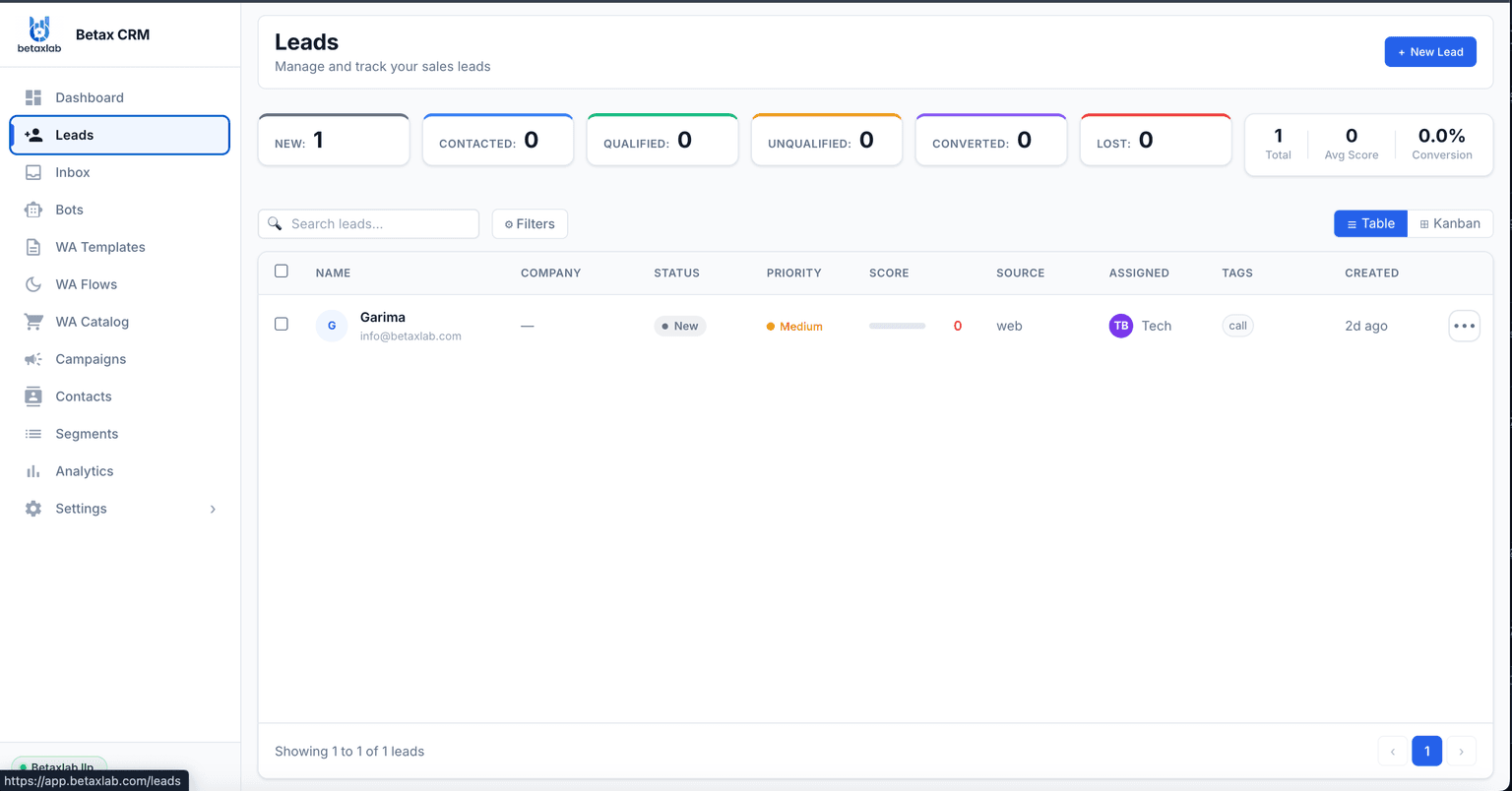
Real BetaXLab lead pipeline showing leads by status, priority and score
✓

Native Deal Pipeline. Custom stages, deal value, owner and a permanent customer timeline attached to every WhatsApp number.

✓

Shared Team Inbox. Multi-agent access with auto-assignment, collision detection, internal notes and role-based access.

✓

Follow-Up & Reminder Automation. Stage-triggered follow-ups and reminder automation so a stalled deal gets flagged instead of forgotten.

✓

Lead Scoring & Source Attribution. Leads scored 0–100 from conversation signals, with source captured automatically at first contact.

✓

AI Conversation Summaries & Chatbot. AI reads a long thread back into a quick summary, and an AI chatbot can pre-qualify enquiries after hours.

✓

Two-Way CRM Integration. A native API, a Zapier connector covering thousands of apps, and outbound webhooks for syncing with an existing CRM.

One Example Workflow: From Incoming Enquiry to Follow-Up

1

An Enquiry Arrives on Your WhatsApp Business API Number. A new number messages your business through a click-to-WhatsApp ad, a website widget, a QR code or a direct message. BetaXLab automatically creates a contact record — name, phone, first message, timestamp and source — and opens it against your pipeline in New Enquiry.

2

The Conversation Is Auto-Assigned to an Owner. Based on your routing rules — round-robin, workload, product line or working hours — the chat gets a named owner within seconds. The assigned agent sees the chat and the contact record side by side, with no tab switching required.

3

The Deal Moves Through Stages as the Conversation Progresses. The agent updates the stage from inside the chat as the conversation develops — Quoted, Negotiation, Closed Won — and logs a deal value. Custom fields capture anything specific to your business, like budget range or preferred date.

4

Follow-Up Automation Catches What a Person Might Forget. A deal that sits in Quoted for 48 hours without a reply can trigger an automatic check-in on an approved template. If the lead goes cold, it is flagged rather than silently forgotten.

Honest note on plan limits. Exact seat counts, contact limits and which automation features are included on which plan vary and are not restated here, because plan details change. Confirm current limits on the BetaXLab pricing page or by asking directly in a demo before you commit a budget.

How to Choose a WhatsApp CRM

Match the decision to where your team actually is today, not where you expect to be in two years.

Solo Operators

If you are the only person answering WhatsApp and handle a modest number of daily conversations, a full CRM may be more than you need today. Revisit the decision once you add a second person to the number, or once you start losing track of who you promised what.

Small Sales Teams (2–10 People)

This is where a shared inbox with assignment and a basic lead pipeline earns its cost quickly — duplicate replies and dropped follow-ups become expensive once more than one person is replying from the same number.

Growing Support or Sales-and-Support Teams

Once you are running both sales and support on WhatsApp, prioritise role-based access, SLA visibility and reporting — you will need to see where enquiries stall, not just where they start.

A Vendor Evaluation Checklist

✓

Get a live demo with your own sample conversation, not a scripted walkthrough

✓

Confirm the Official WhatsApp Business API is used, not an unofficial or ban-risk method

✓

Check current plan pricing, seat limits and contact limits directly on the vendor's pricing page

✓

Ask how template approval and number verification actually work, and how long it typically takes

✓

Clarify what happens to your data — contacts, history, custom fields — if you cancel

✓

Test the shared inbox with two people logged in at once before you commit to a team plan

If automation is the main gap in your current setup, it is worth separately reading our comparison of WhatsApp automation tools and WhatsApp AI chatbots. If you run on Shopify, see our WhatsApp automation for Shopify guide, and if budget is the main constraint, see affordable WhatsApp CRM software.

Frequently Asked Questions

There is no single tool that comes up as a universal answer — the honest pattern in public discussion is that the "best" choice depends heavily on team size, budget and whether the business needs a dedicated sales pipeline versus a simple shared inbox. This guide compares WATI, Interakt, Respond.io, Kommo and BetaXLab on shared inbox, lead pipeline, automation and pricing so you can match features to your own situation rather than a single recommendation.

For a very small volume of enquiries, yes — tagging contacts and setting manual reminders inside the WhatsApp Business app can work for a solo operator. It typically breaks down once a second person joins the number, once lead volume makes manual tracking unreliable, or once follow-ups start depending entirely on memory. At that point a shared inbox with a basic pipeline becomes worth the cost.

WATI, Interakt, Respond.io, Kommo and BetaXLab all support multiple agents working from one number through the Official WhatsApp Business API, though the depth of assignment, collision prevention and role-based permissions varies by vendor and plan. BetaXLab includes a shared team inbox with auto-assignment, collision detection, internal notes and role-based access as standard features — see the shared WhatsApp inbox page for details.

Yes. The free WhatsApp Business app is built for a single device and does not support multiple simultaneous agent logins, automated lead pipelines, or compliant bulk automation. A WhatsApp CRM runs on the Official WhatsApp Business Platform and adds a shared inbox, contact and deal records, automation and reporting on top of the same underlying WhatsApp number.

Cost has two separate components regardless of vendor: the platform’s own subscription (flat or tiered, sometimes per seat) and Meta’s own conversation-based messaging charges, which apply on the Official WhatsApp Business API no matter which CRM you use. BetaXLab publishes flat, transparent plans; always confirm current numbers on the BetaXLab pricing page rather than a comparison article, since plans change.

This varies by vendor and should be confirmed before you buy, not after. Ask specifically whether contacts, custom fields and conversation history export in a usable format, and whether that export is self-serve or requires contacting support. Because conversations run on your own WhatsApp Business API number, the underlying chat history generally belongs to your business rather than the CRM vendor — but the export tooling itself differs by platform.

Yes, for any CRM offering multi-agent access, automation or a lead pipeline. The free WhatsApp Business app has no official way to support multiple simultaneous agents or compliant automation, and unofficial workarounds carry a real risk of the number being banned. A genuine WhatsApp CRM — including BetaXLab, WATI, Interakt, Respond.io and Kommo’s WhatsApp integration — is built on top of the Official WhatsApp Business API. See how BetaXLab’s WhatsApp CRM works.

See Exactly What a BetaXLab Plan Includes

Flat, published plan pricing with the shared inbox, lead pipeline, automation and AI chatbot included — check current plan details and limits before you decide.

✓ No credit card✓ Setup support included✓ Meta verification handled✓ Cancel anytime

Last reviewed 14 October 2026. Competitor details reflect general, publicly known positioning and may change — always confirm current pricing and features directly with each vendor.

Related Reading

Best WhatsApp AI Chatbot (Reddit)Best WhatsApp Automation Tools (Reddit)Affordable WhatsApp CRM Software (Reddit)WhatsApp Shared Inbox for Teams (Reddit)WhatsApp Lead Management Software (Reddit)Best WhatsApp Broadcast Software (Reddit)WhatsApp Automation for Shopify (Reddit)WhatsApp CRM Alternatives Compared (Reddit)Best WhatsApp Business API Provider (Reddit)WhatsApp CRMWhatsApp AI ChatbotShared WhatsApp InboxLead ManagementWhatsApp BroadcastTransparent Pricing

Ready to see a WhatsApp CRM built for small teams? Live in 48 hours.

Ask Us →