3×
Faster Replies
vs manual WhatsApp
0
Missed Messages
with full-team coverage
100%
Chat Coverage
round-the-clock
5 min
Avg Response
with SLA enforcement
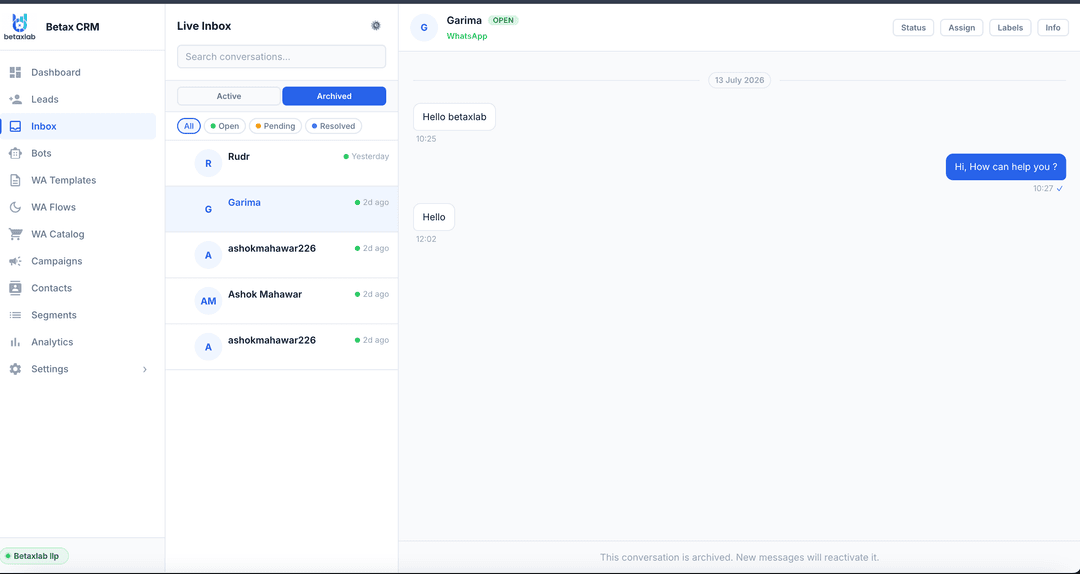
A WhatsApp shared team inbox is a centralised dashboard where your entire customer-facing team — support agents, sales reps, and operations staff — can see, claim, and reply to every incoming message on your WhatsApp Business number simultaneously. Instead of one phone passing between team members or one person becoming the single point of failure, every conversation is visible to everyone with the right access level.
BetaXLab's shared inbox is built on the official WhatsApp Business API, which means it scales without the limitations of the consumer WhatsApp Business app. You get full conversation history, structured assignment workflows, SLA monitoring, and deep CRM integration — all while operating from a single, verified WhatsApp Business number your customers already trust.
Whether you run a 3-person support team or a 50-agent contact centre, the shared inbox grows with you. Every message is logged, every reply is attributed to the right agent, and no conversation falls through the cracks — even during peak hours or staff handovers.
Six purpose-built features that turn your WhatsApp Business number into a professional customer communications hub.
Your entire team works from one WhatsApp Business number simultaneously. No more forwarding screenshots, no more one-person bottlenecks. Every agent logs in with individual credentials and sees the full conversation queue in real time. Support teams, sales reps, and operations staff all collaborate on the same inbox without stepping on each other.
Route any conversation to the right person in one click. Assign manually by selecting a teammate, or configure automatic assignment rules that route chats based on keywords (e.g., "billing" → billing team), time of day, or round-robin across all available agents. Assigned conversations appear in the assignee's personal queue so they always know their workload.
Leave private annotations inside any WhatsApp conversation — only your team can see them. Use notes for context handoffs ("This is a high-value lead — escalate pricing queries to the sales manager"), compliance documentation, or flagging conversations that need follow-up. Notes preserve institutional knowledge and ensure every agent who picks up a chat has full context.
Set response time targets and hold your team accountable. Configure first-response SLA (e.g., 5 minutes for support, 15 minutes for sales) and resolution SLA. BetaXLab shows a live colour-coded timer on every open conversation: green means on track, yellow is approaching the limit, red means the SLA has been breached. Supervisors get instant alerts so they can intervene before customers get frustrated.
See in real time when a teammate is already viewing or typing a reply in a conversation. BetaXLab shows a "typing" indicator next to the conversation in the queue, preventing two agents from simultaneously drafting replies to the same customer — one of the most embarrassing and confusing experiences a customer can have. Collision detection keeps your team coordinated without requiring a Slack message for every chat.
Manage every customer conversation from your iPhone or Android device. BetaXLab's mobile-responsive dashboard lets agents reply, assign chats, add notes, and check SLA timers on the go. Push notifications alert agents to new incoming chats, direct mentions in notes, and SLA warnings — so no chat goes unnoticed even when the team is not at their desks.
From your existing WhatsApp Business number to a fully collaborative team inbox in under 48 hours — no developers required.
BetaXLab connects your existing WhatsApp Business number to the official WhatsApp Business API. We handle green tick verification, Meta Business Manager setup, and message template approval — no technical work on your side. Your number is live on the shared inbox in 24–48 hours.
Add your agents, supervisors, and admins from the BetaXLab dashboard by email. Each team member receives an invitation, sets up their individual login, and immediately gets access to the shared inbox. Set role-based permissions so agents see only what they need and supervisors have full oversight.
Configure automatic routing rules that match incoming chats to the right team or agent. Route "billing" or "invoice" keywords to the finance team, "technical" queries to support, and new leads to sales — automatically. Set SLA targets for first response and resolution, and configure escalation alerts for supervisors.
Your team is live. Every incoming WhatsApp message appears in the shared queue. Agents pick up or are assigned conversations, add internal notes for context, reply with approved templates or free-form messages, and mark chats as resolved. Supervisors monitor SLAs, reassign chats, and track team performance from the analytics dashboard.
The gap between a single person managing WhatsApp and a properly structured team inbox is enormous.
Whether you run support, sales, or operations — the shared inbox keeps your team coordinated and your customers satisfied.
Support teams live in the shared inbox. BetaXLab gives your support agents a structured queue where every inbound issue is visible, assigned to the right agent, and tracked against response SLAs. Agents resolve faster because they can see the customer's full conversation history and any internal notes left by previous agents. Post-resolution, CSAT surveys fire automatically via WhatsApp. Supervisors track first-response time, resolution time, and CSAT scores from one dashboard — and can re-assign or escalate any stuck ticket with one click.
Every inbound lead on WhatsApp is a revenue opportunity — and revenue opportunities need speed. With BetaXLab's shared inbox, your entire sales team can see every new lead the moment it arrives, and the first available rep can claim the conversation before the lead goes cold. Automatic lead qualification flows can pre-fill budget, timeline, and intent before any human involvement, so the rep already knows the deal size when they open the chat. Assignment rules route hot leads directly to senior closers while junior reps handle nurturing.
Operations teams use WhatsApp to coordinate with vendors, field staff, delivery partners, and internal departments — all on the same number. BetaXLab's shared inbox gives your ops team a single communication hub where every vendor query, delivery exception, and internal escalation is tracked, assigned, and resolved systematically. No more important messages buried in personal WhatsApp chats. Automated workflows can trigger confirmations, reminders, and alerts based on operational events without any manual intervention.
BetaXLab gets your entire team on one WhatsApp number with assignment, SLA tracking, and internal notes — live in under 48 hours. No developers, no extra phone numbers.
Everything you need to know about BetaXLab's WhatsApp Shared Team Inbox.
What is a WhatsApp shared team inbox?
A WhatsApp shared team inbox lets multiple agents access and reply to messages coming into a single WhatsApp Business number. Instead of one person managing the phone, your entire support or sales team can see all incoming chats, claim conversations, assign them to teammates, and reply — all from a central dashboard. BetaXLab provides a shared inbox with assignment rules, internal notes, SLA timers, and collision detection so two agents never reply to the same chat.
How many agents can use one WhatsApp number simultaneously?
With BetaXLab, there is no hard limit on the number of agents sharing one WhatsApp Business number. Plans support from 3 to 25+ agents depending on your subscription tier. All agents log in to the BetaXLab dashboard with individual credentials and work on the same conversation queue simultaneously without interfering with each other.
Can agents see who else is replying to a chat?
Yes. BetaXLab's collision detection shows a real-time indicator when another team member is already typing a reply in a conversation. This prevents two agents from sending duplicate replies to the same customer — one of the most common problems with informal multi-agent WhatsApp setups.
How does chat assignment work?
Chat assignment in BetaXLab works in two ways: manually and automatically. Manually, any agent or supervisor can click "Assign" on any conversation and select a teammate. Automatically, BetaXLab's assignment rules can route incoming chats based on keywords (e.g., "billing" → billing team), time of day, or round-robin distribution across available agents. Assigned chats appear in the assignee's personal queue so they never get lost.
Can I set different permissions for different agents?
Yes. BetaXLab supports role-based access: Agents can only see and reply to their assigned conversations, Supervisors can see all chats, reassign conversations, and access reports, and Admins have full access including team settings, SLA configuration, and billing. This ensures each team member sees only what they need.
What are SLA timers and how do they work?
SLA (Service Level Agreement) timers track how long a customer has been waiting for a reply. In BetaXLab, you set a target first-response time (e.g., 5 minutes for support, 15 minutes for sales). As a conversation ages without a reply, the timer changes from green to yellow to red. Supervisors can see a live view of all SLA breaches and configure automatic escalation alerts via email or WhatsApp notification when any conversation is at risk.
Does BetaXLab work on mobile?
Yes. BetaXLab has a fully functional mobile-responsive web app and native app access, so agents can manage WhatsApp conversations from their iPhone or Android device. Push notifications alert agents to new incoming chats or SLA warnings even when the app is in the background.
Can I add internal notes to WhatsApp chats?
Yes. BetaXLab's internal notes feature lets any agent or supervisor add private comments inside a conversation that are visible only to the team — never to the customer. Notes are perfect for context handoffs: "Customer is a premium plan user, give priority handling" or "They called earlier today about invoice #4421 — see CRM for details."
How is this different from the free WhatsApp Business app?
The free WhatsApp Business app is designed for one person on one device. It has no multi-agent support, no assignment system, no SLA tracking, no internal notes, and no CRM integration. BetaXLab uses the official WhatsApp Business API to enable true team collaboration: multiple agents on multiple devices, full conversation history, assignment workflows, performance analytics, and automated routing — all on one WhatsApp number.
How much does the shared inbox cost?
BetaXLab plans start at ₹599/month and include shared inbox access for your team. Higher tiers include more agents, advanced SLA configuration, and dedicated CRM integrations. All plans come with a free trial so you can test the shared inbox with your team before committing.
BetaXLab gives your entire team one shared WhatsApp inbox with assignment, SLA tracking, internal notes, and collision detection — all live in 48 hours. Plans start at ₹599/month.