Broadcast Campaigns

Reach 10,000 Customers in One Click — 98% Will Open It.

Send personalized WhatsApp broadcasts to segmented contact lists. Images, videos, PDFs, and CTA buttons. Real-time delivery and read reports after every send.

Audience segmentationRich mediaReal-time reportsTemplate approval
Start Free Book Demo
Open Rate

98%

vs 20% for email

CTR vs Email

Higher click-through rate

Reply Rate

60% Reply Rate

With interactive buttons

Setup Time

< 1 min

First broadcast ready

BetaXLab Store

Broadcast message

Hi Ravi! 🎉 Diwali Sale

Get 30% off on all plans this week. Offer ends Friday midnight.

Claim Your 30% Off →
10:30 AM

Live report · 2,400 sent

✓ 2,352 delivered✓✓ 2,196 read

98%

Open Rate

vs 20% for email

Higher CTR vs Email

with interactive buttons

60%

Reply Rate

on button campaigns

10K

msgs/minute

throughput capacity

What is it?

What is a WhatsApp Broadcast Campaign?

A WhatsApp Broadcast Campaign lets you send one message to thousands of opted-in contacts simultaneously — and each recipient receives it as a private, personal message from your business. Unlike email, where messages land in promotions tabs or spam, WhatsApp messages arrive in the primary inbox. That's why WhatsApp broadcasts achieve a 98% open rate.

WhatsApp broadcasts are fundamentally different from spam. Every recipient must have explicitly opted in to receive messages from you. BetaXLab uses the official WhatsApp Business API, which means all broadcasts use Meta-approved message templates, respect opt-out requests in real time, and stay fully within WhatsApp's Business Policy. Your sender reputation is protected.

With BetaXLab, you can segment your audience by tag, location, purchase history, or last activity — so the right message reaches the right people at the right time. Attach images, videos, or PDFs. Add CTA buttons. Schedule for peak engagement hours. Then watch real-time reports as messages deliver, open, and convert.

WhatsApp CRM Drip Campaign WhatsApp Chatbot Analytics
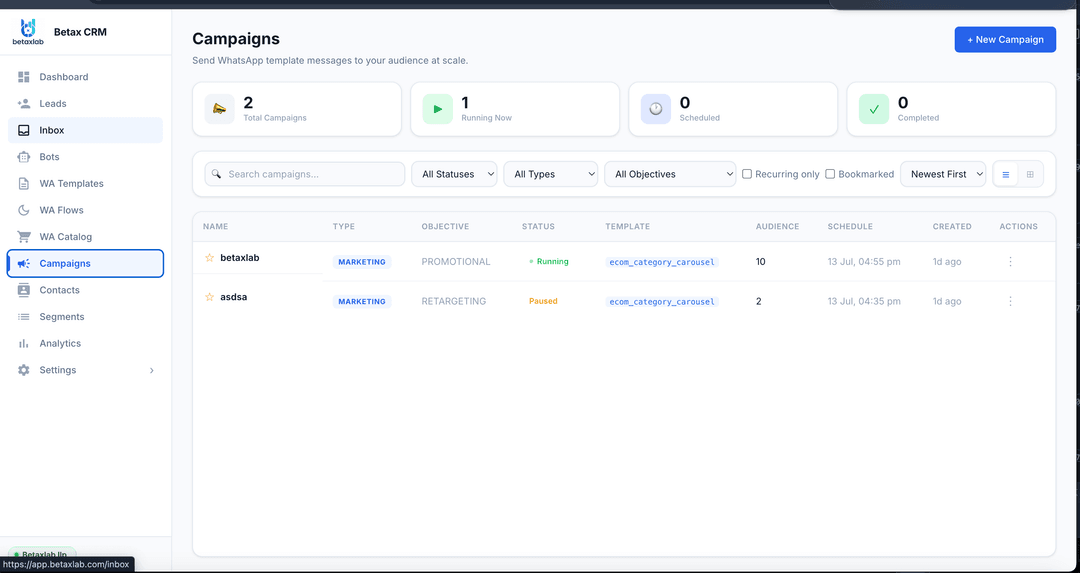
BetaXLab WhatsApp Broadcast Campaign dashboard — audience segmentation and delivery reports
Broadcast Features

Everything You Need for High-Converting WhatsApp Campaigns

Six broadcast tools that take your message from draft to delivered to tracked — without touching a single phone.

Audience Segmentation

Stop sending one message to everyone. Filter your contact list by tag (e.g. "Mumbai"), purchase history (e.g. "bought in last 30 days"), location, or last activity date. Build a targeted segment in seconds and send only to the contacts most likely to convert — improving both results and sender reputation.

  • Filter by tag, location, purchase history, activity
  • Combine multiple filters for hyper-targeted segments
  • Save segments for repeat campaign use
  • Exclude recently messaged contacts automatically

Rich Media Messages

Send more than just text. Attach images, product videos, PDF catalogues, or audio clips to your broadcast. Rich media messages drive 3× higher engagement than text-only messages and are perfect for product launches, event invitations, and promotional offers that need to stand out in the inbox.

  • Images, videos, and PDFs attached to broadcasts
  • Product catalogue broadcasts with item images
  • Header image or video for every template
  • Document sharing — contracts, brochures, menus

Personalization at Scale

Every contact receives a personalised version of your broadcast. Use dynamic variables — {{first_name}}, {{order_id}}, {{product_name}}, {{expiry_date}} — and BetaXLab fills them in for each recipient automatically. A broadcast to 5,000 people feels like a message written for each one individually.

  • First name, order ID, product — any custom variable
  • Per-contact personalised call-to-action URLs
  • Conditional content based on segment or custom field
  • Language personalisation for multi-language lists

Template Management

All WhatsApp broadcasts require Meta-approved message templates. BetaXLab manages the entire template lifecycle — write, submit, track approval status, and reuse templates across multiple campaigns. Get approval in 1–4 hours. Build a library of approved templates for every campaign type: sales, reminders, re-engagement, and alerts.

  • Submit templates to Meta directly from BetaXLab
  • Approval status tracked in real time
  • Template library with categories and search
  • A/B test template variants on the same segment

Scheduled Broadcasts

Set the exact date and time for your broadcast to fire. Schedule a Diwali sale campaign a week in advance, time a flash-sale alert for 9 AM Monday, or drip out a sequence of broadcasts over a week. Once scheduled, BetaXLab sends automatically — no one needs to be at a computer. Change or cancel any scheduled broadcast with one click.

  • Schedule up to 90 days in advance
  • Time-zone aware scheduling per contact location
  • Recurring broadcasts (daily, weekly, monthly)
  • Edit or cancel before the send time, anytime

Real-time Reports

Know exactly what happened to every message. BetaXLab's broadcast report shows sent, delivered, read, and replied counts — updated live as your broadcast reaches contacts. Drill into per-message status, identify undelivered numbers, and export the full report as CSV for your marketing team or clients.

  • Sent, delivered, read, replied — live per-message tracking
  • Per-contact delivery status drill-down
  • Click-through rate tracking on CTA URL buttons
  • CSV export for external reporting or client handover
How It Works

From Contact List to Delivered Campaign in 4 Steps

No technical setup. No IT team. Send your first broadcast in under an hour.

Step 1
01

Upload Contacts

Import your opted-in contact list from a CSV, Google Sheets, or your existing CRM. BetaXLab validates every number, deduplicates, and checks opt-in status before adding to your broadcast list. Segmentation tags can be set during import.

Step 2
02

Create Template

Write your broadcast message in the BetaXLab template builder. Add a header image, body text with personalisation variables, footer, and up to 3 CTA buttons. Preview exactly how it will look on the recipient's screen before submitting.

1–4 hrs
03

Get Meta Approval

BetaXLab submits your template to Meta for review. Approval typically takes 1–4 hours for compliant templates. Once approved, the template is saved to your library for reuse in future campaigns. BetaXLab notifies you the moment it's ready.

Live
04

Send & Track

Select your audience segment, choose your approved template, set a send time or send immediately, and launch. BetaXLab delivers to every contact and updates your live report with sent, delivered, read, and reply counts as they come in.

Broadcast Types

Three Types of Broadcast Campaigns

Marketing, utility, or re-engagement — every broadcast type serves a different purpose and drives different results.

Marketing Broadcasts

Drive sales and awareness

Send promotional campaigns for sales, flash offers, product launches, event invitations, and seasonal campaigns. Marketing broadcasts include CTA buttons for one-tap purchase, sign-up, or booking. Use audience segmentation to send your Diwali offer only to past customers, or your new product launch to leads tagged with that product interest.

  • Diwali / seasonal sale announcement
  • New product launch to past buyers
  • Flash offer with countdown timer
  • Event invitation with RSVP button

Utility Broadcasts

Automate operational messages

Send transactional messages that your customers actually need — order confirmations, shipping updates, appointment reminders, payment receipts, and subscription renewal alerts. Utility broadcasts have the highest open and reply rates because recipients expect and value them. Every message can include a CTA button for one-tap action.

  • Order confirmed with tracking link
  • Appointment reminder 24 hrs before
  • Payment due reminder with pay button
  • Subscription renewal in 3 days

Re-engagement Broadcasts

Win back inactive customers

Target contacts who haven't bought in 30, 60, or 90 days with a personalised re-engagement offer. Use custom fields to reference their last purchase, their name, and the specific offer you're making for them. Re-engagement campaigns often achieve higher reply rates than cold campaigns because the recipient already knows your brand.

  • We miss you — here's 20% off message
  • Abandoned cart reminder with CTA
  • Last activity follow-up with offer
  • Win-back sequence for lapsed users
Comparison

Email Marketing vs WhatsApp Broadcast

The data is unambiguous. WhatsApp outperforms email on every marketing metric that matters.

MetricEmail MarketingWhatsApp Broadcast
Open rate15–25%98%
Response rate2–5%40–60% with interactive buttons
Inbox placementPromotions tab or spam — often missedPrimary inbox — always seen
PersonalizationName only — rest is genericName, order ID, product, location — any field
Rich mediaImages blocked by default in most clientsImages, videos, PDFs shown natively
Cost per messageCheap but zero engagement ROIHigher per-message, but 10× ROI from engagement
Compliance & Policy

Broadcast at Scale — With Zero Risk

BetaXLab is built for policy-compliant WhatsApp marketing. We protect your sender reputation so you can broadcast with confidence.

Opt-in First

BetaXLab collects and tracks explicit opt-in consent for every contact on your broadcast list. Opt-in widgets, landing page forms, and chat-initiation links are provided. You can never accidentally broadcast to a contact who hasn't given consent — the system blocks it.

  • Consent collected via widget or form
  • Opt-in date and source tracked per contact
  • Automatic removal of opted-out contacts
  • Consent audit log for compliance

Meta Policy Aligned

All broadcasts use Meta-approved message templates with mandatory opt-out instructions. BetaXLab reviews templates for policy compliance before submission, reducing the risk of rejection. We stay up to date with every WhatsApp policy change so you never have to.

  • Template compliance review before submission
  • Mandatory opt-out text in every template
  • Policy change monitoring and alerts
  • Account health monitoring dashboard

No Spam Guaranteed

BetaXLab's broadcast system enforces daily frequency caps, cooldown periods between messages to the same contact, and automatic blocking of recently messaged contacts. This protects your sender score, reduces opt-outs, and ensures your broadcasts are always welcomed — not blocked.

  • Daily frequency cap per contact
  • Cooldown period between broadcasts
  • Auto-exclude recently messaged contacts
  • Spam score monitoring and alerts

Send Your First Campaign Today

Join thousands of businesses that reach their customers on WhatsApp — with 98% open rates, real-time reports, and zero spam. First campaign live in under an hour.

Start Free — 14 Days Book a Demo
FAQs

Frequently Asked Questions

Everything you need to know about WhatsApp Broadcast Campaigns.

Q

What is a WhatsApp Broadcast?

A WhatsApp Broadcast is a one-to-many message sent from your WhatsApp Business number to a list of opted-in contacts simultaneously. Unlike a group message where everyone can see each other, a broadcast message is received privately by each recipient — as if it was sent personally to them. WhatsApp broadcasts have a 98% open rate, making them the most effective marketing channel available for businesses in India today.

Q

Is WhatsApp broadcasting legal in India?

Yes — when done through the official WhatsApp Business API with proper opt-in from recipients. WhatsApp broadcasting is completely legal in India under IT Act 2000 and TRAI regulations, provided that every contact on your broadcast list has explicitly opted in to receive messages from your business. BetaXLab ensures all broadcasts use Meta-approved message templates and honours opt-out requests instantly, keeping your business fully compliant.

Q

What is the difference between a WhatsApp group and a broadcast?

In a WhatsApp group, all members can see each other and each other's replies — making it unsuitable for business-to-customer marketing. In a WhatsApp broadcast, the message is delivered privately to each contact, and replies come back to you as individual conversations. Recipients cannot see who else received the message. Broadcasts feel personal to the recipient, which is why they drive 4× higher click rates than email newsletters.

Q

How many contacts can I message in one broadcast?

Using the official WhatsApp Business API through BetaXLab, there is no fixed limit on the number of contacts per broadcast. You can send to hundreds, thousands, or tens of thousands of contacts in a single campaign, subject to your Meta messaging tier. BetaXLab handles tier upgrades automatically as your message volume grows, so you never have to worry about hitting a wall mid-campaign.

Q

Do I need opt-in from customers before broadcasting?

Yes. WhatsApp requires explicit opt-in from every contact before you can send them a broadcast message. Opt-in can be collected via your website form, at checkout, on a landing page, via a WhatsApp chat initiation link, or verbally (with a record). BetaXLab provides opt-in collection widgets and tracks consent per contact so you are always compliant. Broadcasting to contacts without opt-in risks your WhatsApp Business account being suspended.

Q

What types of messages can I send in a broadcast?

You can send text messages, image messages, video messages, PDF/document messages, interactive button messages (up to 3 quick-reply buttons), CTA URL messages (one-tap to a link), and catalogue messages — all via the WhatsApp Business API. All broadcast messages must use a Meta-approved message template. BetaXLab manages template submission, approval tracking, and reuse so you can focus on the content.

Q

What is a WhatsApp message template and how do I get it approved?

A WhatsApp message template is a pre-approved message format submitted to Meta before use. Templates must follow WhatsApp Business Policy — they cannot be purely promotional without value, and must include opt-out instructions. BetaXLab guides you through writing compliant templates, submits them to Meta on your behalf, and typically gets approval within 1–4 hours. Approved templates can be reused across unlimited broadcasts.

Q

Can I personalize broadcast messages with customer names?

Yes. BetaXLab supports dynamic variables in broadcast templates — {{first_name}}, {{order_id}}, {{product_name}}, {{amount}}, or any custom field from your contact list. Every recipient receives a personalised version of the message with their own details filled in. Personalised messages deliver significantly higher open rates and reply rates than generic blasts.

Q

Can I schedule a broadcast campaign for a specific time?

Yes. BetaXLab has a built-in scheduler that lets you set the exact date and time for your broadcast to fire. Schedule a Diwali campaign a week in advance, set flash sale alerts for 9 AM, or time a re-engagement broadcast for Tuesday afternoon when open rates are highest. Once scheduled, the broadcast fires automatically — no one needs to be online to send it.

Q

How much does WhatsApp broadcast cost?

BetaXLab's broadcast campaign feature is included in all plans starting at ₹599/month. WhatsApp also charges a per-conversation fee based on your message volume and country — BetaXLab provides full transparency on these Meta charges in your dashboard. A 14-day free trial is available with no credit card required. Message us to get a cost estimate based on your list size.
Explore More

Shared Team Inbox WhatsApp AI Chatbot WhatsApp CRM Drip Campaign Analytics Dashboard Ecommerce Automation WhatsApp Automation Pricing

Ready to Send Your First WhatsApp Campaign?

BetaXLab sets up your broadcast campaigns — contact import, template approval, audience segmentation, and delivery reports — in under an hour. No technical setup. No agency fees. Just results.

Start Free — No Credit Card Book a Demo