Buying Guide · WhatsApp Automation Software

WhatsApp Automation Software for Business

WhatsApp automation software connects your business number to the official WhatsApp Business Platform and handles the conversations your team keeps repeating — answering questions, qualifying leads, sending order updates, and handing the chat to a person the moment something needs judgment.

Talk to Us on WhatsAppSee Pricing in India →
WhatsApp automation software handling customer conversations across three chat screens

Summarise this post with:

What Is WhatsApp Automation Software?

Strip away the marketing and there are three layers. The first is the WhatsApp Business app, the free one from the Play Store — greeting message, away message, quick replies, one person on one phone.

The second is the WhatsApp Business Platform, which Meta runs. People still call it “the API”. It has no screen and no interface — it’s plumbing. You can’t log in and reply to a customer.

The third layer is where whatsapp automation software lives. It sits on top of the Platform and turns that plumbing into something a team can use: a shared inbox, a bot builder, campaign tools, a place where lead data lives, and connections to your store or CRM.

So when someone says they want WhatsApp automation for business, what they mean is layer three, running on layer two, replacing the limits of layer one.

One warning. A category of cheap tools automates WhatsApp by scripting the web or desktop app. They’re against Meta’s terms, and numbers using them get banned — usually right after you’ve built your customer base on that number. If a vendor can set you up in ten minutes with no business verification, walk away.
WhatsApp Business App vs WhatsApp Automation Software

FeatureWhatsApp Business AppAutomation Software
Multiple agents on one numberNoYes
Shared inbox with assignmentNoYes
Automated workflowsBasic away and greeting messages onlyFull trigger-based workflows
AI chatbotNoYes
CRM integrationNoYes
Automated follow-upsManualScheduled and event-triggered
BroadcastsUp to 256 saved contactsThousands of opted-in contacts
AnalyticsBasic message countsDelivery, read, reply, campaign performance
Human handoffNot applicableBuilt in

The honest read: under 50 messages a day with one person handling all of them, stay on the free app. The moment two people are fighting over one phone, or you’re losing enquiries overnight, the app has become the bottleneck — that’s usually the point to move to a shared inbox.

How WhatsApp Automation Works

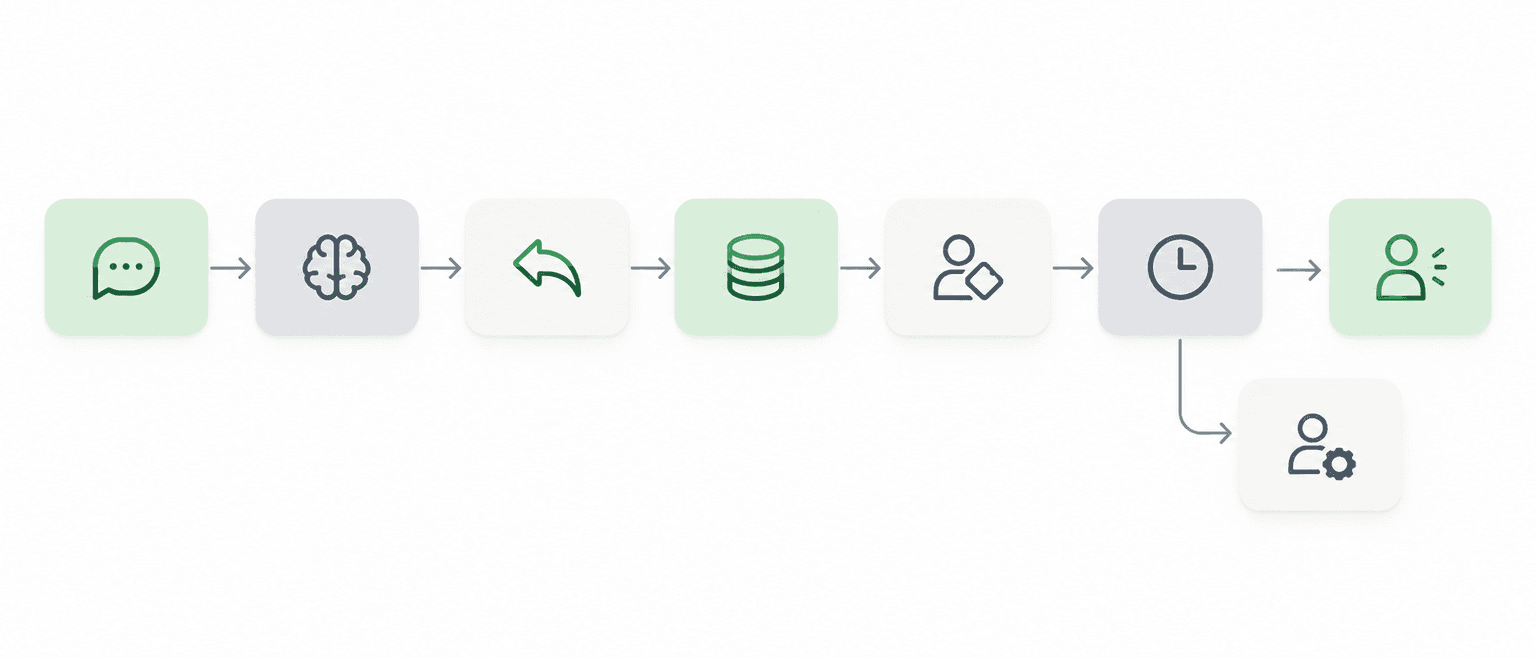
The mechanics are simpler than most vendors make them sound. Here’s the path a single message takes, start to finish, in under a second:

1

A customer messages your number. from a Click-to-WhatsApp ad, a QR code, the website widget, or a number saved from last year.

2

The automation works out intent. Rule-based automation matches keywords. An AI agent reads the actual sentence, messy real-world phrasing included, and decides what the person wants.

3

It responds, or collects information. A price question gets a price. A new enquiry gets asked for name, city and requirement first.

4

The lead record updates and gets assigned. Name, source, product interest, conversation stage — then routed to the right executive by city, product line, or round-robin.

5

Follow-ups fire on schedule. No reply in two days triggers a nudge. A demo booked for tomorrow triggers a reminder an hour before.

6

A human takes over when needed. The part that separates software that works from software that annoys your customers.

WhatsApp automation workflow: message received, intent detected, reply sent, lead recorded, assigned, follow-up scheduled, human handoff

What Can You Automate on WhatsApp?

Lead capture and qualification

Instant reply to every ad click, two or three qualifying questions, filed where sales can see it. If a real estate enquiry names a 3BHK in Wakad with a ₹90 lakh budget, your broker walks in already knowing what to show.

Support that doesn't need a person

Store timings, return policy, GST invoice requests, warranty terms, "where is my order" — usually the majority of inbound volume. Automate them and your team gets its day back.

Transactions, appointments and money

Order confirmations, shipping updates, payment reminders and payment links inside the chat. For clinics, salons and coaching demos, the reminder alone usually pays for the software.

Winning back the ones who left

A message 30 minutes after cart drop-off recovers sales email never touches. Broadcasts work the same way, with one condition — segment them, or you burn your quality rating in three weeks.

Drip campaigns and automated follow-ups handle the re-engagement side without anyone remembering to send them manually, and broadcasts extend reach — as long as they’re segmented.

WhatsApp Automation by Industry

A COD confirmation template with a yes/no button, sent before dispatch, holds back unconfirmed orders. Cutting RTO by 4 points covers the software cost several times over.

Cut RTO, recover carts

Instant reply to every ad lead, routed by geography, then demo reminders at 24 hours and one hour before. That last reminder moves attendance noticeably.

Demo reminders

Appointment confirmation, rescheduling links and check-up reminders. Anything involving symptoms, results or medication should route to a human immediately.

Keep it conservative

Brochures delivered the second someone enquires, site visit scheduling, slow nurture across a months-long cycle. Scoring lets a three-person brokerage focus on buyers who replied twice.

Lead scoring

Reservations, order confirmations and offer broadcasts give a slow Tuesday a lever that costs a few hundred rupees to pull. PNR confirmations and itineraries do the same for travel agents.

Reservations & offers

Pickup confirmations, delivery ETAs and rescheduling turn support calls into messages nobody has to answer. Longer B2B cycles favor handing warm conversations to a human early.

Fewer support calls

WhatsApp Automation Should Not Mean Removing Humans

A bot that refuses to let a frustrated customer reach a person is worse than no bot at all. Everyone reading this has been trapped in one — you type “agent” four times and get another menu. That experience costs you the customer and the referral.

Good automation runs on a split: software handles the repetitive, predictable, high-volume work; people handle the conversations where judgment, empathy or negotiation decide the outcome.

Customer: Bhai order kab aayega?

Automation: Your order #4821 has shipped and is expected tomorrow by 7 PM. Track it here: [link]

Customer: 10 quantity chahiye, best price?

AI: Our standard price is ₹2,400/unit. For an order of 10, let me connect you with sales for bulk pricing. Sharing this now.

Customer: This is the second time you’ve sent the wrong size. I want a refund, not another exchange.

Automation: I’m connecting you with a support executive right away. Priya will take this over in a moment and has your order history.

TaskRule-BasedAIHuman
Order statusBest fitUnnecessaryNo
Messy or mixed-language enquiryPoor fitBest fitSometimes
Bulk pricing and discountsNoShould hand offBest fit
Angry customer, repeat issueNoShould hand offBest fit
Medical, legal or financial adviceNoShould hand offBest fit
WhatsApp automation flow showing the AI bot handling first contact and handing off to a human support team

Human handoff is a feature, not an afterthought

When comparing a whatsapp automation tool, ask how handoff behaves — not whether it exists. Can the customer trigger it by typing “talk to someone”? Can the AI escalate on its own when a word like “refund” appears? Does the agent see the full conversation, or start blind? What happens at 11 PM when nobody’s on shift?

How Much Does WhatsApp Automation Software Cost in India?

Your bill has two independent parts, and vendors aren’t always clear about which is which.

ComponentTypical costWho sets it
Meta’s per-message charges~₹0.85–0.88 marketing, ~₹0.11–0.12 utility/authenticationMeta — billed per message since 1 July 2025, in INR since 1 Jan 2026
Software subscription₹1,000–₹6,000/month, e.g. on BetaXLabThe automation platform you build on

A change to plan for: from 1 October 2026, non-template replies and utility templates sent inside the 24-hour service window become chargeable. Inbound customer messages stay free, and the 72-hour window from Click-to-WhatsApp ads continues.

Worked example: a D2C brand sending 20,000 utility and 10,000 marketing messages a month pays roughly ₹13,700 total — set that against two additional support executives at ₹25,000 each and the comparison usually ends the discussion. One question worth asking directly: do you add any markup over Meta’s rates? A ₹0.05 markup on 300,000 messages a year is ₹15,000 you never budgeted for.

WhatsApp Automation Rules and Compliance

Businesses arriving from the SMS world often assume WhatsApp works the same way. It doesn’t, and the penalty for getting it wrong is losing your number.

Opt-in is required. A checkbox at checkout, a form submission, or a message they sent you first. Uploading a purchased database and blasting offers is the fastest way to get blocked.

Templates need approval. Any message outside the 24-hour window needs an approved template. Categorise honestly — Meta re-categorises misfiled templates and bills at the higher rate anyway.

Quality rating behaves like a credit score. Blocks and reports push your number from Green to Yellow to Red, tightening limits as it falls. The fix: message less, segment better.

Use official access only. Tools that automate the WhatsApp app or web client violate Meta's terms. No version of that is worth the risk.

Data protection is your responsibility. Under India's DPDP framework, consent records and deletion requests sit with you, not your vendor. WhatsApp doesn't run on the TRAI DLT registry that governs SMS — the approval layer here is Meta's.

None of this is legal advice. If you’re in a regulated sector, run your messaging policy past someone qualified.

How to Choose the Right WhatsApp Automation Tool

Nine out of ten demos look identical. These questions separate them:

01

Official Meta partner?

Non-negotiable. Ask to see the listing.

02

Can you build a flow live?

Don't watch a pre-built demo. If a change needs an engineer, you'll be raising tickets forever.

03

Does it connect to your stack?

Shopify, WooCommerce, CRM, Razorpay, Sheets. Automation that can't see your order table only sends generic messages.

04

How does it handle Hinglish?

Test with real messages from your inbox — "Bhai ye available hai kya" is normal production input here.

Features to look for

FeatureWhy it matters
Official WhatsApp Business Platform accessAnything else risks a permanent ban on your number
Shared team inboxMultiple agents on one number without handing a phone around
AI chatbot with a knowledge baseAnswers from your actual policies and catalogue, not generic replies
No-code automation builderYour marketing executive changes a flow without raising a ticket
CRM and lead managementEnquiries become tracked leads instead of disappearing into a chat list
Broadcast with segmentationReach without burning your quality rating
Human handoffThe bot knows when to step aside
Data and number ownershipYou can leave with your number, contacts and green tick intact

What WhatsApp Automation Looks Like With BetaXLab

We built BetaXLab after watching the same pattern repeat across Indian businesses: plenty of WhatsApp traffic, no system underneath it. Ads were running, messages were arriving, and enquiries were quietly dying in a chat list nobody owned.

Conversations get answered without waiting for a human. The AI chatbot answers from a knowledge base you fill with your own FAQs, policies and catalogue.

Enquiries stop disappearing. BetaXLab’s WhatsApp CRM connects every conversation to a lead record, so your team knows who owns it.

Your whole team works from one number. A shared inbox with chat assignment and internal notes — nobody hands a phone around the office.

Automation runs on your schedule, not your memory. A visual, no-code workflow builder for drip sequences, triggered follow-ups and reminders.

It plugs into your stack. Official Meta WhatsApp Business API, Shopify, WooCommerce, Razorpay payment links, Google Sheets, and REST API on the Scale plan.

Humans take over when it matters. Handoff is built in, not bolted on. The bot handles the repeatable work; your people handle the conversations that earn money.

Starter

₹1,299/month

Growth

₹2,799/month

Scale

₹5,999/month

Meta verification handled for you, usually within a few working days. Onboarding support included on every plan.

Start Your 14-Day Free Trial

No credit card required

Frequently Asked Questions

A platform that connects to the official WhatsApp Business Platform and automates business conversations: answering FAQs, capturing and qualifying leads, sending order updates and reminders, running campaigns, and routing chats to human agents when needed.

A message arrives, the software identifies intent using rules or AI, replies or collects information, updates the lead record, assigns the conversation, schedules follow-ups, and hands over to a human when the conversation needs judgment.

The WhatsApp Business app is free and built for one person on one phone, with basic greeting and away messages. Automation software runs on the WhatsApp Business Platform and adds multiple agents, AI chatbots, CRM, workflows, broadcasts and analytics on the same number.

Two costs apply. Subscriptions generally run from about ₹1,000 to ₹6,000 a month. Meta charges separately per message, with marketing costing significantly more than utility and authentication. Check Meta's current rate card for exact figures.

Yes. Most platforms include a built-in WhatsApp CRM or connect to an external one, so every conversation becomes a tracked lead with an owner and a status.

Yes, through a shared inbox on the WhatsApp Business Platform. Several agents handle the same number at once, with chats assigned to individuals and internal notes visible to the team. The free app cannot do this.

Yes to both. Follow-ups run on a schedule or trigger from an event such as an abandoned cart, a booked demo or an upcoming renewal, and messages sent outside the 24-hour window must use an approved template. AI chatbots read the customer's actual sentence rather than matching keywords, which matters in India where enquiries arrive in mixed English and regional languages.

Yes, and treat it as a requirement rather than a bonus. Good platforms let the customer request a person, let the AI escalate on its own, pass full conversation history to the agent, and pause the bot while a human handles the chat.

It's safe on the official WhatsApp Business Platform with proper opt-in and approved templates. It's risky with unofficial tools that script the WhatsApp app, or when messaging people who never opted in. Both can get your number permanently banned.

For most small and mid-sized businesses, no. Modern platforms offer no-code builders and ready integrations with Shopify, WooCommerce and similar tools. Developer help is needed only for custom ERP or in-house connections.

Ready to Automate the Work That's Costing You Money?

Start with the one workflow that's visibly costing you revenue right now — abandoned carts, missed enquiries, no-shows or RTO. Automate it properly, measure it for thirty days, and let the numbers tell you what to automate next.

Related Reading

AI WhatsApp ChatbotWhatsApp CRMShared WhatsApp InboxWhatsApp BroadcastDrip CampaignsWhatsApp Business APIWhatsApp Analytics DashboardBetaXLab Pricing

Not sure which plan fits your business?

Ask Us →