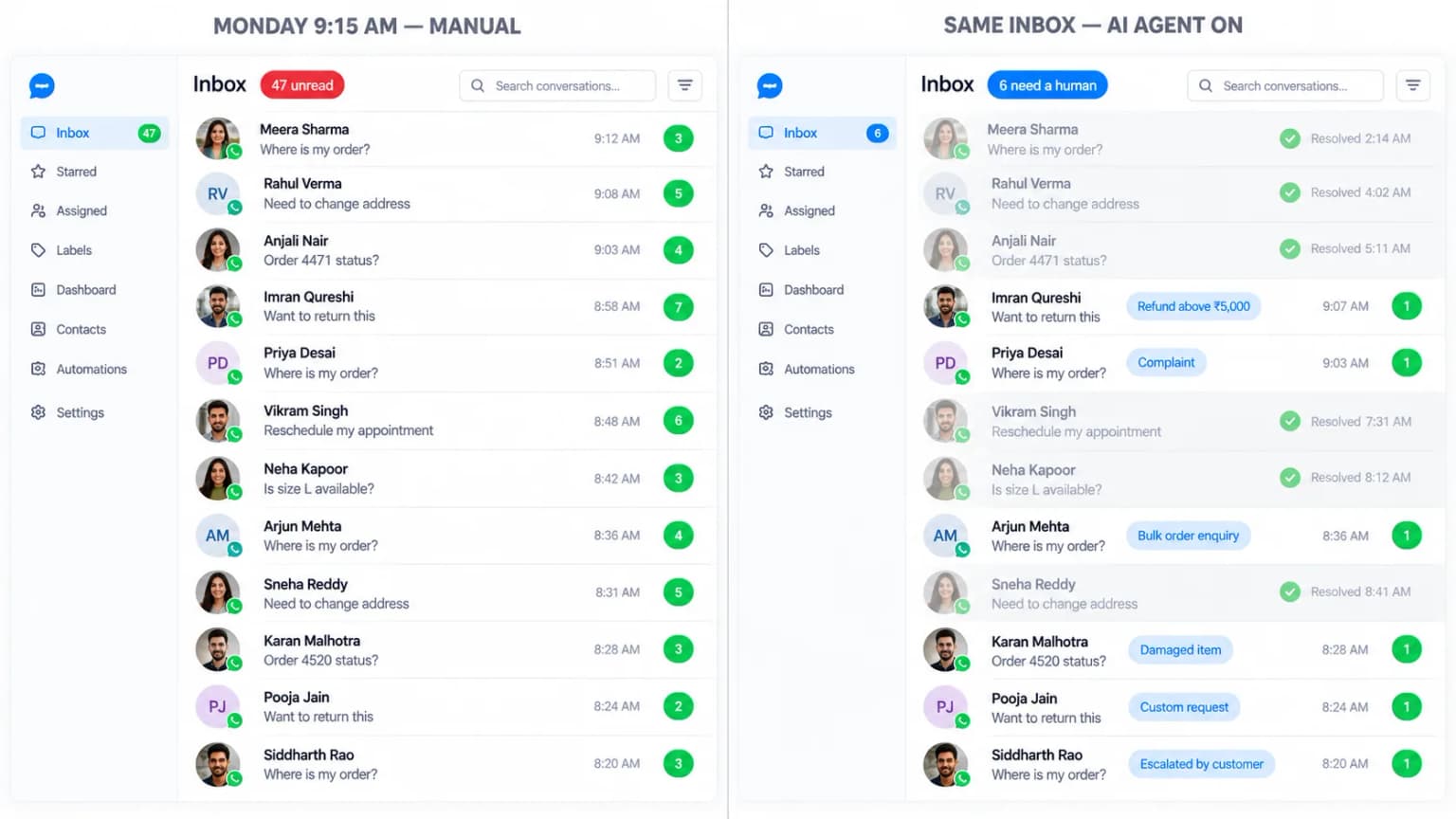
If you already run a WhatsApp chatbot that answers common questions, you’ve probably wondered what a WhatsApp AI agent adds on top. The short answer: a chatbot replies. An agent acts — it can look up an order, rebook an appointment, or process a return by itself, inside the same chat.
On This Page
A WhatsApp AI agent is software that uses AI to understand what a customer wants and then takes action to resolve it — not just answer with pre-written text. Instead of only forwarding a request to a person, it can retrieve an order status, reschedule an appointment, or process a return request on its own.
That word “agent” is doing real work here. Rather than referring to a person, it now describes software that can check an order status, rebook an appointment, or process a return. A customer asking to change their delivery address gets it updated immediately — not a link to a form.
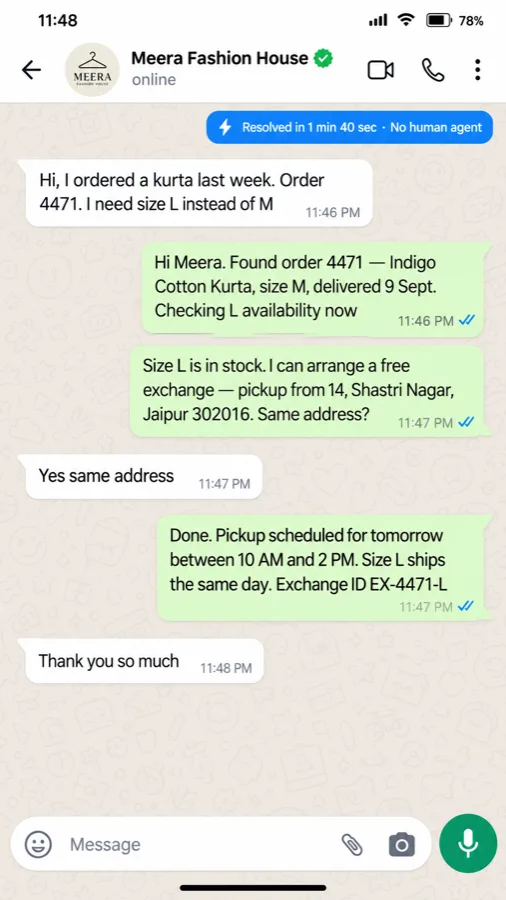
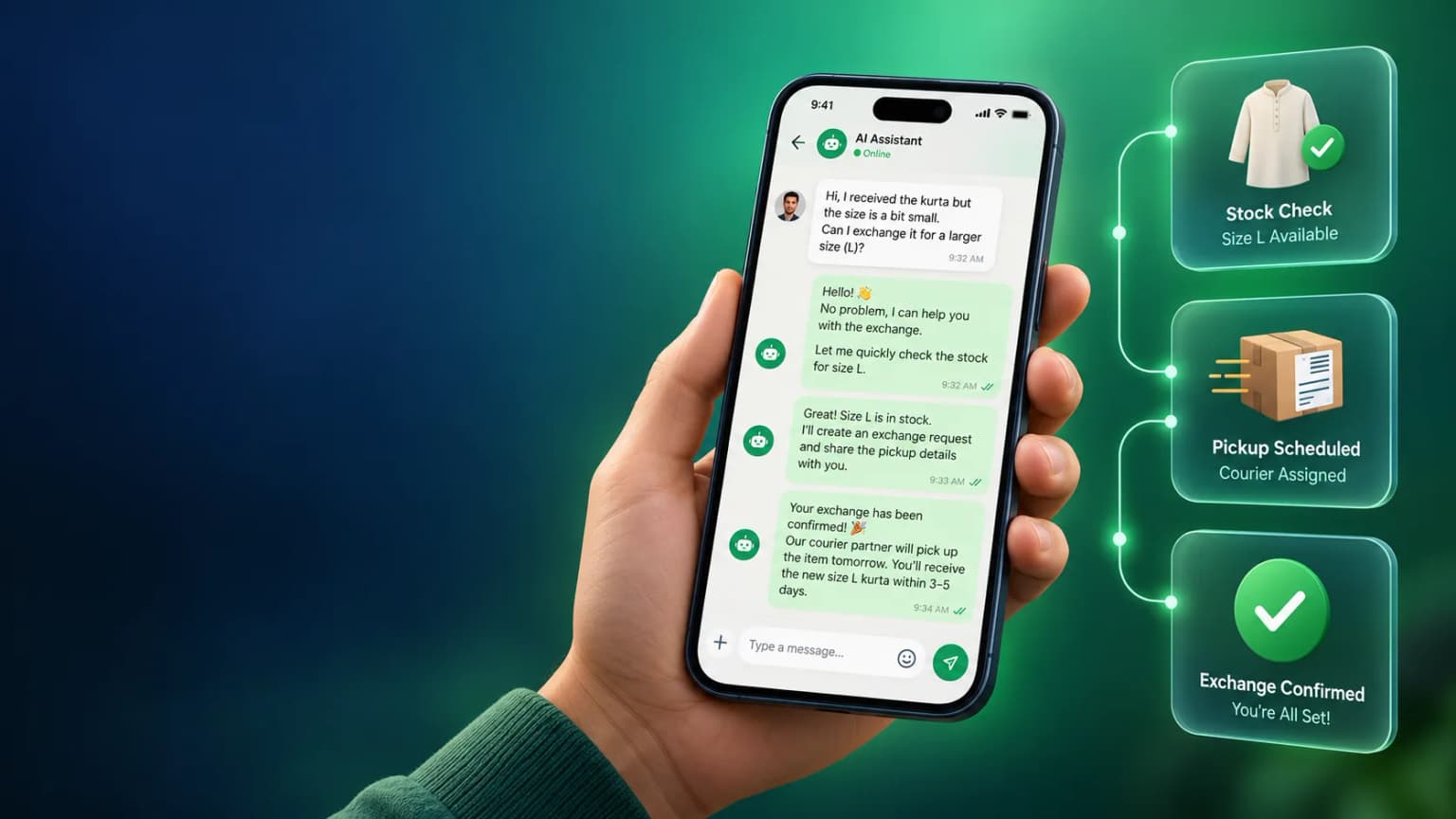
Picture a customer messaging a clothing brand to ask for the same kurta in a larger size. An AI agent checks stock in the new size, generates the exchange label, and confirms it — all inside the same chat, with no human agent involved. That’s the same conversation shown here: resolved in under two minutes.
For businesses, that translates into fewer handoffs to human staff and faster resolution times. A support team that used to spend hours a day on address changes and order lookups can spend that time on the conversations that actually need a person.
A WhatsApp chatbot, in the traditional sense, replies from a script or basic AI — it can interpret what a customer is asking, but it doesn’t act on it. It’s very good at answering frequently asked questions, but if a customer needs something changed in your systems, a person still has to step in.
An AI agent is different because it’s connected to your existing tools — your CRM, inventory, booking system, or payment app — and can perform the action independently. The chatbot tells the customer what to do next; the agent does it.
| Feature | WhatsApp Chatbot | WhatsApp AI Agent |
|---|---|---|
| What it does | Answers from a script or basic AI — can interpret a question, but not act on it. | Understands the request and completes it inside your systems. |
| Connected to your systems | Usually standalone, or a thin layer over FAQs. | Plugs into your CRM, inventory, booking, or payment tools. |
| Order changes & rebooking | Forwards the request to a person. | Checks stock, updates the record, confirms it — no handoff. |
| Language handling | Needs a separate flow built for each language you support. | Replies in whatever language the customer typed in, no extra setup. |
| Real-time data lookup | Only if someone wires up a specific API step for it. | Pulls live data on its own — order status, stock, slot availability. |
| Setup time | Can go live in days. | Usually weeks, since it needs real integration work. |
| Monthly cost | Lower — mostly a messaging subscription. | Higher — reflects the integration and the actions it can take. |
| Best for | FAQs, store hours, menu questions. | Order tracking, rescheduling, returns, refunds. |
Send a chatbot “hey do u have this in a bigger size, also where’s my order” and it usually matches nothing — casual spelling and two questions in one line rarely fit a predefined trigger, so it falls back to a menu. An AI agent reads the same message and handles both parts in one reply: it looks up the order without being asked twice, checks stock in the new size, and offers an exchange on its own if the item is already in transit.
This isn’t an argument against chatbots. Plenty of businesses genuinely don’t need one that takes actions — a restaurant answering hours and menu questions is fine with an AI WhatsApp chatbot running on a script. The distinction matters most when your customers regularly need something done, not just answered. The extra capability isn’t free either — a basic chatbot can go live in days, while a true AI agent needs proper integration with your systems, which usually takes weeks and carries a higher monthly fee.
This usually isn’t a straight either-or decision. A chatbot handles the repetitive, predictable share of your conversations at a low cost; an AI agent picks up the rest — the messages that need judgment, a system lookup, or an action. Most businesses that run both simply route between them: script first, agent for anything the script can’t resolve.
There’s a quick way to tell which side of that line you’re on: pull up last month’s WhatsApp conversations and count how many actually needed a human to step in.
| Share needing a human | What it usually means | Best starting point |
|---|---|---|
| Under 20% | Most requests are repetitive and predictable. | A chatbot alone is usually enough. |
| 20% – 40% | A mix of predictable and open-ended requests. | Start with a chatbot, layer in an agent for the exceptions. |
| Above 40% | Requests are varied and need context or judgment. | An AI agent is worth the higher cost from month one. |
The price you’re quoted is rarely the full bill. There are two components stacked on top of each other, and if you’re using Meta’s own AI feature, a third.
| Component | Typical cost | Who sets it |
|---|---|---|
| Platform / agent fee | Roughly ₹1,299–₹5,999/month depending on tier, e.g. on BetaXLab | The provider you build the agent on |
| Meta messaging fee | ~₹0.10–₹1.14 per 24-hour conversation, depending on category | Meta — billed per conversation, not per message |
| Meta Business Agent (if used) | ~₹190 per million tokens | Meta — only applies if you use Meta’s own AI feature |
One thing stays free on both a chatbot and an AI agent: replying inside the 24-hour window a customer opens by messaging you first. Meta only charges once you send outside that window, or once you use its own token-priced AI feature on top. Most businesses handling 1,000–5,000 conversations a month land under ₹3,000/month combined — see the full breakdown on our WhatsApp Business API pricing page.
Ask any provider to itemize all three lines before you sign — a platform quote that leaves out Meta’s conversation fees isn’t the real number.
This shift isn’t only coming from third-party software. Meta launched its own AI feature, Meta Business Agent, directly inside WhatsApp Business on 1 July 2026, letting businesses hand off routine conversations to Meta’s AI without building anything themselves.
It was free when it launched, but Meta began charging for it from 1 August 2026, at roughly ₹190 per million tokens under Meta’s official pricing. That works out to just a few rupees for each AI-generated reply, depending on how much content is processed — worth keeping in mind before automatically accepting any AI feature.
There’s also a practical trade-off worth naming. Keep everything inside Meta’s own agent and your data stays within Meta’s infrastructure, which can simplify how you think about data handling. Use a third-party agent instead, and conversations also pass through their systems — which means you should ask exactly where your customer information is being stored.
This doesn’t mean you have to use Meta’s version. Plenty of businesses still choose a dedicated third-party AI agent because it plugs into their existing tools more directly. What it does mean is that AI on WhatsApp is no longer a niche add-on running on the WhatsApp Business API — it’s becoming the default.
The 20/40 rule above plays out differently depending on how varied your customers’ requests actually are. A few patterns show up often enough to call out:
Booking, timing, and price questions repeat constantly — a scripted flow covers most of it.
Every buyer asks something different — budget, location, timeline — which favors an agent that holds context.
Hours, menu, and table booking are predictable enough for a script.
Order status is easy to script — exchanges and returns are where an agent starts paying for itself.
Course fit, schedules, and eligibility vary by student more than a fixed menu can handle.
Every conversation your AI agent handles is also data. Good WhatsApp insights tools show you what customers ask most, where the agent hands off to a human, and how long each issue takes to close.
This matters beyond support. If 40 percent of conversations are people asking whether something has been delivered late, that’s a sign to fix the underlying delivery problem — not just reply faster. Insights like this usually surface issues no one on the team had noticed yet.
The best setups close the loop. If the same request keeps failing week after week, that tells you exactly what to fix next — a broken workflow, a missing integration, or a gap in training.
Not every provider reports this well. Some show basic message counts and call it analytics; the more useful platforms break conversations down by intent, outcome, and customer sentiment, so you can actually act on what you learn — see how BetaXLab’s own reporting dashboard handles this.
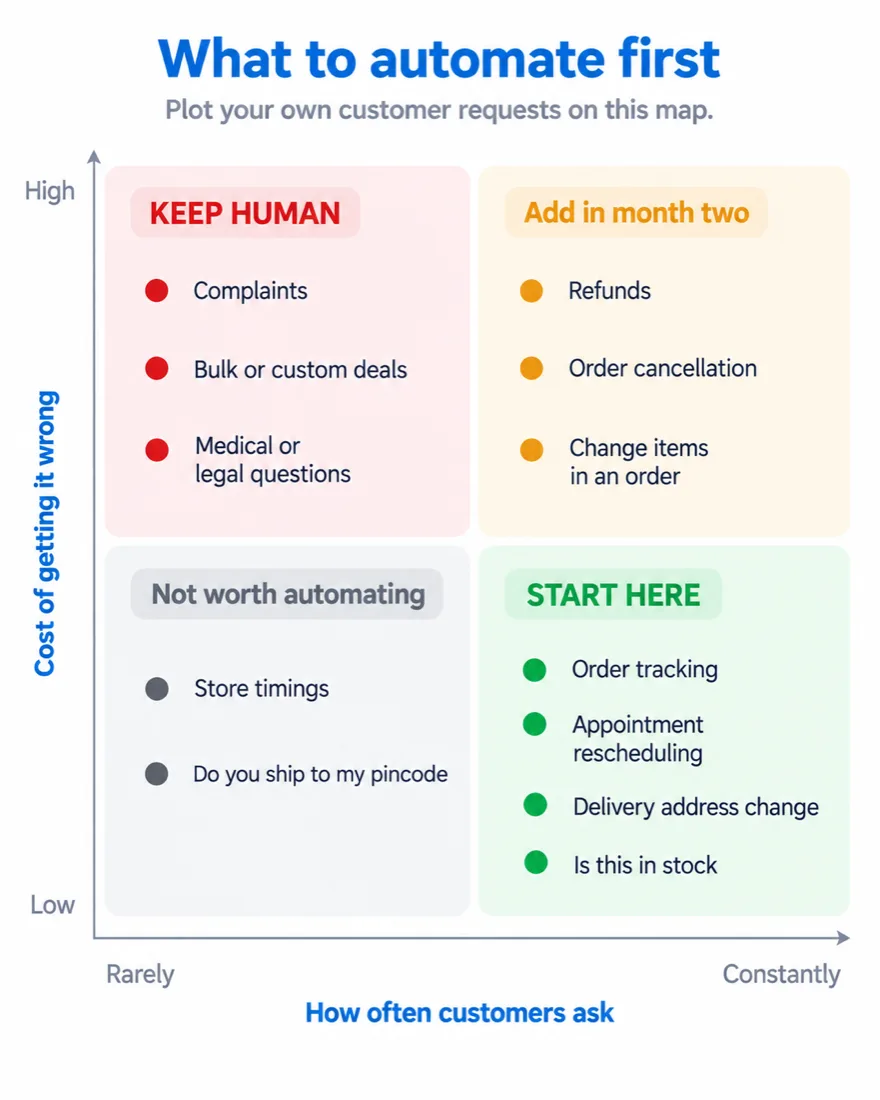
Make a list of the things you want automated, not only the questions you want answered — order lookups on your Shopify store, rebooking, refunds, everything. That list tells you whether you need a true AI agent or whether a simpler chatbot already covers it.
Plot your own customer requests on a map like this before you automate anything.
Start here
Add later
Keep human
List the actions, not the questions
Order lookups, rebooking, refunds — everything you want done automatically, not just answered.
Verify the integrations
An agent can sound convincing in a demo. Confirm it actually connects to your CRM, inventory, or booking system before you buy.
Start with 1–2 low-risk tasks
Order tracking and appointment rescheduling are common starting points — a mistake there is easy to catch and fix.
Check the reporting dashboard
If it looks thin during the demo, it won’t improve after you sign.
Finally, the real measure of a WhatsApp AI agent isn’t how closely it imitates a human agent — it’s how many issues it resolves, and why. A demo can look convincing; ask specifically which actions the agent can complete inside your systems, and ask any provider to show both numbers before you sign.
Whether you need a full WhatsApp AI agent or a simpler chatbot that just answers questions, BetaXLab will help you figure out which one your business actually needs — and get it live on the official WhatsApp Business Platform.
Not sure if you need an agent or a chatbot?
Ask Us →